
توضیحات
This plugin help to activate night mode and increase or decrease brightness of your website.You can easily add night mode filter to whole website and adjust it to improve the readability of text, images and other elements, Protect eyes from hurting when the screen is too bright by dimming the light.
Features of Night Mode for WordPress
- Custom Menu Select Option
- Elegent Night Mode Kit
- Custom CSS option
- Easy To Customize all Settings
- Import/Export Settings
- Night Mode Options
- Text Color
- Background Color
- Link Color
- Link Hover Color
- Border Color
- Image filter (Opacity)
Font Size kit options
- Control website font sizes for Large
- Control website font sizes for Extra Large
- Medium is your default font size
NIGHT MODE FOR WORDPRESS IS COMPATIBLE WITH ALL MAJOR MODERN BROWSERS:
- Firefox
- Chrome
- Safari
- Opera
- Edge
Need Support?
If you need any technical support, please send us a message at addonmasterwp@gmail.com and we will get back to you as soon as possible.
Why Night Mode for WordPress?
- Help Visitor Reduce Eye Strain
- Reduce Dry Eye of your Visitors
- Prevent Retinal Damage
- Reduce Risk of Depression, Diabetes, and Cardiovascular Issues while reading your blog
- Improve Battery Life of your Visitors
- Keep Visitor’s Device Cooler
- Boost Their Mood and Spand More Time To your website
- Increase/Decrease Font Size
- Zero Delay activation
عکسهای صفحه

Night Mode Activated demo 
Normal Mode Demo 
Dark Mode & Font size Activation panel 
Night Mode Settings Panel 
Font size kit Settings Panel 
Custom CSS Settings Panel 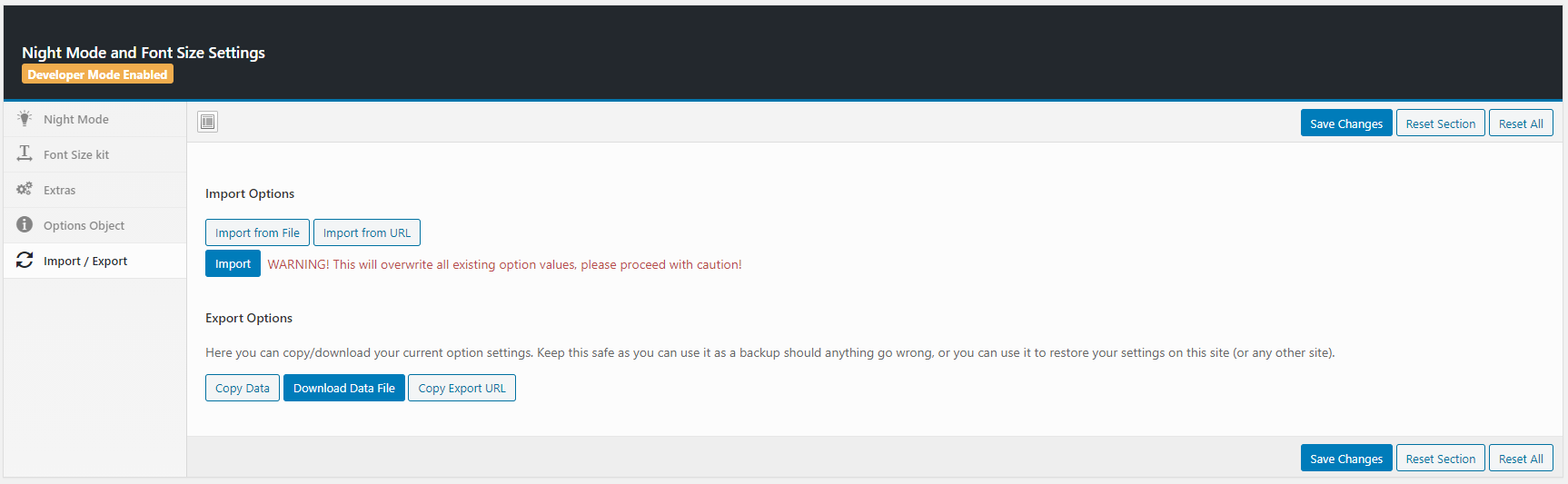
Import/Export Settings Panel
نصب
Please follow the below steps to install and activate the plugin:
STEP 01:
Please download the installable file or install it from wordpress.org
STEP 02:
Go to your wordpress Dashboard > Plugins > Add New then click Upload Plugin
After that upload the installable plugin file and click Install Now
STEP 03:
Activate The Plugin
سوالات متداول
-
How to install?
-
Please follow the below steps to install and activate the plugin:
STEP 01:
Please download the installable file or extract installable fileyou will find instable file inside the full package
STEP 02:
Go to your wordpress Dashboard > Plugins > Add New then click Upload PluginAfter that upload the installable plugin file and click Install Now
STEP 03:
Activate The Plugin -
How to configure the plugin?
-
To configure this plugin, click on the Night Mode and Font Size on left side of your wordpress dashboard. You will see the below options:
All the options are self-explanatory. If you still have confusions in understanding any of the option, you can get in touch through support forum
-
Please go to optional Panel of Night Mode and Font Size
You will see all of your menu area. just select a menu where you want to show the kit. That’s it.
Screenshoot: http://prntscr.com/lznojq
-
How to custom night mode colors?
-
Please go to optional Panel of Night Mode and Font Size
You will see all of the options of colors. Change the color from specific option
Screenshoot: http://prntscr.com/lznqwp
نقد و بررسیها


توسعه دهندگان و همکاران
“Night Mode for WordPress” نرم افزار متن باز است. افراد زیر در این افزونه مشارکت کردهاند.
مشارکت کنندگان

ترجمه “Night Mode for WordPress” به زبان شما.
علاقه مند به توسعه هستید؟
Browse the code, check out the SVN repository, or subscribe to the development log by RSS.
گزارش تغییرات
2.4.0
( Feb 3, 2021 )
– Code Improvement
– Fixed: Font size kit
– Performance upgrade
2.3.0
( Jan 31, 2021 )
– Code Improvement
– Fixed: Incorrect behaviour