
توضیحات
The Random Featured Post plugin allows you to display a random post from a designated category. Ideally this should draw readers landing on your homepage to some of your best posts. The featured post will display the title “Featured Post” (customizable) along with the post’s title, an excerpt and a link to continue to the full post.
Using it
Please go here for now for documentation: http://geegood.com/wordpress/
عکسهای صفحه
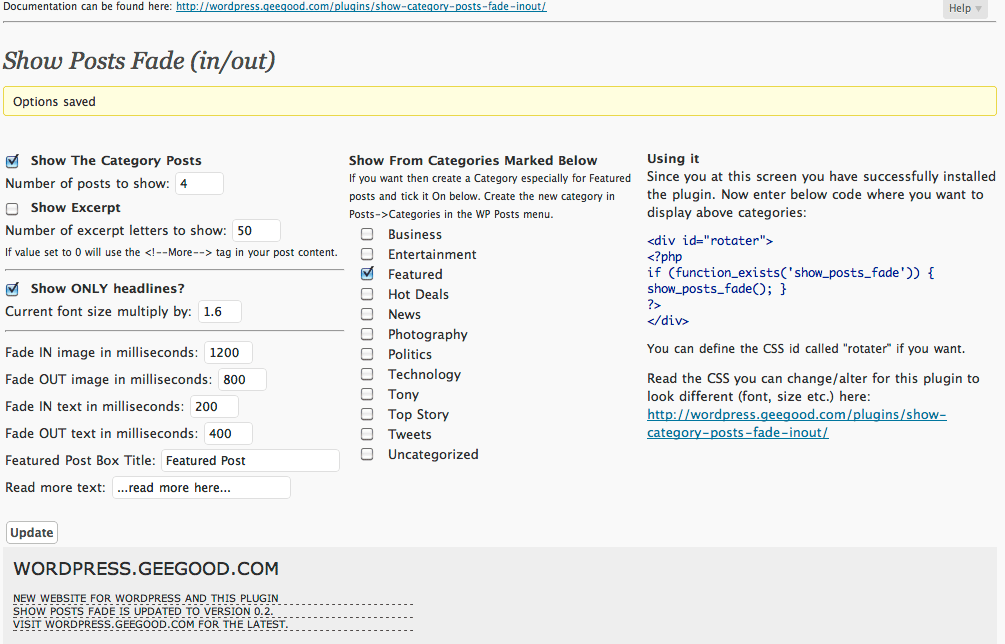
Setup screen. You can customize which things to show via this screen. 
The menu in the Wordpress Dashboard 
Example use real life screenshot as seen on http://geegood.com
نصب
- Download and unzip to your plugin folder.
- Activate the plugin from the Plugins section of your dashboard.
- (Optional) Create a “Featured” category.
- Go to the “Featured Post” options in your dashboard and select the categories from which you would like posts to be randomly selected.
- Check the “Show Posts” box and click “Update” to save your changes.
- Place a call to the show_posts_fade() function in your template, most likely in your main index template just before the loop.
سوالات متداول
Please see the plugin home page for more information.
نقد و بررسیها
نقد و بررسیای برای این افزونه یافت نشد.
توسعه دهندگان و همکاران
“Show Category Posts Fade in/out” نرم افزار متن باز است. افراد زیر در این افزونه مشارکت کردهاند.
مشارکت کنندگان
ترجمه “Show Category Posts Fade in/out” به زبان شما.
علاقه مند به توسعه هستید؟
Browse the code, check out the SVN repository, or subscribe to the development log by RSS.
گزارش تغییرات
0.2.3
- Forgot to hide() the top story fade frame so the links did not changed. Fixed.
0.2.2
- Added can show HEADLINES only and change the size of the HEADLINES
0.2.1
- Updated author URLs and CSS links. Updating to reflect new website wordpress.geegood.com. So a few but vital bugs fixed.
0.2
- The ability to show excerpts as how-many-letters or using the More Tag in your post.
- Added a help screen to get you started.