

توضیحات
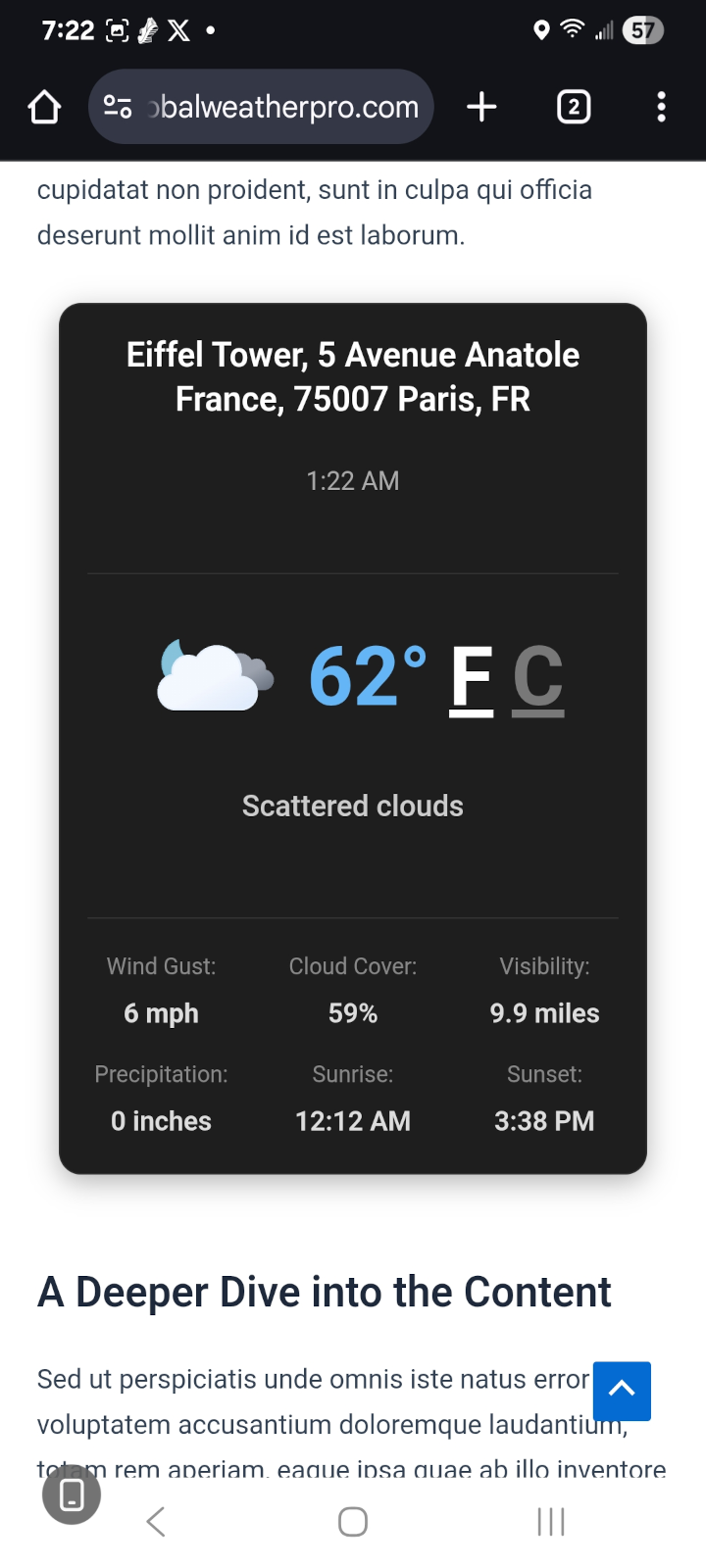
**Global Weather Pro provides accurate weather forecasts and critical weather alerts for locations around the world. To offer maximum flexibility, Global Weather Pro includes two distinct widgets optimized for different placements: a comprehensive header widget and a compact sidebar widget. Effortlessly display current conditions, detailed 7-day forecasts, air quality, and severe weather alerts to keep your visitors informed and engaged. Perfect for any website, Global Weather Pro offers precision and flexibility to ensure an enhanced user experience, now featuring stunning, AI-generated animated images for all 60+ WeatherAPI’s weather conditions in the widget’s header. Make the widgets your own with 18 professional typefaces — and self-host every one of them with a single click for a fully Google-free, privacy-friendly setup. All weather data and alerts are sourced from WeatherAPI, a well-known and trusted weather provider, ensuring reliable and professional-grade forecasts you can count on. Global Weather Pro handles all API communications through our dedicated service, meaning you get reliable data from top providers like WeatherAPI without needing to sign up for, manage, or pay for your own API keys.
Check out the live demos to see both widgets in action: Sidebar Demo
Header Demo
Features:
- Critical Weather Alerts: Keep your audience safe and informed with timely notifications for severe weather events, sourced directly from WeatherAPI. Alerts are prominently displayed within the widget to ensure maximum visibility.
- No API Keys Needed: Instantly set up and deliver weather forecasts without any third-party signups or costs. Global Weather Pro handles all API communications through our dedicated service.
- Dual Widget Design: Comes with two specialized widgets—one designed for prominent header placement and another optimized for sidebars, ensuring a perfect fit for your theme’s layout.
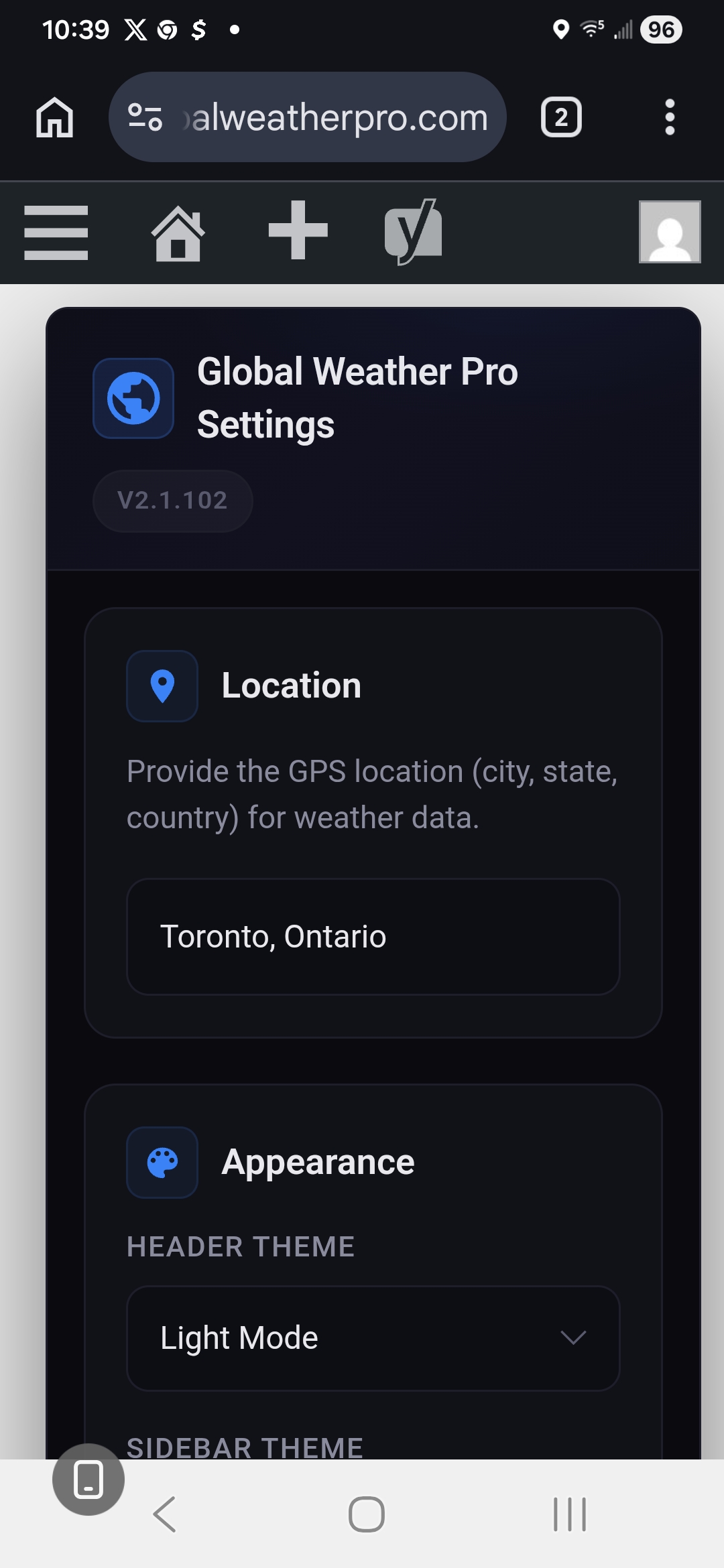
- Professional Dark & Light Themes: Choose between a rich, innovative Dark Mode featuring a slate-based palette with frosted glass effects and cyan accents, or a clean, polished Light Mode—both designed for a modern weather app aesthetic.
- AI-Generated Animations: Stunning AI-generated animated images for all 60+ weather conditions are displayed in the header of the weather widget, creating a beautiful user experience.
- Accessibility Compliant (WCAG): Built with comprehensive ARIA attributes, semantic HTML, keyboard navigation support, and reduced motion preferences for an inclusive experience for all users.
- Detailed Hourly & Daily Forecasts: Provide a true, 24-hour, hour-by-hour forecast and a 7-day forecast. Display key metrics like temperature, chance of rain, humidity, UV index, air quality, and more.
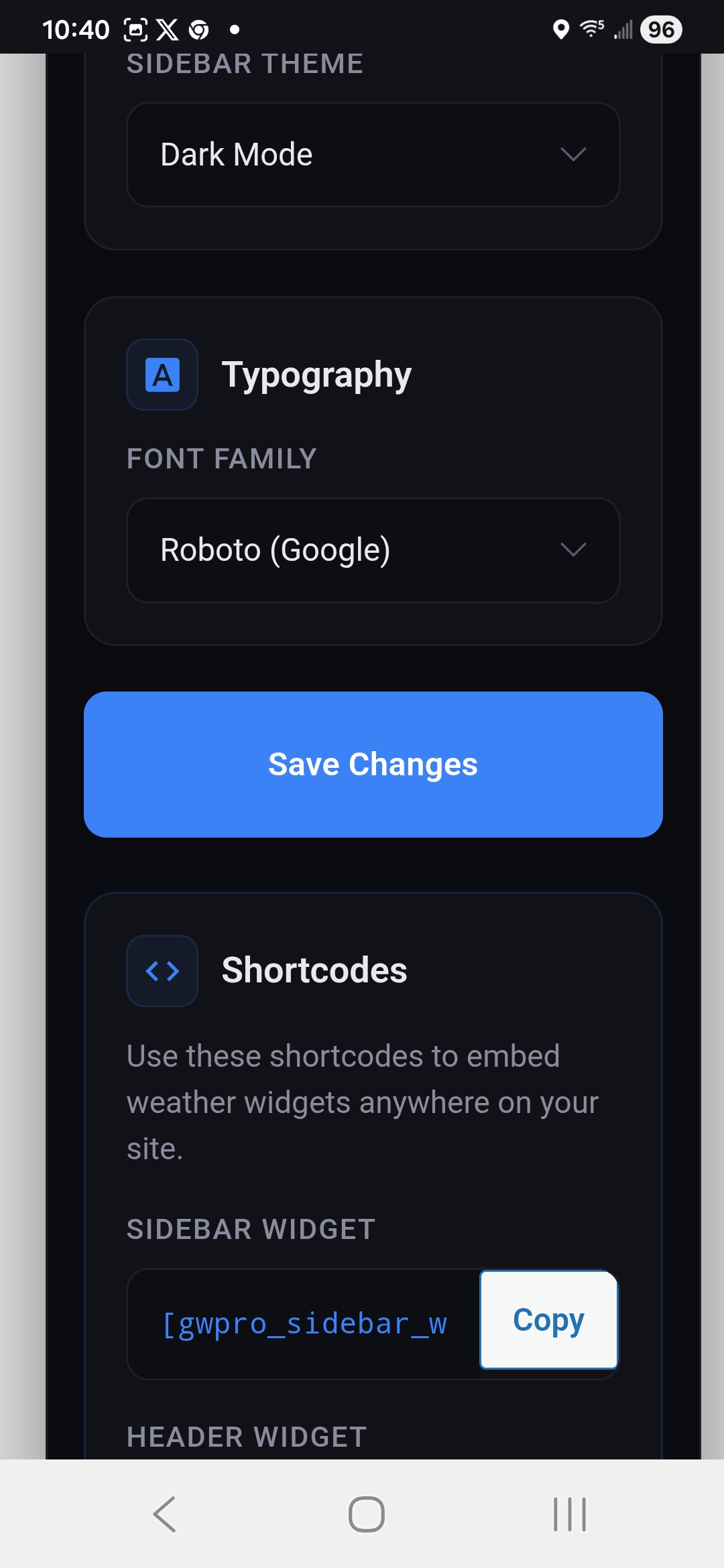
- Shortcode Support: Includes separate, reliable shortcodes for both the header and sidebar widgets ([gwpro_header_weather] and [gwpro_sidebar_weather]) for easy embedding anywhere on your site.
- Flexible Placement (Widgets & Shortcodes): Seamlessly add widgets to your header, footer, or sidebar. You can also use the simple shortcodes ([gwpro_header_weather] and [gwpro_sidebar_weather]) to embed forecasts anywhere on your posts or pages.
- Font Customization: Personalize the widget’s appearance by choosing from 18 professional Google Fonts organized into Sans-Serif, Serif, Monospace, and Display categories, including Roboto, Open Sans, Inter, Montserrat, EB Garamond, Merriweather, Playfair Display, Roboto Mono, Poppins, and more. The widget layout stays pixel-consistent no matter which font you choose.
- Privacy-First Font Self-Hosting: Prefer not to link your site to Google’s Font API? One click on the settings page downloads all 18 font families directly to your own server (each with its license file included), so visitor browsers never contact Google Fonts. Any font not yet downloaded automatically falls back to Google’s CDN, so nothing ever breaks.
Whether you run a blog, business website, or community portal, Global Weather Pro makes it easy to share up-to-date weather insights with your audience.
Third-Party Services
Global Weather Pro API
-
Fetches weather data.
-
No personal data collected.
-
Accessed at:
-
Privacy Policy: https://globalweatherpro.com/gwpro-privacy-policy
WeatherAPI
- Provides weather forecasts and alerts.
- Location data (entered by site owner) sent; no personal data collected.
- Accessed at:
- Weather condition icons served from: https://cdn.weatherapi.com/weather/
- Privacy Policy: https://www.weatherapi.com/privacy.aspx
Geoapify API
- Provides geolocation services.
- No personal data collected.
- Accessed at: https://api.geoapify.com/v1/geocode/search
- Privacy Policy: https://www.geoapify.com/privacy-policy/
Google Fonts API
– This service is used to load and display the custom font selected in the widget settings, but only for fonts that have not yet been self-hosted. Once a font is downloaded via Settings > “Download & Self-Host All Fonts,” it is served entirely from your own server and visitor browsers never contact Google.
– Personal Data: When a font loads from Google’s CDN, Google may collect data such as visitor IP addresses in order to serve the font files. Self-hosted fonts send no visitor data to Google.
– Access: Visitor browsers access https://fonts.googleapis.com (stylesheet) and https://fonts.gstatic.com (font files) only while a selected font is not self-hosted. When the site owner runs the one-click download tool, these same two endpoints are contacted once, server-side by your WordPress site, never by your visitors, to fetch the font files.
– Privacy Policy: Refer to Google’s privacy policy here: https://policies.google.com/privacy.
Third-Party Fonts & Licenses
This plugin offers 18 Google Fonts as font-family options. When downloaded via Settings > “Download & Self-Host All Fonts,” the actual font files are saved to this plugin’s own /fonts/ directory (one subfolder per font, each including a LICENSE.txt). Both licenses below permit free use, modification, and self-hosted redistribution:
- Apache License, Version 2.0 (Roboto, Roboto Mono) — http://www.apache.org/licenses/LICENSE-2.0
- SIL Open Font License, Version 1.1 (Open Sans, Inter, Lato, Source Sans Pro, Raleway, Montserrat, Nunito, EB Garamond, Merriweather, Playfair Display, Lora, Crimson Text, Source Code Pro, Fira Code, Poppins, Quicksand) — https://scripts.sil.org/OFL
Until a given font is self-hosted, it is instead loaded live from Google Fonts under the same license terms; see “Google Fonts API” under Third-Party Services above for that data flow.
عکسهای صفحه


نصب
- Upload the plugin files to
/wp-content/plugins/global-weather-proor install through the WordPress plugin screen. - Activate the plugin through the ‘Plugins’ menu.
- Navigate to “Appearance” > “Widgets” and add either the “Global Weather Pro Header” or “Global Weather Pro Sidebar” widget to your desired location.
- Alternatively, embed the widgets directly into posts and pages using a shortcode: Use [gwpro_header_weather] to display the header widget. Use [gwpro_sidebar_weather] to display the sidebar widget.
سوالات متداول
-
How do I display the widget?
-
To display the Global Weather Pro widget, you have a few options:
Widget Menu: Navigate to “Appearance” > “Widgets” in your WordPress admin panel. From there, you can add either the “Global Weather Pro Header” or “Global Weather Pro Sidebar” widget to your desired location, such as your header, footer, or sidebar.
Shortcodes: For more flexibility, you can embed the widgets directly into your posts and pages using shortcodes.
Use [gwpro_header_weather] to display the header widget.
Use [gwpro_sidebar_weather] to display the sidebar widget.
It is important to note that the original shortcode, [gwpro_global_weather_pro], now functions as an alias for the sidebar widget shortcode ([gwpro_sidebar_weather]) for backward compatibility. Therefore, any existing instances of the old shortcode will continue to work without issue. -
Does Global Weather Pro use AI?
-
Yes. Global Weather Pro uses artificial intelligence for its visual layer. Every one of the 60+ weather conditions reported by WeatherAPI (condition codes 1000–1282) has its own AI-generated animated image, displayed in the header of the weather widget so the animation always matches the reported condition, including day and night variants for clear skies.
To be clear about what the AI does and does not do: the artificial intelligence is used to create the weather animations only. The forecasts, air quality readings, and severe weather alerts themselves are not AI-generated or AI-predicted, they come directly from WeatherAPI, a professional meteorological data provider. Your visitors see AI-created artwork paired with real, trusted weather data.
-
Are the AI-generated weather animations self-hosted?
-
Yes. All AI-generated animation files are bundled with the plugin and served from your own site, so displaying them requires no third-party image service, no AI API key, and no per-request AI costs. Nothing is generated on the fly at page load, the artificial intelligence work was done in advance, so the animations add no latency.
-
What happens during severe weather?
-
Severe weather alerts are sourced from WeatherAPI and displayed prominently inside the widget so visitors see them immediately. Alerts appear alongside current conditions in both the header and sidebar weather widgets, and no configuration is required, alerts for the widget’s location surface automatically whenever the provider issues them.
-
Is the plugin compatible with all WordPress themes?
-
Global Weather Pro is designed to work with most WordPress themes. If you experience any issues, please create a topic on our official WordPress support forum so our team and the community can assist you: Official Plugin Support Page
نقد و بررسیها
نقد و بررسیای برای این افزونه یافت نشد.
توسعه دهندگان و همکاران
“Global Weather Pro: Weather Widget for WordPress” نرم افزار متن باز است. افراد زیر در این افزونه مشارکت کردهاند.
مشارکت کنندگان
ترجمه “Global Weather Pro: Weather Widget for WordPress” به زبان شما.
علاقه مند به توسعه هستید؟
کد را مرور کنید، مخزن SVN را بررسی کنید، یا از طریق RSS در گزارش توسعه مشترک شوید.
گزارش تغییرات
For the complete version history (all releases), see the readme.txt revision log: https://plugins.trac.wordpress.org/log/global-weather-pro/trunk/readme.txt
2.7.2 – 2026-08-19
Action Required: Re-Download Self-Hosted Fonts. Self-hosted fonts now survive plugin updates. If you had self-hosted your fonts, click “Download & Self-Host All Fonts” once more under Settings > Global Weather Pro, this is the last time it will be needed.
* Fix: Self-Hosted Fonts No Longer Lost on Plugin Updates. Downloaded font files were being stored inside the plugin’s own folder, which WordPress deletes and recreates every time a plugin updates. Self-hosted fonts were therefore wiped by each update, and the site quietly resumed loading them from Google’s servers, silently undoing a privacy choice the site owner had deliberately made. Fonts are now stored in the WordPress uploads directory, which survives updates, so a font downloaded once stays downloaded.
* Enhancement: Migration of Existing Self-Hosted Fonts. On the first admin page load after updating, any font files still present in the old location are moved to the new one and their stylesheets repointed automatically. In most cases the previous update has already removed them, in which case the fonts simply need downloading once more.
* Enhancement: Font Directory Protection. The self-hosted fonts directory is now created with an index file so its contents cannot be listed by browsing to it directly.
* Fix: Font Files Removed on Uninstall. Self-hosted font files were left behind permanently when the plugin was deleted. They are now removed along with the plugin’s settings.
2.7.1 – 2026-08-19
- Fix: No More Default Location. A fresh install with no configured location was showing real weather for a hard-coded town in New Mexico, which looked like a malfunction to anyone who had just activated the plugin. The widgets now render a neutral “Set a location to see weather.” message until a location is saved, and the plugin makes no outbound API requests at all while unconfigured.
- Fix: Sidebar Widget Failed Silently. When weather data could not be loaded, the sidebar widget’s message was being written to an element that does not exist, so visitors saw an empty space instead of an explanation. The message now renders correctly.
- Enhancement: Themed Status Messages. The “set a location” and “could not load weather data” messages now use a stylesheet class instead of inline styling, so they inherit the widget’s configured font and theme colors rather than appearing as unstyled text.
2.7.0 – 2026-08-18
- Performance: Eliminated Render Blocking Weather Requests. The widgets previously fetched alerts, hourly, daily, and geocode data from the weather service synchronously while the page was being generated, adding latency to every page load and, on a slow upstream, potentially stalling it for several seconds. Weather data is now served from cache using a stale-while-revalidate model: a cached copy is returned immediately and refreshed in the background via WP-Cron, so page rendering no longer waits on the network except on a completely cold cache (which now uses a shorter timeout).
- Performance: Conditional Asset Loading. The widget stylesheet and its Google Font were being enqueued on every page of the site regardless of whether a widget appeared. They now load only on pages that actually display a widget, shortcode, or block.
- Performance: Reduced Outbound API Traffic. The severe weather alerts cache lifetime was raised from 1 minute to 15 minutes, and geocode results (which do not change for a fixed location) are now cached for a week. Data for both widgets on a single page is also fetched once per request rather than twice.
- New: Background Cache Warming. An hourly scheduled task refreshes weather data for the saved location, so visitors are no longer the ones who trigger a cold fetch. Changing the location in settings refreshes the cache immediately within the admin request.
- Reliability: Graceful Degradation on API Failure. A failed request is now briefly remembered so the plugin does not retry a struggling service on every page view, and an alerts-only failure no longer blanks the entire forecast — the widget shows the forecast with no active alerts instead.
- Developer: New Filters. Added ‘gwpro_api_base_url’, ‘gwpro_request_timeout’, and ‘gwpro_failure_backoff’ filters so site owners can point the plugin at a proxy or tune request behavior without editing plugin files.
For older releases, see changelog.txt.