توضیحات
Looking for the easiest way to create custom header and footer in Elementor?
Turbo Header Footer Builder for Elementor is the ultimate free solution to design, customize, and control your website’s header and footer without touching a single line of code.
Get Advanced Features for Modern Website Design — Explore Turbo Addons For Elementor
Whether you’re building a business site, eCommerce store, or personal blog, this plugin gives you complete control over your header and footer designs — directly inside Elementor’s drag-and-drop editor.
Why Choose Turbo Header Footer Builder For Elementor?
- User-Friendly: Designed for beginners and advanced users alike
- No coding required — design entirely in Elementor
- Works with both Elementor Free and Elementor Pro
- Advanced conditional display rules for different pages.
- Lightweight, SEO-friendly, and performance optimized
Key Features
Essential Elementor Widgets for Header and Elementor Footer Builder
- Navigation Menu Widget – Build fully customizable menus with dropdowns, hover effects, and responsive controls.
- Site Logo Widget – Display dynamic site logo with custom link, width controls, and responsive options.
- Icon Button Widget – Create modern icon-based buttons with full styling controls.
- Top Bar Widget – Add contact info, social icons, announcements, or custom text in a stylish top bar.
- Copyright Widget – Add footer copyright text with dynamic year, company name, and full typography & styling options.
Header Builder
- Customizable Header Templates: Design fully customizable headers using Elementor’s drag-and-drop interface.
- Display Conditions: Define when and where your header should appear on different pages, posts, or custom post types.
- Global or Page-Specific Headers: Set headers globally across the site or assign them to specific pages.
- Header Style Options: Customize the header style, including background color, fonts, spacing, and more.
- Live Editing and Preview: Use Elementor’s live preview to make real-time changes to your header.
- Exclude Header from Specific Pages: Choose pages where the header should not appear, giving you granular control over your site’s design.
- Sticky Header: Make your elementor sticky header to remain at the top of the page when scrolling.
- Scroll Animation: Add animation effects to headers that stay at the top while scrolling.
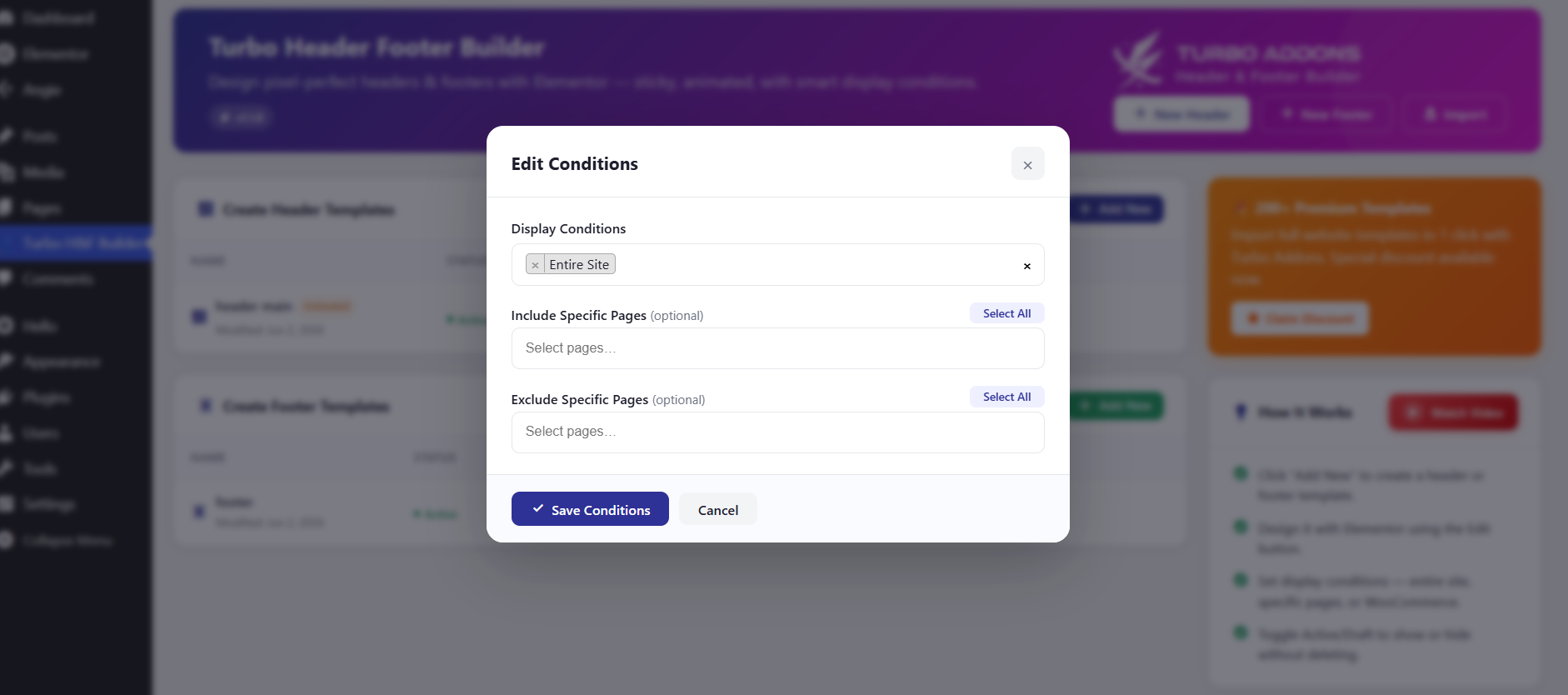
- Edit Display Conditions: After creating the header template, you can easily edit the display conditions from the template list by clicking the Edit Condition button.
Header Effects
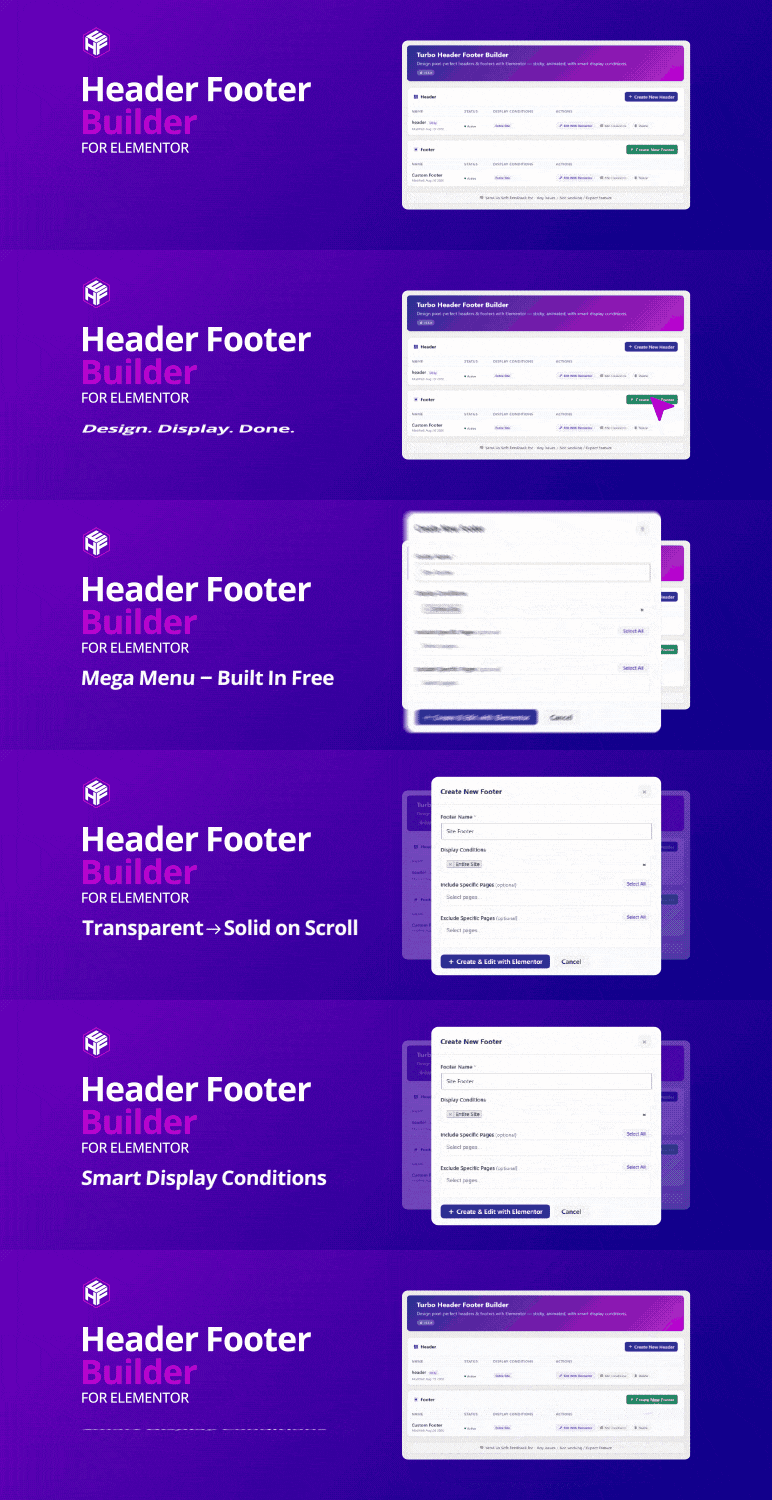
- Transparent to Solid on Scroll: Start with a transparent header that smoothly transitions into a solid background as visitors scroll down the page.
- Configurable Scroll Distance: Set exactly when the effect kicks in with a custom scroll distance.
- Custom Solid Background Color: Choose the solid background color your header changes to after scrolling.
- Bottom Shadow: Add a subtle bottom shadow for a polished, sticky look.
- Editor-Integrated Panel: Configure everything right inside the Elementor editor — no code needed. Open any Section or Container in a header template, go to the Advanced tab, and find the Header Effects panel.
Mega Menu
- Assign Elementor Templates: Turn any top-level menu item into a elementor mega menu by assigning an Elementor template to it — right from Appearance Menus.
- Hover or Click Trigger: Open the mega panel on hover or on click, and close it by clicking outside.
- Full-Width, Custom & Default Widths: Give each menu item a full-width (100vw), custom-width, or default-width panel.
- Panel Width & Alignment Controls: Responsive panel width (px, %, vw) plus left / center / right alignment relative to the screen.
- Responsive Mobile Menu: A hamburger toggle with a scrollable, accordion-style mobile menu and full-width dropdown.
- Complete Styling: Typography, color, background, border, shadow, divider, and hover/active styling for menu items, dropdowns, and the panel.
- AJAX Loading: Load large elementor mega menu content on demand for better performance.
Footer Builder
- Customizable Footer Templates: Create fully customizable footer layouts using Elementor’s drag-and-drop interface.
- Conditional Display Rules: Define when and where your footer should appear, including options to target specific pages, posts, or user roles.
- Multiple Footer Layouts: Choose from various footer layouts to quickly set up your footer or create one from scratch.
- Global and Page-Specific Footers: Easily set footers globally or assign them to specific pages, post types, or custom post types.
- Preview and Live Editing: Use Elementor’s live preview feature to make adjustments and see changes in real-time.
The Footer Builder gives you complete control over your footer’s design, layout, and visibility, all from within the intuitive Elementor interface.
Visual Dashboard Features (Based on Plugin UI)
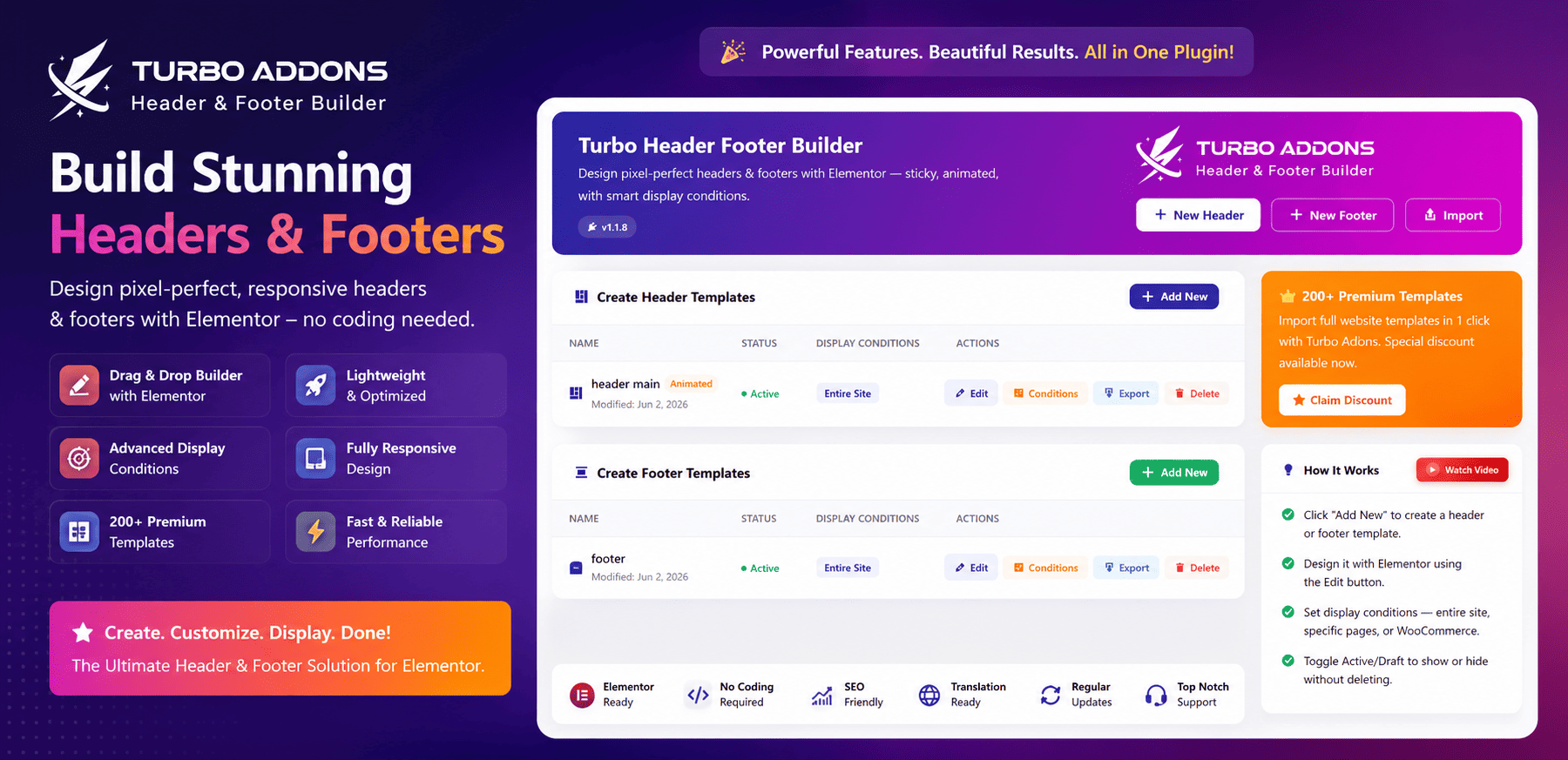
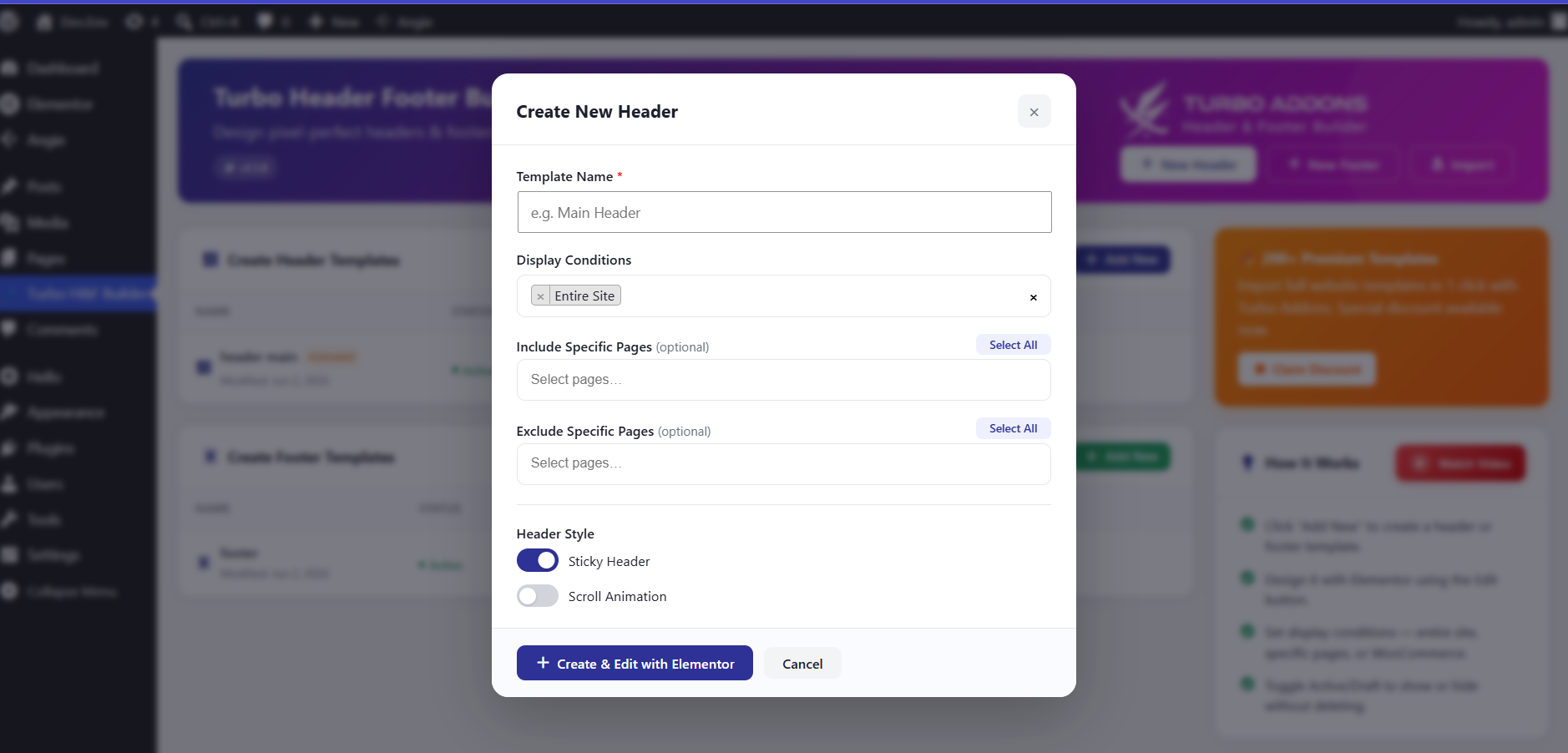
Your elementor header footer builder managed in a simple modal-based interface directly inside WordPress:
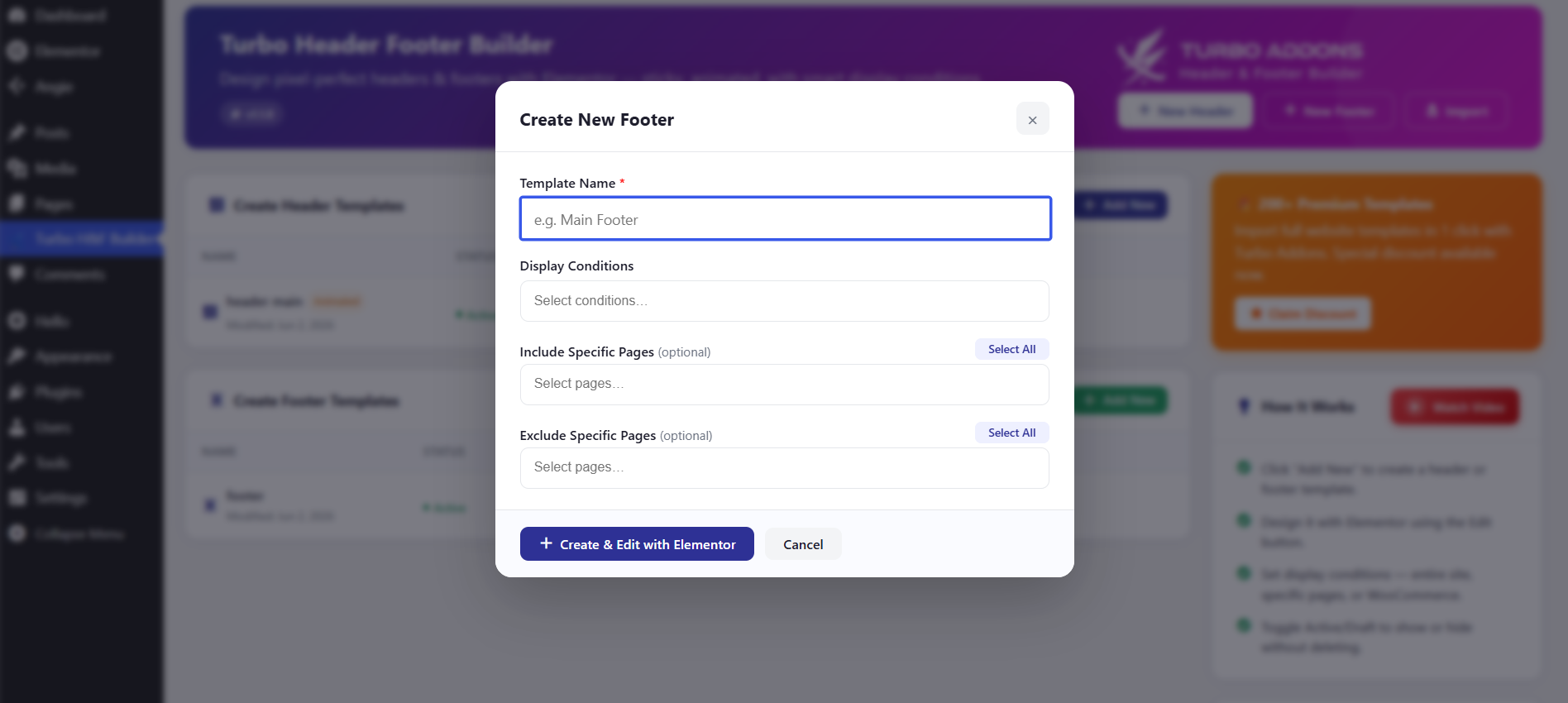
- Quick Create Modals — Create headers or footers without leaving the template list screen.
- Include Pages Selector — Choose individual pages or “Select All” for global use.
- Display Conditions Dropdown — Choose where the header/footer appears:
- Entire Site
- All Blog Posts
- All Archive Pages
- All WooCommerce Products (only appear when woocommerce installed)
- All WooCommerce Pages (only appear when woocommerce installed)
- Exclude Pages Selector — Exclude specific pages where the design shouldn’t appear.
- Header Style Options:
- Make Header Sticky
- Enable Scroll Animation
- Inline Editing — Update conditions instantly from the “Edit Conditions” modal without rebuilding templates.
This visual system ensures fast setup and easy customization for all WordPress users — even beginners.
Benefits of Using Elementor Header Footer Builder
- Completly Free: Unlocked all advance features completly free
- Save Time: Quickly create custom header and footer in Elementor without coding.
- Boost Performance: Optimized for speed and minimal resource usage
- SEO Friendly: Clean, semantic HTML output for better search rankings
- Responsive Design: Looks great on all devices
- Regular Updates: Continuous improvements and new features
- Active Support: Get help from our dedicated support team
- Extensive Documentation: Comprehensive guides and tutorials available
Installation Steps
- Log into your WordPress admin dashboard
- Navigate to Plugins > Add New
- In the search bar, type “Header Footer Builder for Elementor”
- Click Install Now next to the plugin
- After installation, click Activate to enable the plugin
How to Create Custom Header and Footer in Elementor
Creating a Custom Header
- Go to Turbo H&F Builder > Header Templates
- Click Add New Header Template
- Enter a name for your header template.
- Select the page if the header is for a specific page, or leave it if it applies globally.
- Set display conditions for pages or post types.
- Select pages to Exclude the header from if needed, or leave it blank to apply globally.
- Mark the checkbox to Set the Header Style for Sticky or Scroll Animation you can select both
- Click the Create button; you will be redirected to the Elementor editor
- Use Elementor’s drag-and-drop interface to create your header template
Creating a Custom Footer
Go to Turbo H&F Builder > Footer Templates
– Click Add New Footer Template
– Enter a name for your Footer template.
– Select the page if the header is for a specific page, or leave it if it applies globally.
– Set display conditions for pages or post types.
– Select pages to Exclude the header from if needed, or leave it blank to apply globally.
– Click the Create button; you will be redirected to the Elementor editor
– Use Elementor’s drag-and-drop interface to create your footer template
Conditional Display Rules
Set up smart display rules for your headers and footers:
- Page Types: Home, Blog, Single Post, Archive, etc.
- Custom Post Types: Specific headers for products, services, etc.
- Device Types: Mobile-specific or desktop-specific designs
- Date/Time: Seasonal or time-based header changes
Performance & Compatibility
- Optimized for Speed: Minimal CSS/JS, clean HTML output
- Compatible With:
- Elementor (Free & Pro)
- WooCommerce
- All major WordPress themes
- WPML & Polylang
Getting Help:
- Documentation: Visit our comprehensive documentation
- Support Forum: Get help from our community
- Email Support: Contact our support team directly
- Video Tutorials: Step-by-step video guides
Frequently Asked Questions (FAQ)
Q: Do I need Elementor Pro to use this plugin?
A: No, this plugin works with both the free and Pro versions of Elementor.
Q: Can I use different headers for different pages?
A: Yes, you can create multiple header templates and set conditional display rules for different pages or page types.
Q: Does the plugin affect my website’s performance?
A: No, the plugin is optimized for performance and includes caching features to ensure fast loading times.
Q: Can I create a elementor sticky header using this plugin?
A: Yes, you can enable the sticky header feature to keep the header fixed at the top as users scroll down the page.
Q: Can I add animations to my header?
A: Yes, the plugin supports scroll animations for headers, adding dynamic effects when users scroll down the page.
Q: Can I make my header transparent and turn solid on scroll?
A: Yes! Use the Header Effects panel in the Elementor editor (Advanced tab of any Section or Container in a header template). You can set a transparent header, a solid scroll state, the scroll distance that triggers the transition, and a bottom shadow.
Q: Can I combine a sticky header with scroll or transparent effects?
A: Yes. You can enable the sticky header option and pair it with scroll animations or the Header Effects panel to keep your header fixed while it changes appearance as visitors scroll.
Q: How do I create a mega menu with this plugin?
A: Assign an Elementor template to any top-level menu item from Appearance Menus, or use the standalone Mega Menu widget. You can open the panel on hover or click, control its width and alignment, style it, and enable a responsive mobile menu.
Q: How can I edit the display conditions of my header/footer?
A: After creating your header or footer template, you can edit the display conditions by clicking the Edit button from the template list.
License
Turbo Header Footer Builder for Elementor is licensed under the GNU General Public License v3 or later.
Credits
Developed by TurboAddons team with contributions from the WordPress community.
Transform your website’s header and footer with Turbo Header Footer Builder for Elementor – the ultimate solution for custom header and footer design!
عکسهای صفحه
نقد و بررسیها


توسعه دهندگان و همکاران
“Header Footer Builder for Elementor” نرم افزار متن باز است. افراد زیر در این افزونه مشارکت کردهاند.
مشارکت کنندگان


“Header Footer Builder for Elementor” به 1 زبان ترجمه شده است. با تشکر از مترجمین برای همکاری و کمکهایشان.
ترجمه “Header Footer Builder for Elementor” به زبان شما.
علاقه مند به توسعه هستید؟
کد را مرور کنید، مخزن SVN را بررسی کنید، یا از طریق RSS در گزارش توسعه مشترک شوید.
گزارش تغییرات
Version 1.3.1
- Update Plugin Logo
- Update the plugin user dashboard
Version 1.3.0
- New Feature : Header Effects panel — Transparent Header to Solid on scroll, with configurable scroll distance, solid background color, and bottom shadow.
- New Feature : Advanced display conditions — Front Page, 404, Search, Date/Taxonomy/Author archives, logged-in/out users, user roles, and device targeting.
- New Feature : Standalone elementor Mega Menu widget with per-menu-item setup and a responsive Mobile Menu.
- Fixed : Headers with the “All Pages” display condition now render correctly.
- Fixed : Header no longer stays invisible when JavaScript is unavailable.
- Security : Diagnostic report restricted to logged-in administrators.
Version 1.2.9
- Fixed : Header no longer appears blank in the Elementor editor preview when an active header template is assigned to the entire site.
Version 1.2.8
- Fixed : Bug Fixed, Solved Select2 Conflict
Version 1.2.7
- Fixed : JS fallback for early header insertion is now guarded to avoid duplicate insertion.
Version 1.2.6
- New Features : Added feedback button with popup in the dashboard.
Version 1.2.5
- Update : Updated the dashboard with new features
Version 1.2.4
- Fix : Plugin tested up to date wp version 7.0
Version 1.2.3
- Fix : Removed “Requires Plugins: elementor” header that was causing auto-deactivation on sites where Elementor was temporarily inactive.
- Fix : Corrected “Tested up to” version.
Version 1.2.2
- Bug Fix : Fixed Elementor V4 atomic/flexbox element styles not rendering on frontend (header & footer).
- Bug Fix : Create modal now shows “Header Name” or “Footer Name” dynamically.
Version 1.2.1
- Security Fix : Restricted all template management actions (create, edit, delete, conditions) to Administrators only (manage_options capability). Previously accessible to Contributors.
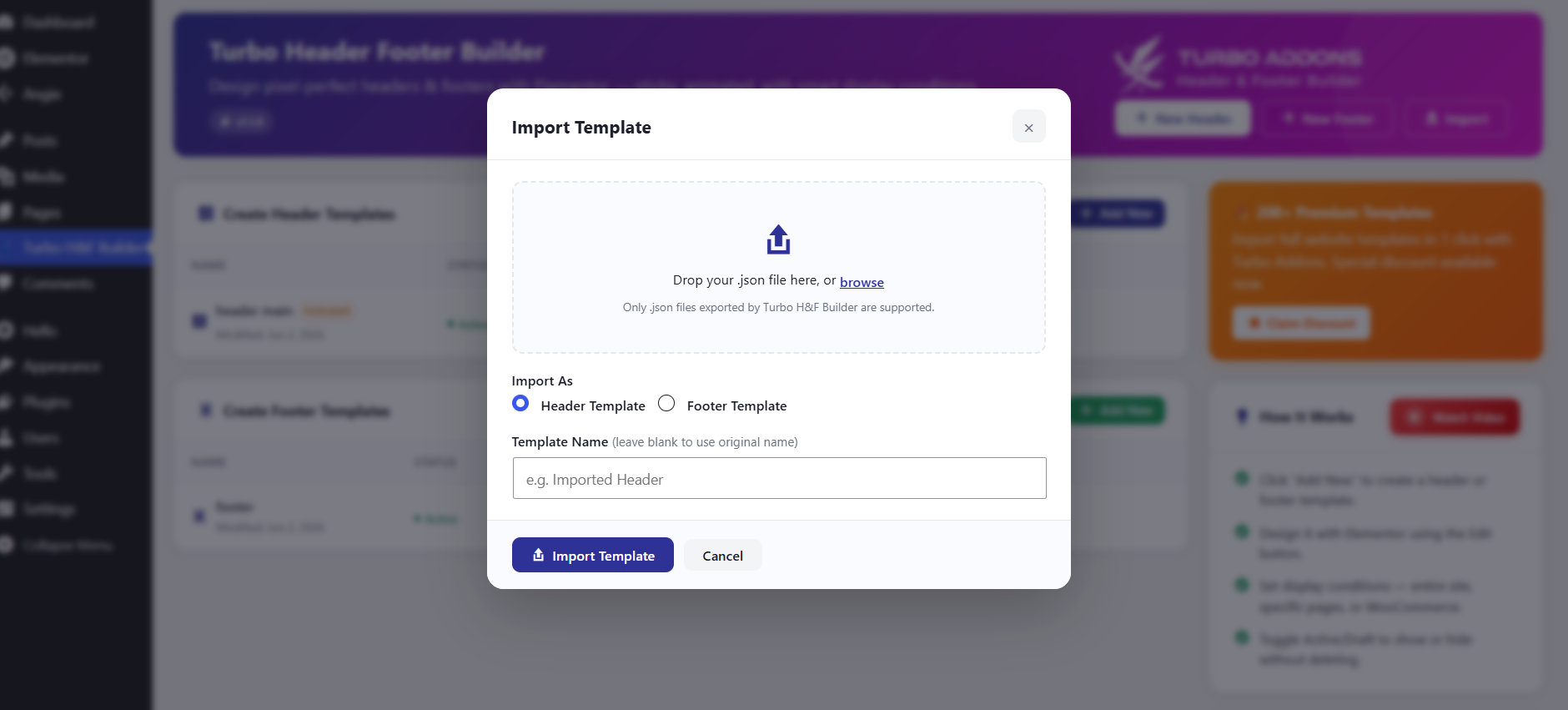
- Removed : Removed import and export template features.
- Bug Fix : Fixed Elementor V4 atomic/flexbox element styles not rendering on frontend.
- Bug Fix : Create modal now shows “Header Name” or “Footer Name” dynamically.
Version 1.2.0
- New Features : Added Plugin Dashboard for make the header and footer more easiar
See all changelog
To see all changelog, visit the Development tab.