

توضیحات
The WordPress media library hasn’t really changed in years. A few hundred uploads in, you spend more time scrolling than working. Refined Media Library turns it into an actual asset manager, without adding a single per-image setting for you to babysit.
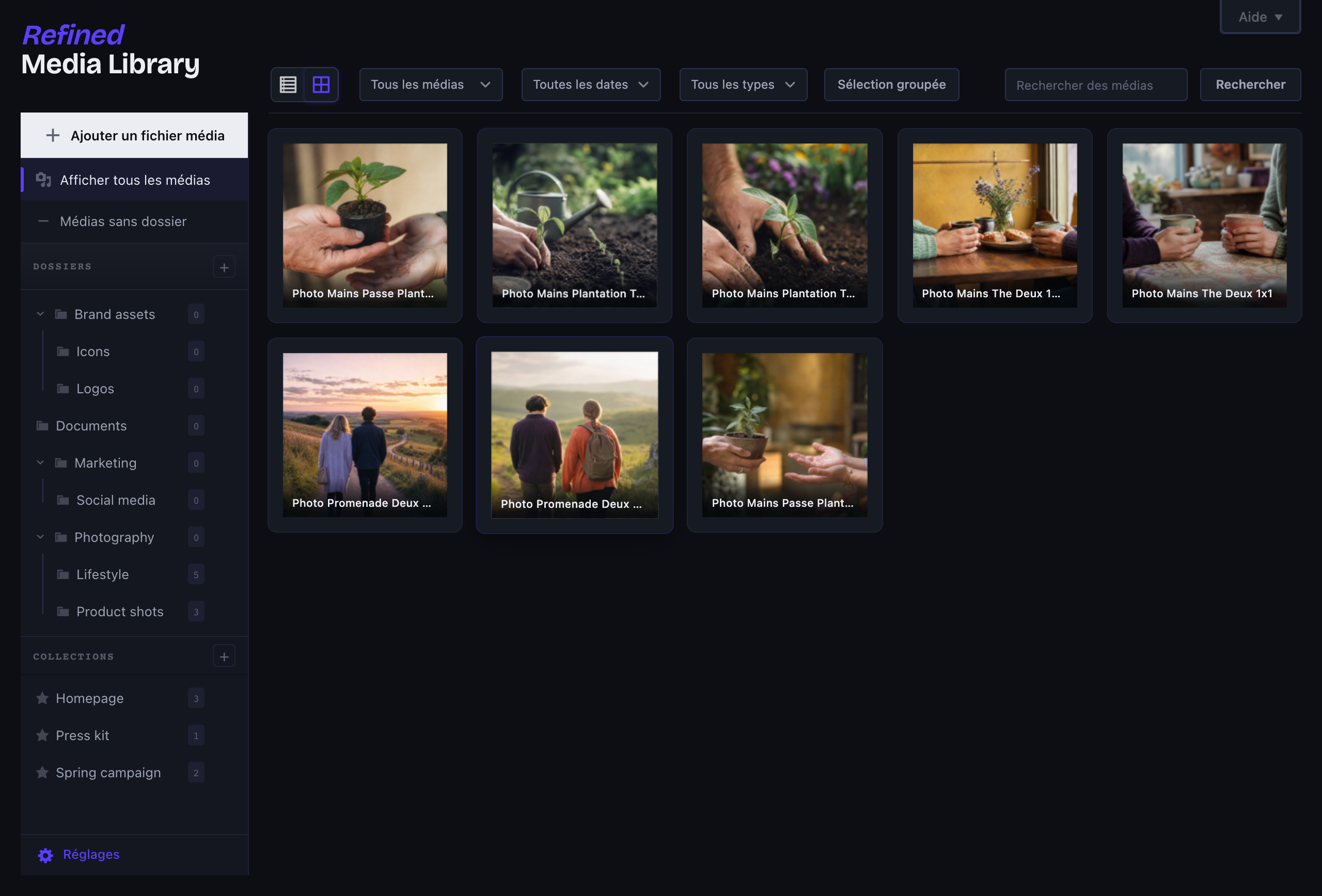
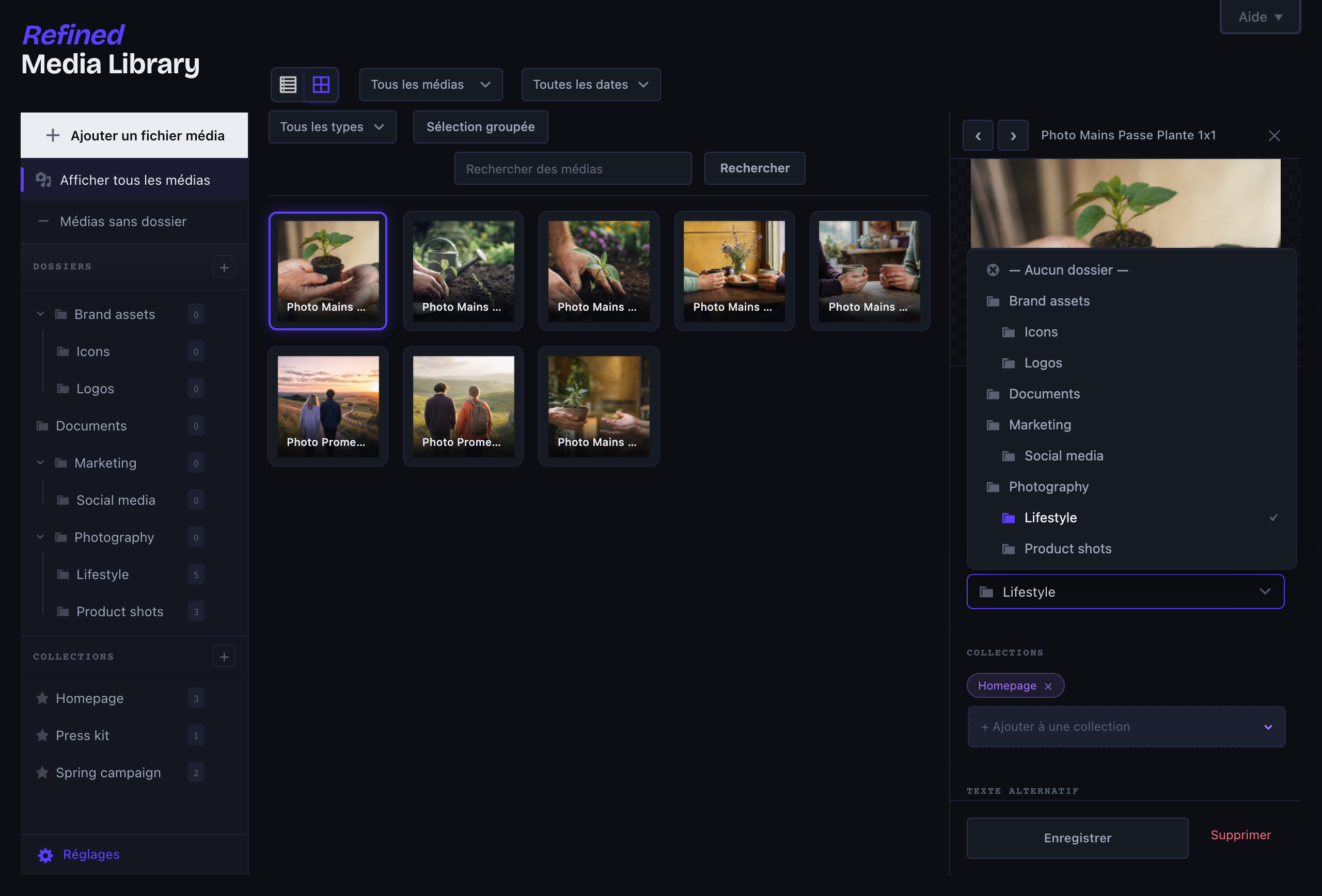
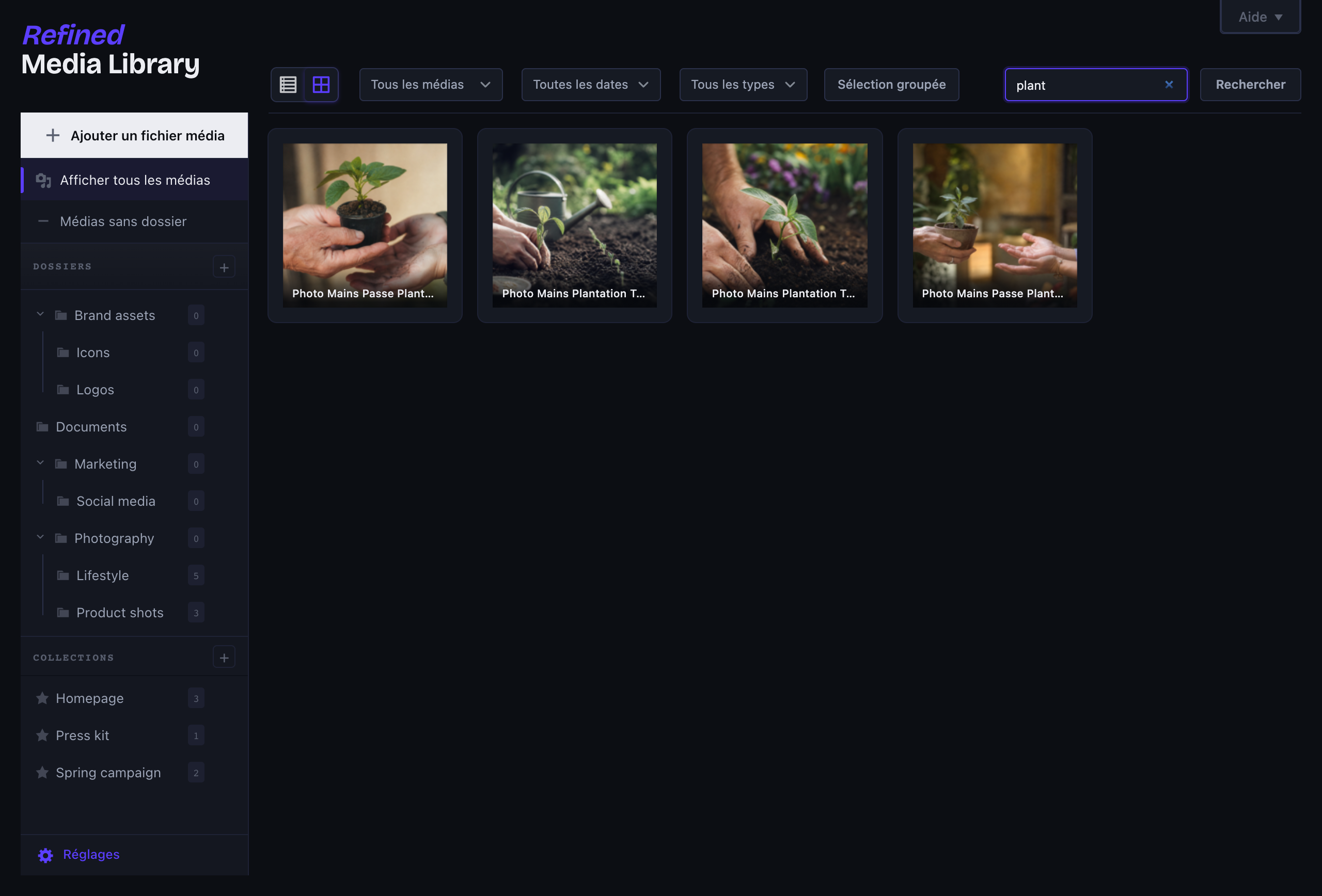
Folders that actually feel like folders
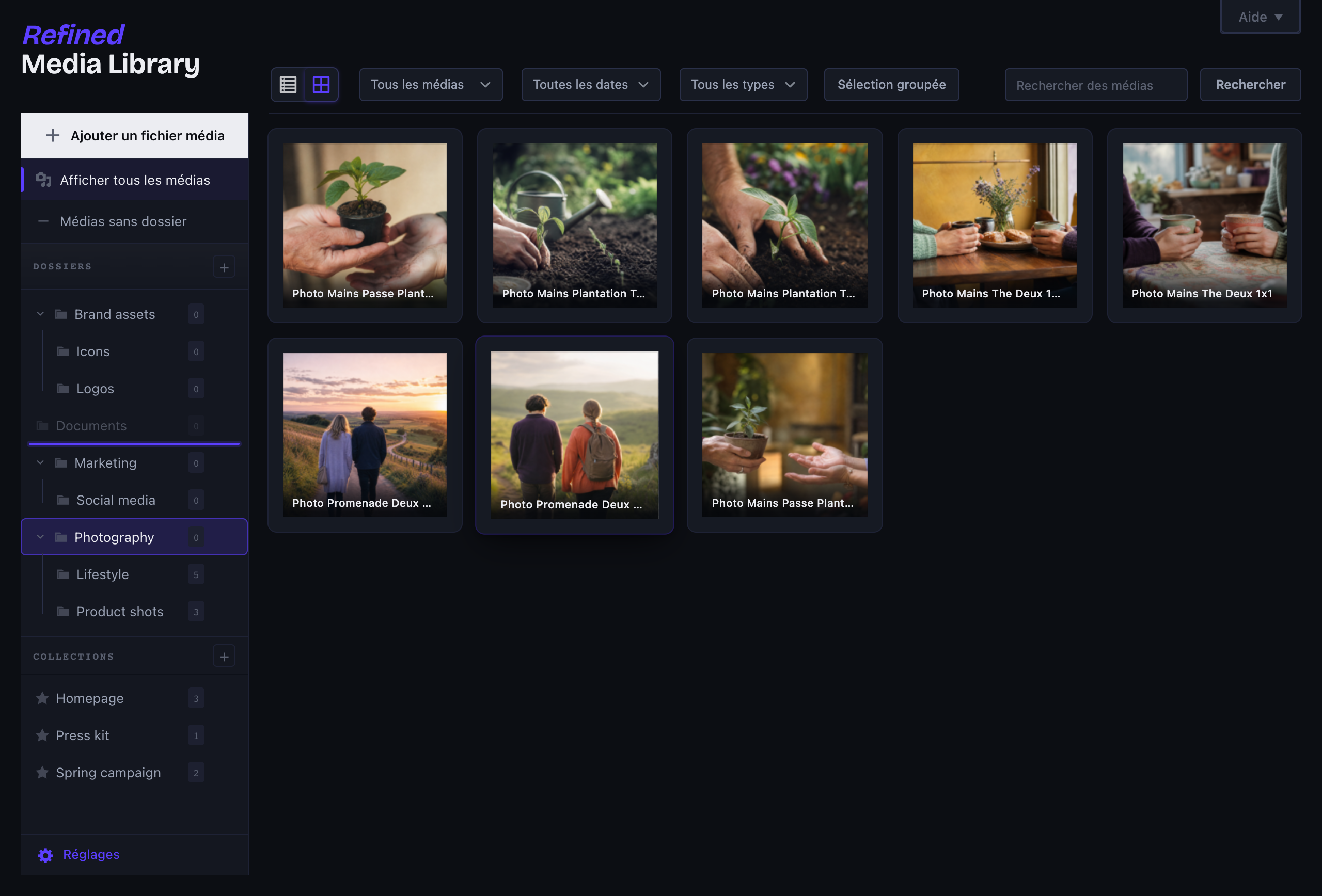
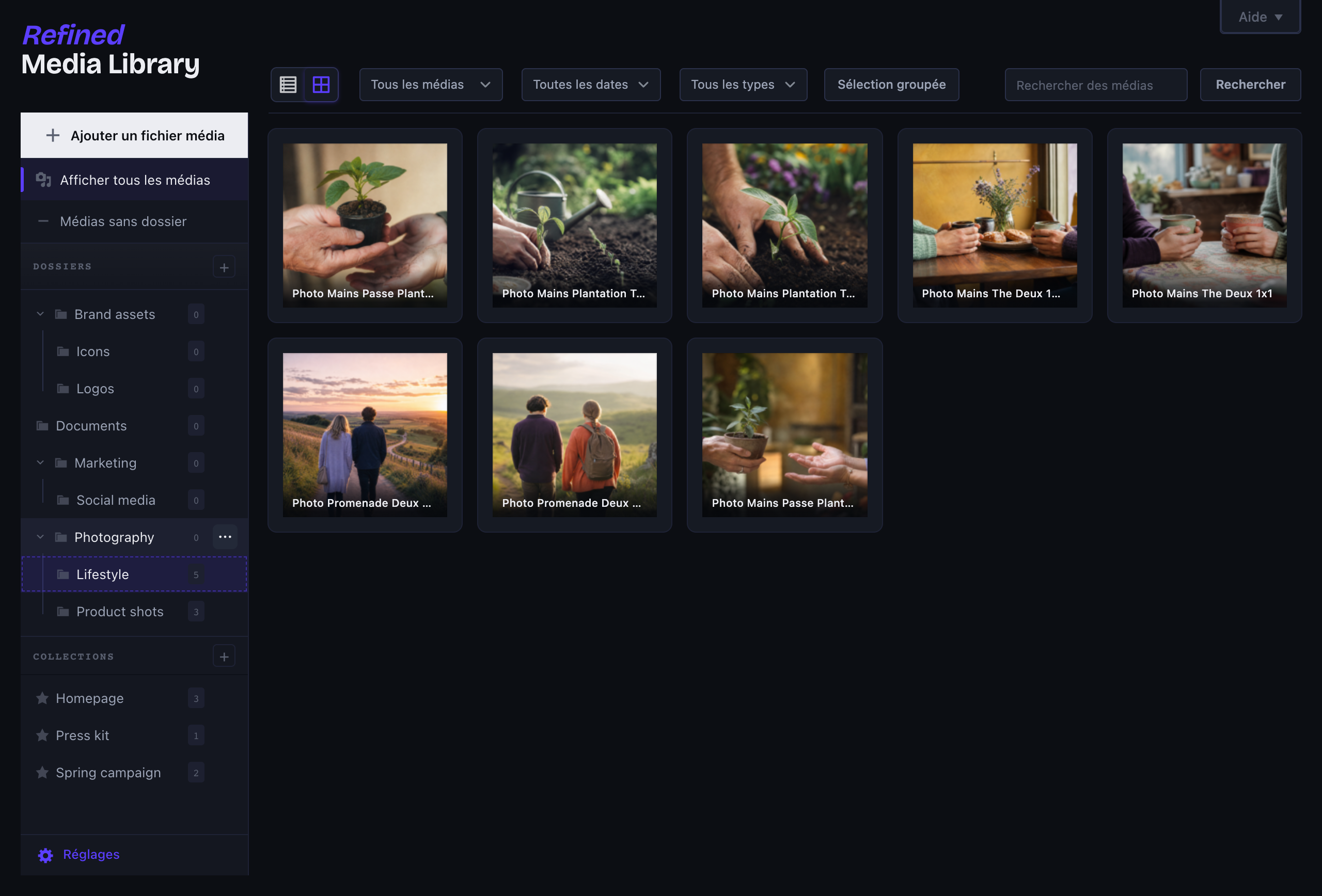
- Real nested folders: create subfolders, drag a folder into another to re-parent it, or drop it between two to reorder, with live drop indicators so there’s no guesswork.
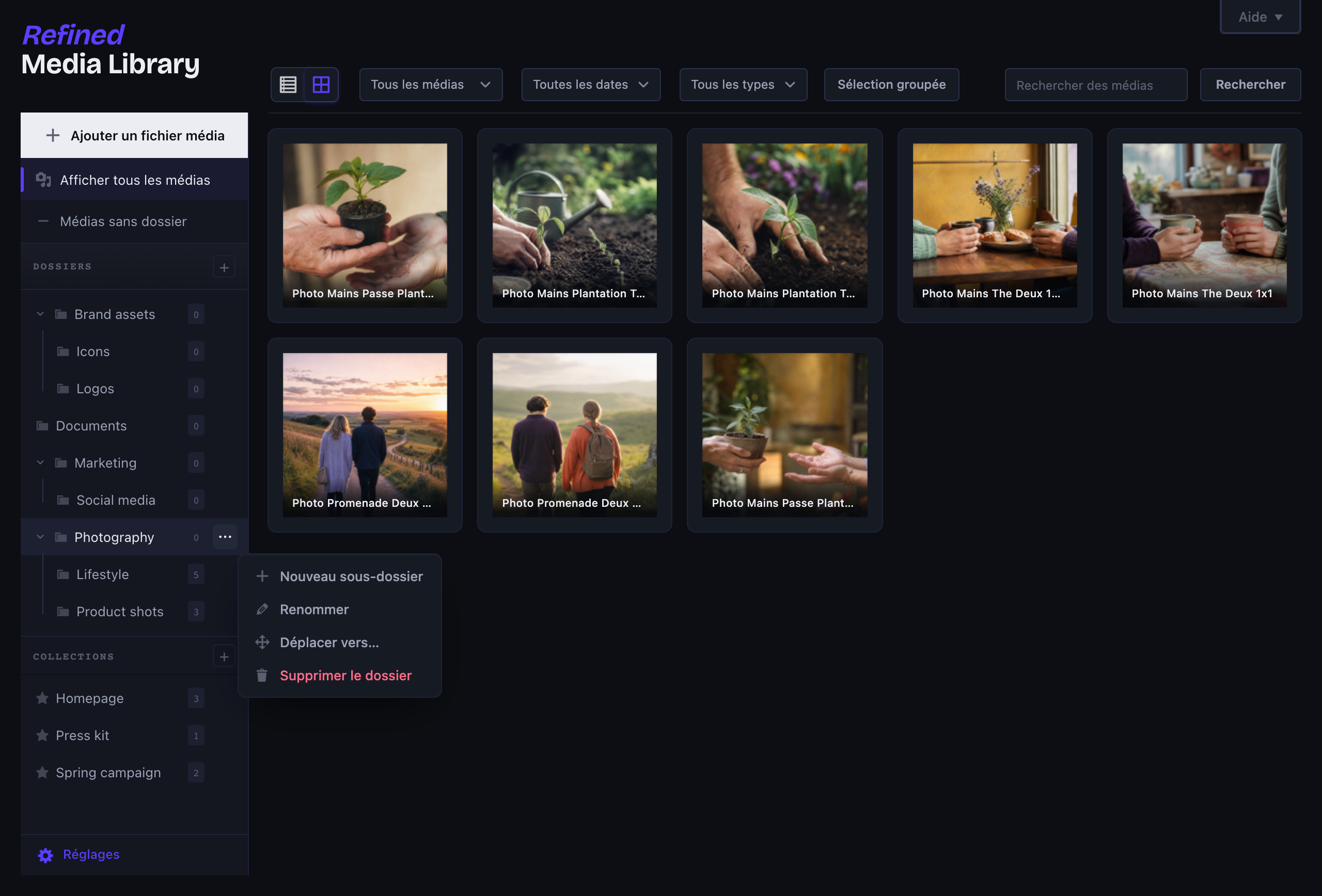
- Right-click any folder (or the ⋯ button) for new subfolder, rename, move and delete, in clean designed dialogs rather than the browser’s grey pop-ups.
- Collections that ignore folder boundaries, so the same image can sit in several at once.
- Drag media straight onto a folder or collection, from the grid or the list, and upload right into the folder you’re looking at.
- Works on top of the native media library, so it behaves the same whether you build with Bricks, Elementor, Gutenberg or Divi.
A real detail panel
Click any file and a panel slides in from the right, no more full-screen modal. Edit the alt text and title, move it to a folder, drop it into collections, copy its URL, and see exactly which posts and pages use it (WooCommerce galleries included). The preview is resizable: it scales proportionally as you widen the panel, and you can drag the handle beneath it to set its height. Click the image to open it full screen in a lightbox and step through the whole library with the arrow keys.
Less clutter, automatically
- Automatic alt text and titles, filled in from the filename on upload, but only when you left them blank. It runs on your server and talks to nobody.
- Duplicate detection: re-upload the same file and it gets flagged, with a link to the original.
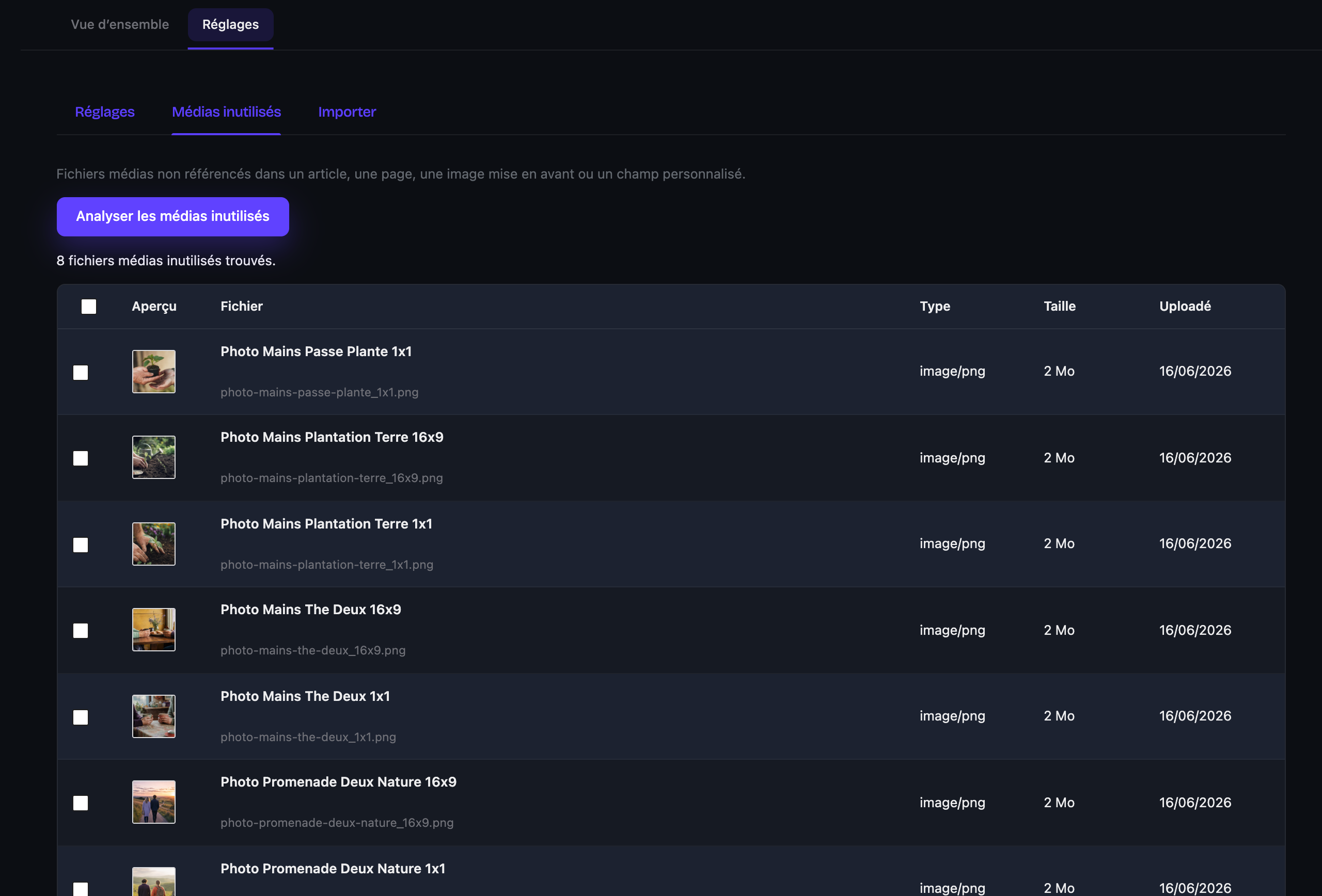
- An unused-media scanner that finds files no post actually references (featured images, content, custom fields, WooCommerce galleries) and lets you bulk-delete them behind a deliberate double confirmation. It errs on the side of caution: if it can’t be sure, it leaves the file alone.
WebP and AVIF on upload
Convert images to WebP and/or AVIF the moment they land, after a quick check that your server can actually do it. Quality is one slider, not a wizard. If another plugin already owns image conversion, Refined Media Library steps aside.
Switching from another plugin?
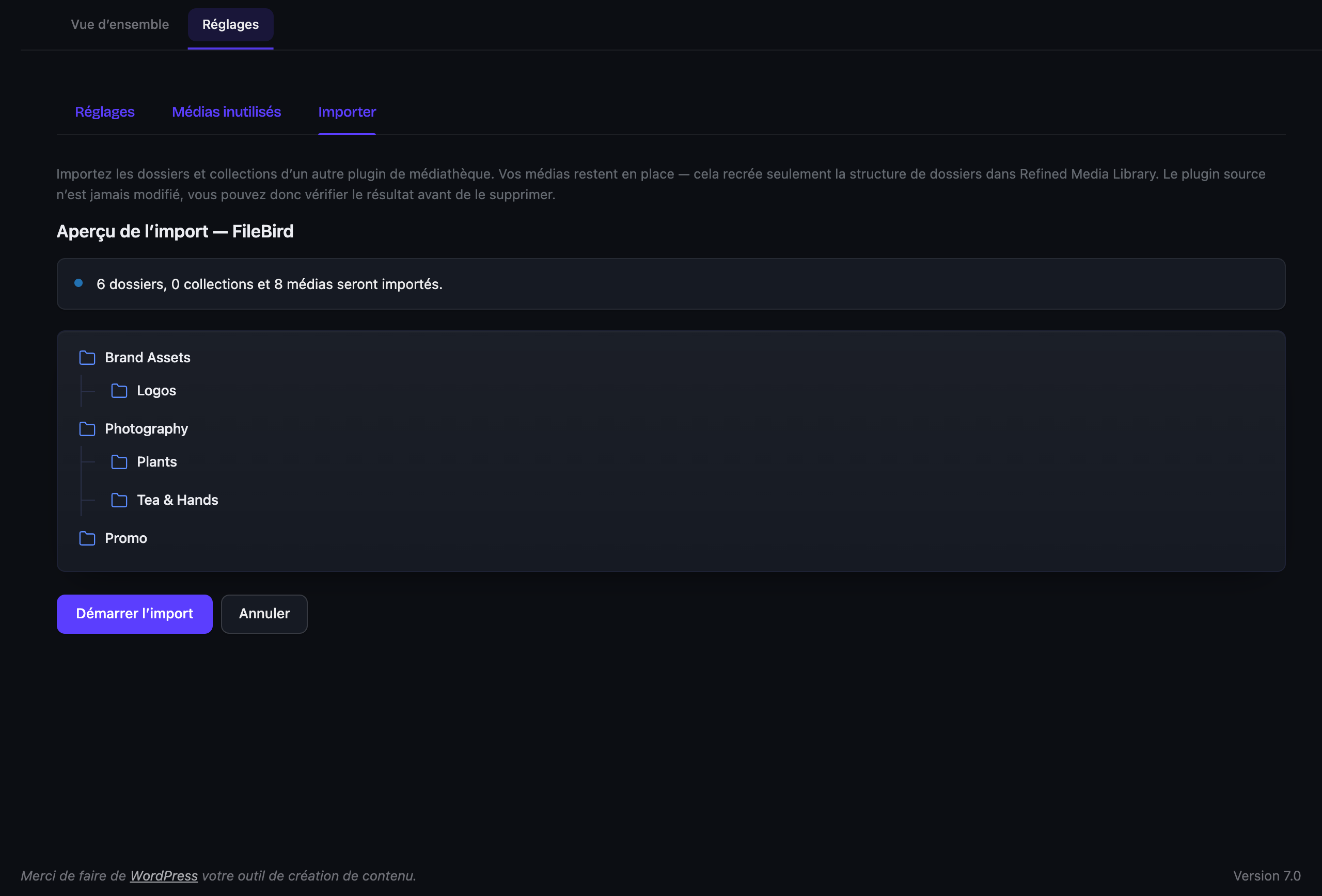
One-click import from FileBird, Real Media Library, HappyFiles, Folders (Premio) and Enhanced Media Library. It reads their data directly, even if the plugin is already deactivated, never touches it, and the import is reversible. Preview first, undo anytime.
No per-image settings
That’s the whole point. A few toggles in one place, sensible defaults everywhere else.
Free, and built to stay that way
No locked features, no “upgrade to unlock folders”, no nag screens. It’s the standalone edition of the Double Youpï suite: the whole thing, free for good and actively maintained.
No per-image settings
That’s the whole point. A few toggles in one place, sensible defaults everywhere else.
External services
This plugin sends a report to doubleyoupi.com when you use the “Send feedback” tab, and only then. Nothing is sent while you simply use the media library, and nothing is sent in the background.
When it happens. Only when you open the feedback tab, write a message and tick the consent box. The dialog shows you the exact report before you send it, and you can read every field.
What is sent. Your message and, if you attached one, your screenshot. The title and address of the admin screen you were on, with any token removed. The plugin or theme the screen belongs to. Version numbers for WordPress, PHP, your theme and this plugin. Your browser’s user agent string and window size. A site identifier that is a truncated one-way hash of your site address, so reports from one install can be grouped without knowing which site it is. If, and only if, you ask for a reply, your email address and your site address.
What is never sent. No posts, pages, media files, users, passwords or database content. Nothing from your site’s contents, ever.
Reports are kept for 24 months, then deleted, screenshot included. You can ask for access, correction or deletion at any time.
Service provider: Double Youpi, https://doubleyoupi.com
Terms of use: https://doubleyoupi.com/terms
Privacy policy: https://doubleyoupi.com/privacy
عکسهای صفحه
نصب
- Install it from the Plugins screen, or upload it to
/wp-content/plugins/doubleyoupi-refined-media-libraryby hand if that’s your thing. - Activate it.
- Open Double Youpï Refined Media Library > Settings and switch on what you want. There isn’t much to switch on, which is rather the point.
سوالات متداول
-
How do I organize the WordPress media library into folders?
-
Create a folder in the media library sidebar, then drag files onto it to file them. Folders can be nested as deep as you like, and you reorganize them by dragging one into another or between two others. A file can also belong to one or more collections, which work across folders, so the same image can live in several places at once.
-
How do I convert images to WebP or AVIF on upload in WordPress?
-
Enable conversion in the settings and every image you upload is converted to WebP and/or AVIF automatically, after a quick check that your server (Imagick or GD) supports it. Quality is a single slider. If another plugin already handles image conversion, Refined Media Library detects it and steps aside.
-
How do I find and delete unused images in WordPress?
-
Run the unused-media scanner. It lists files that no post, page, featured image, custom field or WooCommerce gallery references, and lets you delete them in bulk behind a deliberate double confirmation. When it cannot be sure a file is unused, it leaves it alone.
-
Does it create real folders, or just categories and filters?
-
Real folders. You manage them with drag-and-drop and a right-click menu, and they nest as deep as you need. Under the hood they are standard WordPress taxonomies, so nothing is moved on disk and your files stay portable. Disable the plugin and you simply fall back to the stock library, with nothing lost.
-
Can I import my folders from FileBird, Real Media Library or HappyFiles?
-
Yes. One-click import is supported for FileBird, Real Media Library, HappyFiles, Folders (Premio) and Enhanced Media Library. It reads the source directly (even if that plugin is deactivated), never modifies it, and the whole import can be undone.
-
Will it work with my page builder?
-
Yes. It improves the native media library rather than replacing it, so Bricks, Elementor, Gutenberg, Divi and everything else all see the same thing.
-
Does it send my images anywhere?
-
No. Alt text is built from the filename, right there on your server. Conversion uses Imagick or GD, also local. Nothing about your media leaves your site.
-
What is the catch with “free”?
-
There isn’t one. This is the standalone version, no strings attached. If it saves you an afternoon and you feel like it, there’s a coffee button somewhere. Entirely optional.
نقد و بررسیها
نقد و بررسیای برای این افزونه یافت نشد.
توسعه دهندگان و همکاران
“Double Youpï Refined Media Library – Folders, Collections & WebP” نرم افزار متن باز است. افراد زیر در این افزونه مشارکت کردهاند.
مشارکت کنندگان
“Double Youpï Refined Media Library – Folders, Collections & WebP” به 2 زبان ترجمه شده است. با تشکر از مترجمین برای همکاری و کمکهایشان.
ترجمه “Double Youpï Refined Media Library – Folders, Collections & WebP” به زبان شما.
علاقه مند به توسعه هستید؟
کد را مرور کنید، مخزن SVN را بررسی کنید، یا از طریق RSS در گزارش توسعه مشترک شوید.
گزارش تغییرات
0.3.2
- Fixed: installing this plugin next to Double Youpï Refined Admin Dashboard brought the whole site down, front end included. The two run side by side now.
- Fixed: with both plugins active, the folder panel sat on top of the page title and the thumbnails covered the file names.
- Feedback sent from a media screen is now filed under this plugin instead of WordPress, so a report about folders or collections lands in the right place.
- The Unused Media screen now carries the same accent colour as every other screen of the plugin. It had kept an older blue.
- French translation: apostrophes are typographic throughout, as most of the interface already was.
0.3.1
- Fixed: on sites where another plugin or some custom CSS changes the width of the WordPress admin sidebar, the folder panel sat behind it. The panel now measures the sidebar instead of assuming its width, and follows it when it is collapsed or resized.
- Fixed: a notice about translations being loaded too early could appear at the top of the Media screen, on the first page load after an update.
- Fixed: on a site that forces one text colour across the whole admin, the folder panel turned unreadable. It now restores its own colours on those screens.
- Fixed: with a long list of folders, the Add Media button and the section headers were squeezed to a fraction of their height. They keep their size now, and the lists scroll instead.
- Fixed: a folder or a collection whose name contains an ampersand displayed it as “&”.
0.3.0
- New: a feedback tab on every admin screen, to report a bug or ask for something without leaving the page. It shows you the exact report before it leaves, and sends nothing until you agree. See “External services” above.
- A file you are not allowed to edit now opens read-only, with its information and a line explaining why, instead of an error code.
- The folder panel no longer shows a Settings link to people who cannot open that page.
- When a competing media library plugin is active and holds folders, the notice offers to import them rather than only to switch.
- Fixed: competing plugins were only recognised by their free edition’s folder name, so a paid edition went unnoticed and its interface overlapped ours.
- Fixed: menu labels stayed in English on WordPress 6.5 and 6.6.
- Fixed: three strings had lost their translations in every language, including the text of the Import tab.
0.2.0
- Caption and description are now editable straight from the detail panel, next to the title and alt text. Everything a file carries is in one place.
- The four text fields sit in one section, in the order you actually write them: title, alternative text, caption, description. Their labels are clickable.
- Moving to the next file saves what you typed, and drops the cursor back in the same field, so a long captioning run never needs the mouse. Cmd/Ctrl + arrow moves on from inside a field.
- The Save button now tells you something: quiet when there is nothing to save, lit when there is. Each edited field is marked next to its label.
- Folders and Collections sit side by side once you drag the panel wider.
- Fixed: on a site left on Plain permalinks, opening a file from the grid answered 404 and the panel stayed empty.
- Fixed: admin notices printed over the page title instead of lining up with the grid.
- Fixed: pressing Escape in the folder picker closed the whole detail panel.
- Fixed: in list view, the switch between list and grid did not show which view you were on.
- Tidier surfaces: lighter borders in the library, fields that rest on the panel instead of being boxed in, redrawn file-type icons.
- Confirmed with WordPress 7.1.
- French translation aligned with the official WordPress.org glossary and typography.
0.1.3
- New “Mine” filter in the media library toolbar (shown only when several people upload) to quickly narrow to your own files.
- Removed a redundant media-type dropdown so the filters bar is cleaner.
- Fixed a stray horizontal scrollbar above the media grid.
- Lightbox navigation arrows are now crisp SVG icons.
0.1.2
- Readme and wording refresh, clearer feature descriptions and an expanded FAQ. No functional changes.
0.1.1
- Detail panel: the image preview now scales proportionally as you widen the panel, a drag handle underneath resizes the image, and clicking it opens a full-screen lightbox gallery with keyboard navigation.
- Buttons added to the media screen by other plugins (such as Elementor) now move neatly into the folder panel instead of crowding the page title.
0.1.0
- First public release. Nested folders with drag-to-reorganise and a right-click menu, collections, a Finder-style detail panel, duplicate and orphan cleanup, automatic alt text and titles, WebP/AVIF conversion on upload, and one-click import from FileBird, Real Media Library, HappyFiles, Folders and Enhanced Media Library.