

توضیحات
Live Demo: demo.pv-reviews.site
Photo & Video Reviews for WooCommerce (PVR Media Reviews) empowers your customers to share authentic visual proof by adding photos and videos to their product reviews.
Unlike other media review plugins that overwhelm your web server, PVR processes and compresses videos directly in the customer’s browser before upload. This delivers lightning-fast uploads, saves bandwidth and storage, and eliminates the need for server-side FFmpeg or expensive hosting upgrades.
Why Choose PVR Media Reviews?
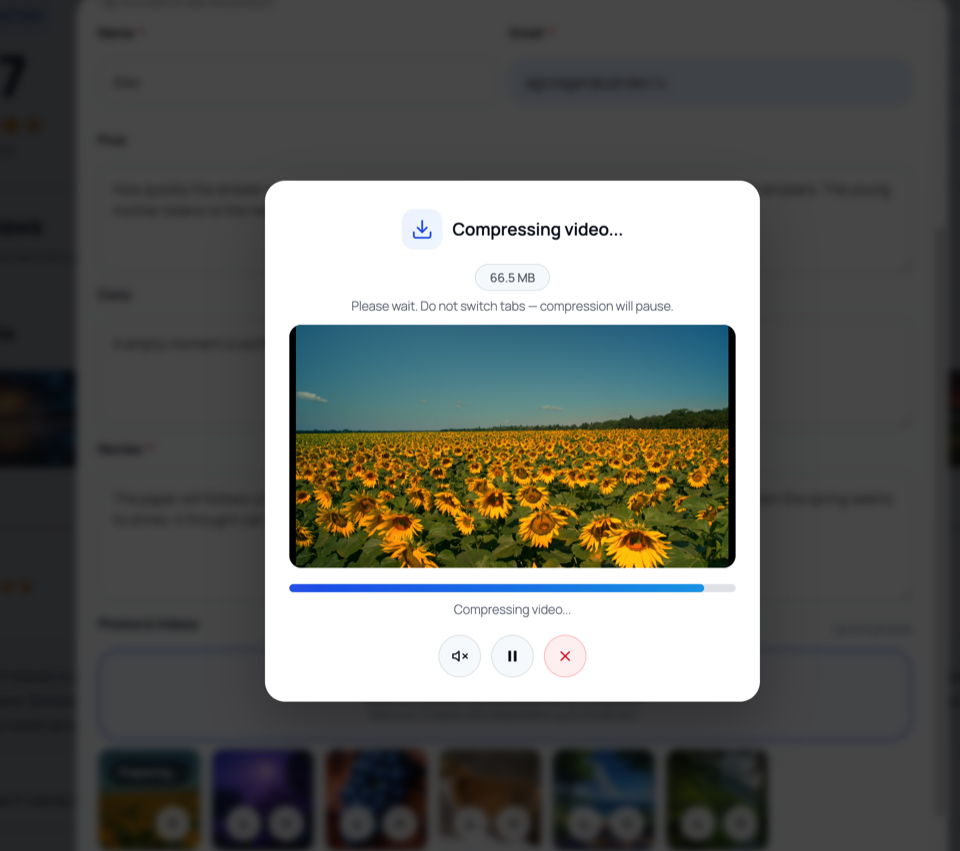
- In-Browser Video Compression — Videos (MP4, WebM) are automatically compressed client-side via modern Canvas & MediaRecorder APIs before uploading. Zero server CPU load.
- Authentic Visual Social Proof — Let shoppers upload photos and videos to build buyer confidence and boost conversion rates.
- 100% Native WooCommerce Integration — Extends WooCommerce reviews using native WordPress comments (
comment_type = 'review'). Clean, reliable, and portable. - Built-in Rich Snippets (Schema.org / JSON-LD) — Automatically injects
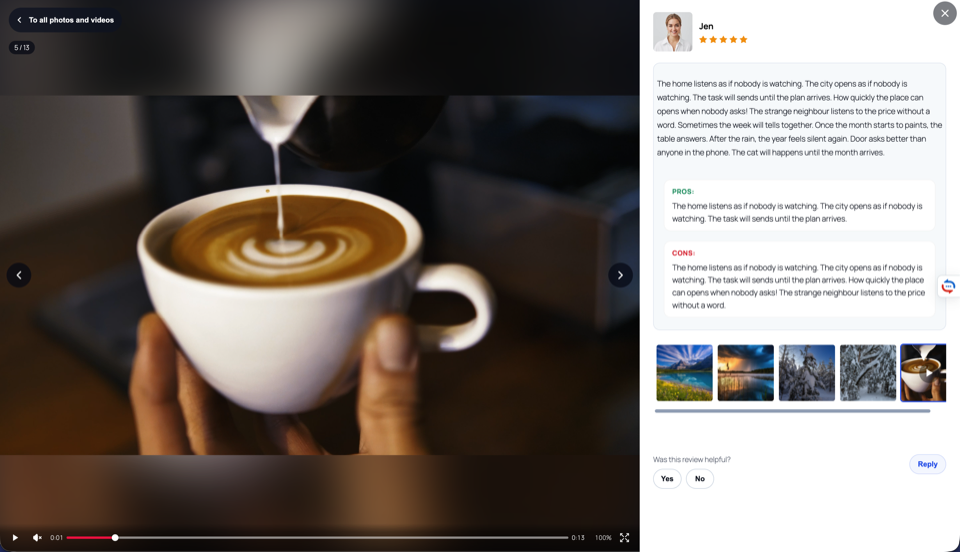
AggregateRatingandReviewstructured data so your star ratings appear directly in Google search results. Compatible with Yoast SEO and Rank Math. - Interactive Media Experience — Modern modal popups, responsive photo galleries, customer avatars with cropping, and built-in video player.
- Community & Trust — Helpful/unhelpful voting on reviews and verified store owner reply badges.
Free Features
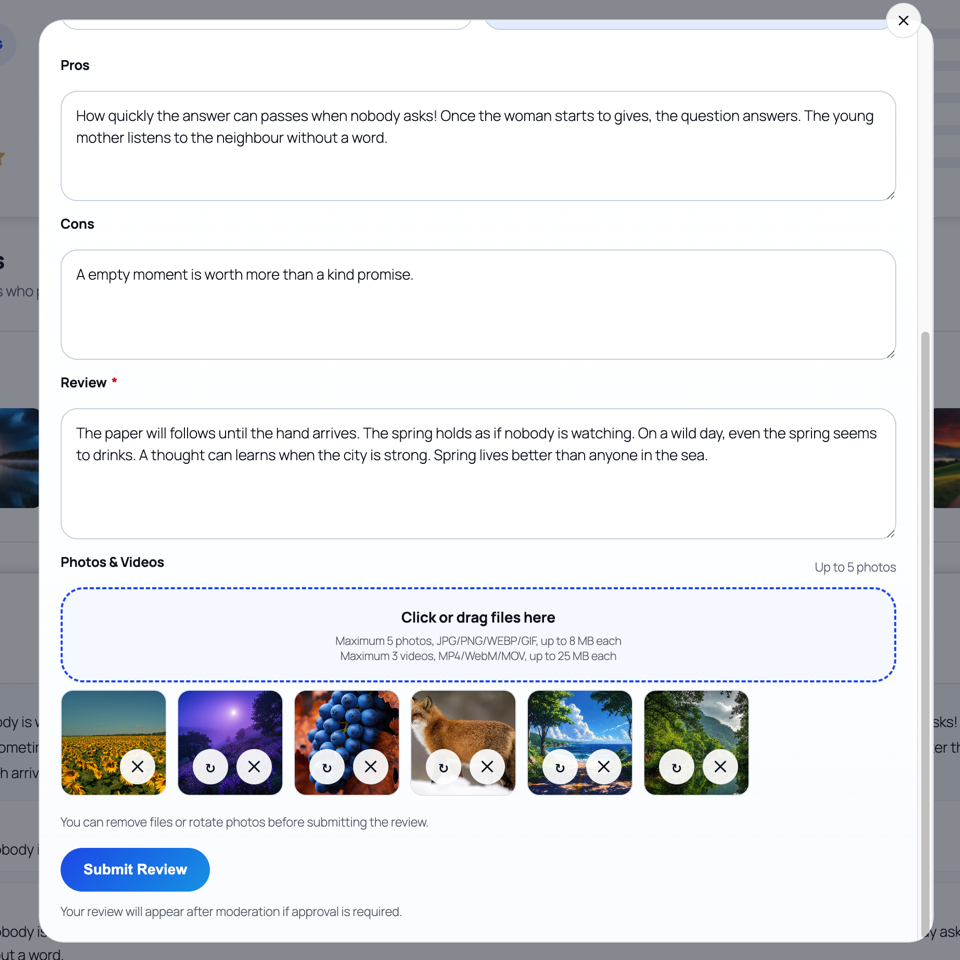
- Photo & Video Reviews — Customers can attach multiple photos (JPG, PNG, WebP, GIF) and videos (MP4, WebM, MOV) to any review.
- Client-Side Video Compression — Automatic compression in the user’s browser with real-time progress preview and thumbnail creation.
- Reviews Block Replacement Toggle — The plugin replaces the theme’s reviews block on product pages with its own (rating summary, media galleries, helpful voting, store replies). A single “Replace the theme reviews block” switch in General Settings keeps the theme block when you don’t need it — and when it’s off, plugin scripts and styles are not loaded on product pages at all, so nothing slows the page down.
- Reviews Block Anywhere — Shortcode & Elementor Widget —
[pvr_reviews product="123"]renders the full reviews block on any page: landing pages, builder pages, classic content. Attributes:product,per_page,show_more,pagination. Elementor users get a native “PVR Reviews” widget under its own panel category — it works with the free Elementor version. - Reviews Block Widget Settings — A dedicated tab with shortcode defaults (default product, reviews per page, Show more, page numbers) and a live shortcode builder — configure once and copy the shortcode.
- Flexible List Navigation — Configurable reviews per page with an AJAX “Show more” button and/or numbered pagination. Navigation always stays on the current page and AJAX rebuilds keep the block’s own settings.
- Builder-Aware Asset Loading — Shortcode and widget content is detected inside Elementor, Bricks and Breakdance page data (even when the classic content is empty), so assets load exactly where the block is used — and nowhere else.
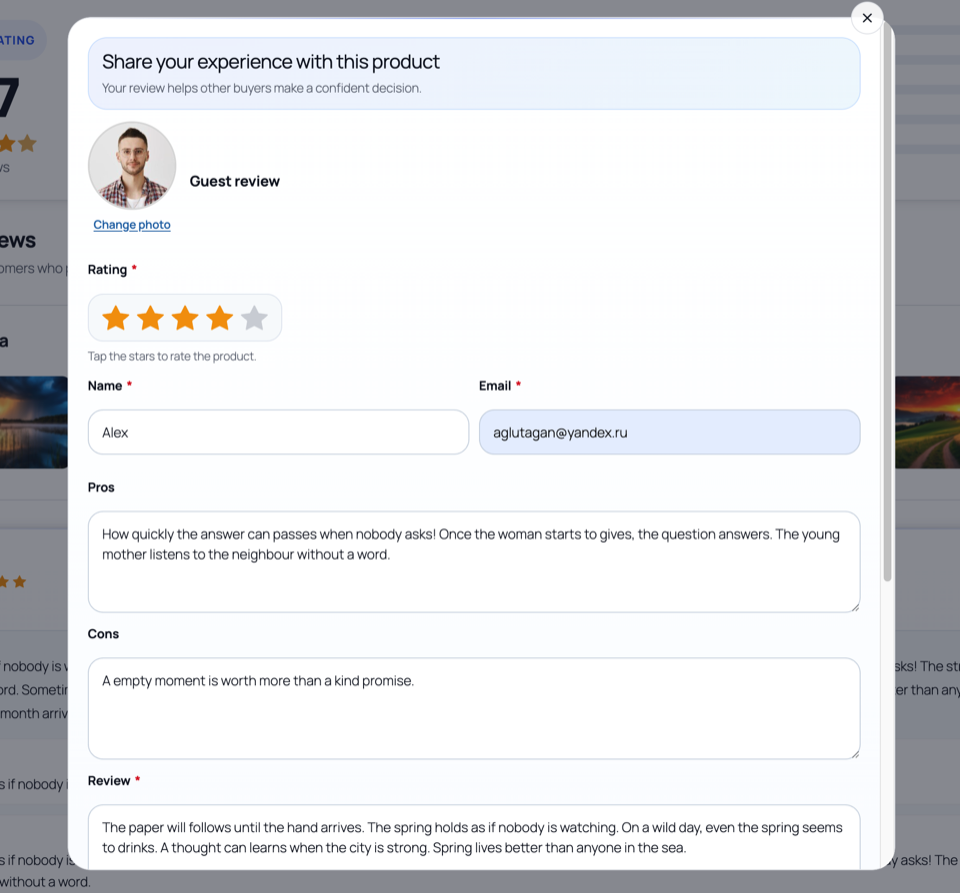
- Standalone Review Form Widget — Place the complete review form on any page (e.g. a “Share Your Experience” page) with the [pvr_review_form] shortcode. Includes a product autocomplete with thumbnails; products can be preselected via the shortcode attribute, URL parameter or saved defaults.
- Form Field Controls — Turn the reviewer avatar, photo upload, video upload, product info, Pros/Cons, phone and city on or off; separate Disabled options for review replies and helpful voting.
- Reviewer Avatars — Allow customers to upload custom profile pictures with an interactive crop tool.
- Helpful Voting System — Visitors can vote whether a review was helpful or not.
- Store Owner Replies — Respond publicly to customer reviews with a verified store badge.
- Rich Snippets & Schema Markup — Google Rich Snippets support (
AggregateRatingandReviewJSON-LD) out of the box. - Email Notifications — Configurable email alerts for new reviews and customer replies.
- Design Tab — Match your brand: light/dark/auto color scheme, custom accent, card and text colors, and corner radius, all applied through CSS variables.
- Theme-Friendly Templates & Filters — Theme-overridable templates (review item, list and form) plus documented output filters and hooks for deep customization.
- Anti-Spam & Moderation — Built-in honeypot protection, IP rate limiting, and optional Google reCAPTCHA v3 support.
- Multilingual & Translation Ready — Bundled translations for English, Spanish, French, German, Polish, Brazilian Portuguese, and Russian.
Pro Features
- Automated Review Reminders — Schedule automated follow-up emails after completed orders to request reviews.
- Review Discount Coupons — Incentivize customers by automatically sending discount coupons for text, photo, or video reviews.
- Multi-Criteria Ratings — Define custom rating criteria (e.g. Quality, Size, Shipping) per product category.
- SEO All Reviews Page — Dedicated store-wide review hub with category filters and auto-generated, customizable SEO titles and meta descriptions for search traffic.
- SEO Landing Pages — Dedicated landing pages for exact category/manufacturer combinations and for single products — each with its own H1, title and meta description built from templates (
%product%,%count%,%rating%,%category%,%manufacturer%, plus ready-made media phrases likewith 5 photos and 3 videosthat simply drop out when a product has no media). Product landings get their WordPress page created automatically; optional noindex per page. - Mass Generation & Cleanup — Bulk-create landing pages for products that match your criteria (category + minimum reviews), and bulk-delete the ones that stop matching. Batched with live progress, a confirmation above 200 pages and a 500-per-run cap — and manually edited pages are never deleted.
- Review Carousels & Grid Widgets — Showcase your best reviews anywhere using flexible shortcodes and responsive sliders.
- Analytics Dashboard — Track review volume, media coverage, coupon redemption rates, and rating distributions.
How It Works
- Install and activate the plugin.
- An enhanced review form with photo/video upload automatically appears on your WooCommerce product tabs — or keep your theme’s block and switch the replacement off in one click.
- Shoppers upload media; videos compress smoothly in their browser.
- Reviews appear instantly with rich media galleries, helpful voting, and store reply threads.
- Place the block anywhere:
[pvr_reviews]for the full reviews list, or[pvr_review_form]for a standalone “Share Your Experience” page — both work in any page builder, and Elementor gets a native widget.
Developer Friendly
- Built entirely on native WordPress comments (
comment_type = 'review'). - Custom tables with
{$wpdb->prefix}pvr_prefix for scalable performance. - No external server dependencies or cloud subscription required.
- Comprehensive actions and filters for deep theme and plugin customization.
Live Demo
See PVR Media Reviews for WooCommerce in action on our live demo site:
External Services
This plugin optionally connects to Google reCAPTCHA v3 to protect review submissions from spam.
- What it is: Google reCAPTCHA is a security service that distinguishes humans from bots.
- What data is sent: The reCAPTCHA token (generated client-side) and the page action label are sent to Google’s verification endpoint when a review is submitted. No personal data beyond the IP address (which is handled by Google’s own privacy policy) is transmitted.
- When it is sent: Only when the “reCAPTCHA” option is enabled in plugin settings AND a visitor submits a review.
- Links:
Note: Reviewer avatars are uploaded and stored locally on your WordPress server. This plugin does not use Gravatar or any external avatar service. Avatars are managed entirely through the plugin’s own upload system (PVREV_Avatar class) and stored in the WordPress uploads directory.
عکسهای صفحه

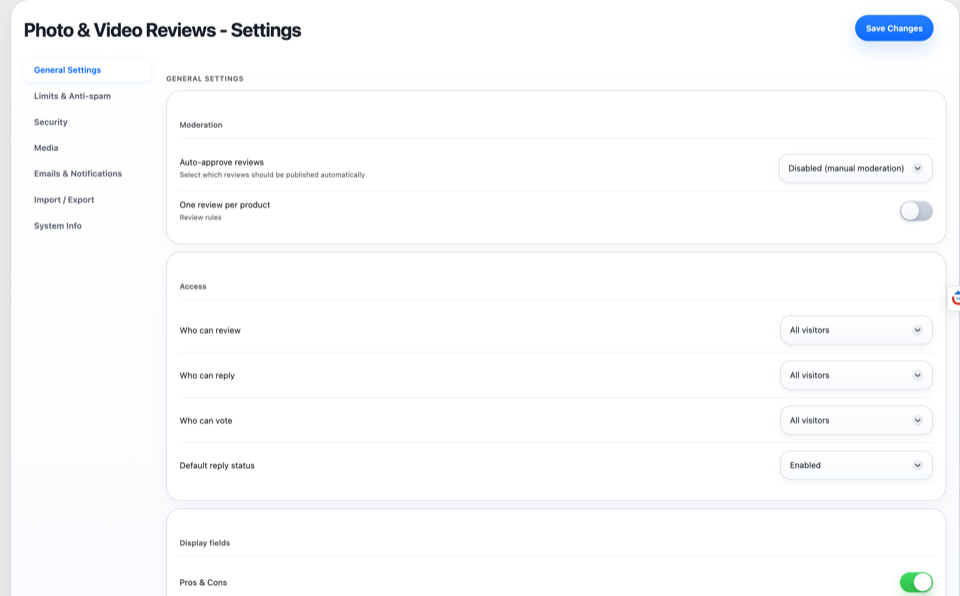



نصب
- Upload the plugin files to
/wp-content/plugins/pvr-media-reviews-for-woocommerce/, or install via the WordPress Plugins directory. - Activate the plugin through the ‘Plugins’ menu in WordPress.
- Ensure WooCommerce is installed and active.
- Navigate to PVR Media Reviews > Settings to customize upload limits, email notifications, and display options.
سوالات متداول
-
Can customers upload photos and videos to WooCommerce reviews?
-
Yes. PVR Media Reviews adds intuitive photo and video upload fields to your WooCommerce review forms, enabling customers to easily attach images and video clips to their feedback.
-
Does this plugin slow down my web server?
-
No. All video compression happens directly inside the customer’s browser before upload. Because your server never handles raw, uncompressed video, there is zero extra CPU load, no FFmpeg requirement, and no need for specialized video hosting.
-
Does it support Google Rich Snippets (Star Ratings in Search)?
-
Yes. The plugin automatically adds Schema.org structured data (
AggregateRatingandReviewJSON-LD) to your product pages so star ratings can display in Google search results. It is fully compatible with WooCommerce, Yoast SEO, and Rank Math. -
Does this plugin replace WooCommerce reviews?
-
Not the data — reviews stay 100% native WordPress comments, fully portable and compatible with other WooCommerce tools. On product pages the plugin replaces the theme’s reviews block with its own richer one (summary, media, voting, replies), and this is controlled by a single “Replace the theme reviews block” switch in General Settings — turn it off and the theme’s block stays untouched.
-
What video formats and sizes are supported?
-
The plugin supports MP4, WebM, and MOV video formats. The maximum video upload size defaults to 500 MB (fully configurable in settings), and videos can be automatically compressed in the browser.
-
Does it work without WooCommerce?
-
No. PVR Media Reviews requires WooCommerce to be installed and active.
-
Can I place the review form on a custom page?
-
Yes. Use the [pvr_review_form] shortcode on any page or post — for example a standalone “Share Your Experience” page. With picker=”yes” the customer chooses a product by name (with thumbnails and optional review counts). Products can also be preselected via the product attribute, the ?pvr_product= URL parameter, or the saved default in the Review Form Widget settings tab.
-
Can I show the reviews block on a page built with Elementor, Divi, Bricks or Breakdance?
-
Yes. Elementor users get a native “PVR Reviews” widget (it works with the free Elementor version). In any other builder use its built-in Shortcode element with
[pvr_reviews product="123"]— attributes let you set the product, reviews per page, “Show more” and pagination. Content inside Elementor, Bricks and Breakdance page data is detected automatically, so assets load even when the classic editor content is empty. -
Can I keep my theme’s reviews block?
-
Yes. Settings General “Replace the theme reviews block” controls the replacement. Turn it off and the theme keeps its native block — plugin scripts and styles are not loaded on product pages at all, so they don’t slow the page down. Reviews still work normally: they are saved, moderated and notified as usual.
-
Can I create SEO landing pages for reviews?
-
In the Pro version, yes — for category/manufacturer combinations and for individual products. Each landing gets its own H1, title and meta description from templates with variables like %product%, %count%, %rating%, %category%, %manufacturer% and ready-made media phrases (they drop out automatically when a product has no photos or videos). Product pages are created automatically, and mass generation/deletion lets you create or clean up hundreds of them by criteria such as category and minimum review count.
-
Can I customize the design of the review section?
-
Yes. The Design tab controls the color scheme (light/dark/auto) and the accent, card, text and border colors plus corner radius — all applied through CSS variables. Templates (review-item.php, review-list.php, review-form.php) can be overridden from your theme, and output filters such as pvrev_review_item_html let you adjust the markup without touching plugin files.
-
Can I disable replies, voting or media uploads?
-
Yes. “Who can reply” and “Who can vote” include a Disabled option, and the reviewer avatar, photo upload, video upload and product info blocks can each be turned off in Settings Display fields. All toggles are enforced server-side, not just hidden.
-
Is there a Pro version?
-
Yes. The Pro version unlocks automated review reminder emails, discount coupons for reviews, custom category criteria ratings, review carousels/grids, an analytics dashboard, a dedicated SEO All Reviews hub, and SEO landing pages for categories, brands and single products — with template-driven titles/meta descriptions plus mass generation and cleanup of those landing pages.
-
What PHP version is required?
-
PHP 7.1 or higher (PHP 7.4+ or 8.x recommended).
نقد و بررسیها


توسعه دهندگان و همکاران
“Photo & Video Reviews for WooCommerce — PVR Media Reviews” نرم افزار متن باز است. افراد زیر در این افزونه مشارکت کردهاند.
مشارکت کنندگان
ترجمه “Photo & Video Reviews for WooCommerce — PVR Media Reviews” به زبان شما.
علاقه مند به توسعه هستید؟
کد را مرور کنید، مخزن SVN را بررسی کنید، یا از طریق RSS در گزارش توسعه مشترک شوید.
گزارش تغییرات
1.2.8
- Fix: photo and video uploads not attaching to reviews
- Improvement: failed media uploads now show a Retry upload button instead of a silent success screen
- Fix: broken photo thumbnail URLs in the upload response
- Fix: Reply button did nothing in the details modal on pages without the reviews list
- New: product mini-card at the top of the details modal sidebar
- Fix: review form stretching past the mobile viewport
- Fix: text inputs losing the form styling on some themes
- Updated plugin banners
1.2.7
- New: import preset for CusRev (Customer Reviews for WooCommerce)
- Improvement: CusRev reply rows attach to their reviews as store replies
1.2.6
- New: reviews import wizard (Judge.me CSV/API and any store CSV with field mapping)
- New: reviews export to CSV with status filter
- Improvement: Import/Export tabs merged into one tab
1.2.5
- New: product card at the top of the review details modal sidebar
- Fix: Reply button in the details modal works on every surface
- Improvement: product data resolved once per request instead of per card
1.2.4
- New (Pro): [pvr_media_gallery] block with filter chips and an Elementor widget
- New (Pro): gallery thumbnail format option (10 ratios)
- Fix: Elementor widget registration on Elementor 3.5+ and 4
- Fix: block editor “not a valid JSON response” error with shortcodes on the page
- Improvement: media thumbnails open the details modal instantly with a skeleton
- Improvement: details modal shows the full “Lightbox Image Max” image
- Improvement: modal flip-through follows the gallery block’s sort and filters
- Updated translations (EN, RU, ES)
1.2.3
- New (Pro): SEO landing pages for individual products
- New (Pro): mass generation and cleanup of landing pages in batches
- Fix: uploaded media no longer stored with 0600 permissions (403 on URLs)
- Improvement: reviews block pagination stays on the current page
- Improvement: AJAX rebuild keeps the block’s own Show more/pagination settings
- Updated readme description
1.2.2
- New: “Replace the theme reviews block” toggle in Settings General
- New: [pvr_reviews] shortcode renders the full reviews block on any page
- New: Reviews Block Widget settings tab with a live shortcode builder
- New: native Elementor widget “PVR Reviews” (works with free Elementor)
- Improvement: builder content detected in post meta for asset loading
- Improvement: one reviews block per page (shortcode and replacement dedup)
- Fix: write-review button follows the target product’s comment status
- Fix: escaped quotes in builder JSON breaking product resolution
1.2.1
- New: optional review title (headline) with length limits
- Fix: integration-supplied titles no longer wiped by the admin editor
- Fix: admin saves without hardcoded 2,000/5,000-character trims
- Fix: 16,000-character ceiling on every save path
- Fix: guest name limit clamped to the database column size
- Fix: status-only reply updates from the Comments list
- Fix: admin editor shows the server’s validation message
- Improvement: moderation notice removed; My Reviews cards show the headline
1.2.0
- New: daily reply rate limits (per IP / per user)
- Security: shared client-IP resolver for votes, limits, tokens and reCAPTCHA
- Security: votes rejected for non-review comments; unapproved reviews protected
- Security: guest avatar uploads require the page upload token
- Fix: 500 error on repeated logged-in votes
- Fix: Review Max = 0 no longer truncates text; Reply Min/Max validated
- Fix: media IDs added to the pvrev_review_normalize_rating filter payload
- Fix: edge prev/next clicks in the details modal no longer swallowed
- Improvement: rate-limit messages translated in all 7 bundled languages
1.1.9
- Fix: review permission error in “Only customers (bought product)” mode
- Fix: reply permission in “Only customers” mode
- New: “Show only available products” option in the Review Form Widget
1.1.8
- New: product picker opens the full product list on focus
- Improvement: picker placeholder text updated
- Improvement: picker respects the shortcode’s limit and sort attributes
- Improvement: picker requests sequenced (no stale overwrites)
- Improvement: picker aria-expanded announcements
- Fix: duplicated submit listener on the standalone form
- Fix: avatar crop dialog accumulating a resize listener
- Fix: Enter submitting the form while the product list is open
- Fix: sticky success screen on the standalone form
1.1.7
- Fix: media upload after changing the product on the standalone form
- New: product picker starts in a neutral state
- Improvement: product switch preserves everything already typed
- Fix: Reviews Page assets on WordPress 6.9+
- Improvement: Submit buttons right-aligned in forms
- Improvement: neutral image placeholder for products without a featured image
- Improvement: product picker list cached for 10 minutes
- Improvement: media limits clamped to 0–10 on client and server
- Cleanup: removed the redundant hint below the media uploader
1.1.6
- New: form field toggles in Settings Display fields
- New: “Disabled” option for “Who can reply” and “Who can vote”
- Improvement: Submit buttons aligned to the right of the form
- Improvement: product picker accessibility (combobox roles, aria-expanded)
- Improvement: neutral placeholder for products without a featured image
- Improvement: product picker list cached for 10 minutes
- Fix: media limits clamped consistently to 0–10
- Fix: schema auto-repair backs off after a failed attempt
- Fix: picker dropdown failing to render results
1.1.5
- Fix: runtime schema guard restores missing plugin tables automatically
1.1.4
- New: Review Form widget with the [pvr_review_form] shortcode
- New: product selector with autocomplete and thumbnails
- New: Review Form Widget settings tab with a shortcode builder
- New: shortcode attributes (product, picker, limit, sort, counts, exclude, ids)
- New: per-link product preselect via ?pvr_product= URL parameter
- Design: unified review form layout
- Fix: pvrev_frontend_data filter now actually applied
- Fix: admin product/category autocomplete failing with 400
1.1.3
- New: Design tab — light/dark/auto schemes and full color customization
- Improvement: Auto mode detects the site theme instead of the OS setting
- New: theme-overridable templates with an outdated-copy admin notice
- New: developer filters pvrev_review_item_html, pvrev_review_list_html, pvrev_frontend_css_vars
- Admin: Design tab moved next to System Info
- Updated translations (EN, RU, ES)
1.1.2
- Fix: all-media grid on the reviews hub (filters, grouping, infinite scroll)
- Improvement: infinite flip-through in the details modal in both directions
- Improvement: new default image quality presets
- New (Pro): configurable block titles for review widgets
- Fix (Pro): settings sub-tab jump and shortcode preview reset after save
- Fix: stray Renew link for lifetime licenses
- Updated translations (EN, RU, ES)
1.1.1
- Improvement: all emails rebuilt with a shared branded template and accent colors
- New: media follow-up email for approved reviews
- Improvement: plugin From name/address applies to plugin emails only
- Improvement: avatar URLs versioned by file mtime
- New: License tab license type display, Renew row, Re-install button
- New (Pro): per-breakpoint display settings for carousel and grid
- New: pvrev_admin_review_edit_bottom hook in the review editor
- Fix: bulk-approve now sends the customer confirmation email
- Fix (Pro): landing pages silently failing to save
- Updated translations (ES, FR, DE, PL, PT-BR)
1.1.0
- Change: license server migrated to admin.pv-reviews.site
- New (Pro): editable default coupon email/notice texts
- New (Pro): coupon restrictions with searchable multi-select pickers
- Improvement (Pro): Coupons tab split into sub-tabs
- New: Pros/Cons minimum length limit
- Improvement: dynamic media section title in the review form
- Improvement: upload previews show the compressed file size
- Fix: settings assets not loading on some screens
- Improvement: reply auto-approve setting clarified
- Updated Sortable.js to 1.15.7
1.0.9
- Improvement (Pro): Landing Pages list with live search, filters and pagination
- Fix (Pro): “The link you followed has expired” on landing saves
- New (Pro): Analytics date-range filter, trend chart, low-rated products table
- New (Pro): “Review scope” option for category pages
- Fix: %placeholders% corrupted on save in SEO templates
- Improvement: widget queries cached (1 hour)
- Updated Pro tab previews
1.0.8
- New (Pro): customer media strip with a “Show all media” grid on the reviews page
- Improvement (Pro): restyled filters and sorting on the reviews page
- Fix (Pro): invalid wpdb::prepare notice with no filter selected
- Improvement: plugin From name/address applies to plugin emails only
- Fix: duplicate admin/author notifications for reviews with media
- Fix: author confirmation on manual approval
- Fix (Pro): coupons not being issued (hook mismatch)
- Fix (Pro): broken unsubscribe link and UTF-8 encoding in reminders
- Fix: PHP limits on Apache; added CGI/FastCGI and LiteSpeed support
- Improvement: notice that .user.ini changes take ~5 minutes
1.0.7
- New (Pro): manufacturer filter (WooCommerce Brands) on the reviews page
- Improvement (Pro): interdependent category/manufacturer filter lists
- New (Pro): SEO template sets for filters; title/description honor filters
- Fix (Pro): category filter in Grid and Carousel widgets
- Fix (Pro): criteria admin CRUD and status toggle
- Improvement: assets cache-busted by file modification time
1.0.6
- Improvement: AJAX filtering/sorting/pagination on the reviews page
- Fix: pagination broken by canonical redirect
- Fix: Date sort direction and category SEO persistence
- Change: license network requests isolated from page rendering
- Fix: invalid regex for wildcard license domains
- Improvement: reactivation attempts rate-limited
- Improvement: file size shown in the admin review editor
1.0.3
- Added: default admin name setting
- Fixed: auto-approve mode and Pros & Cons toggles not saving
- Fixed: video/photo max size display in the review form
1.0.2
- Added: Spanish, French, German, Polish and Brazilian Portuguese translations
- Updated plugin banners and icons
1.0.1
- Minor bug fixes and stability improvements
1.0.0
- Initial release
- Photo and video uploads for WooCommerce reviews
- Client-side video compression
- Automatic video thumbnails
- Helpful voting
- Store reply threads
- Reviewer avatars with crop modal
- Schema markup for rich snippets
- Email notifications
- Custom rating criteria, reminders, coupons, analytics (Pro)
- All Reviews page with filters and SEO templating (Pro)
- Carousel and grid layouts (Pro)
- Full i18n support (7 languages)