

توضیحات
Safkit Fixed Bundles for WooCommerce sells a fixed group of products as one kit — at a fixed total price or with a percentage discount off the combined price.
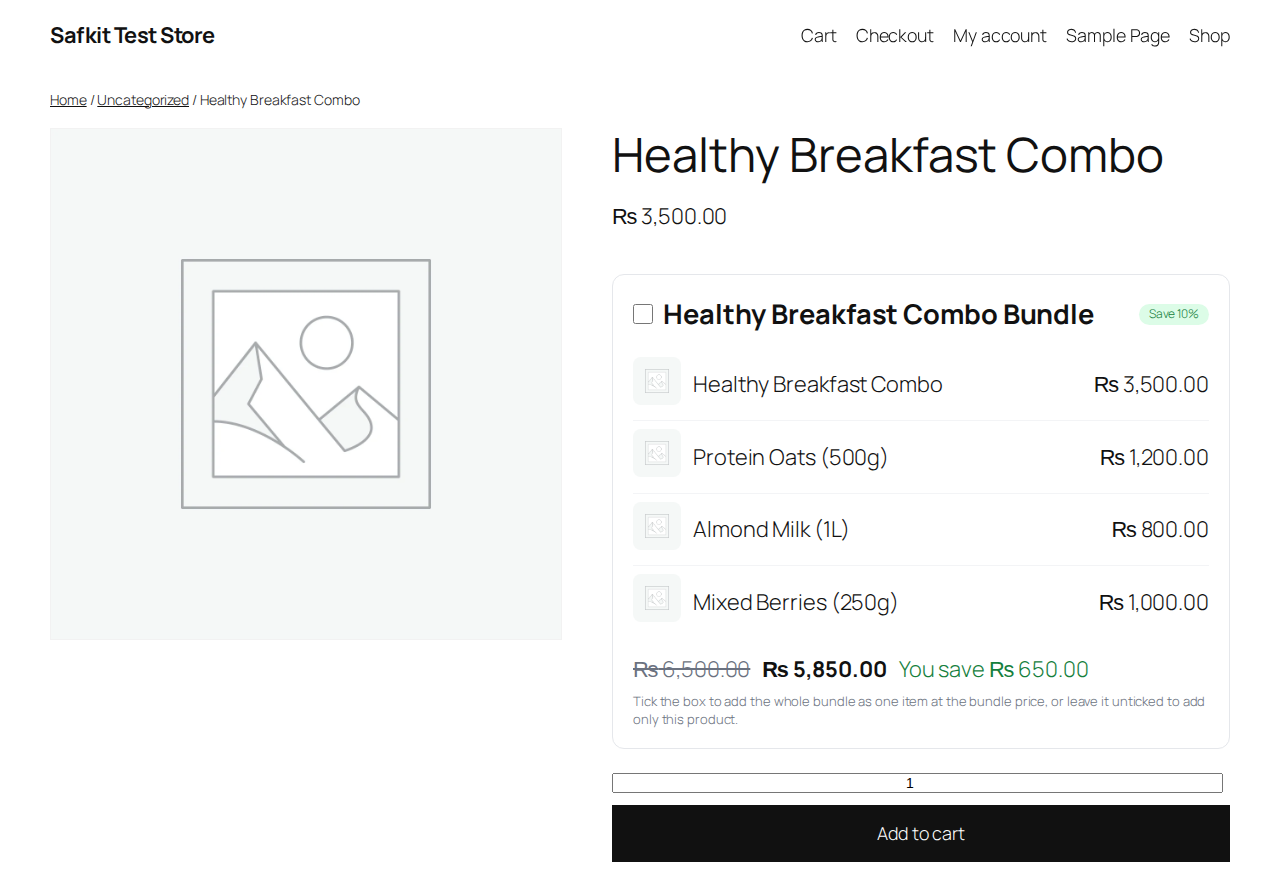
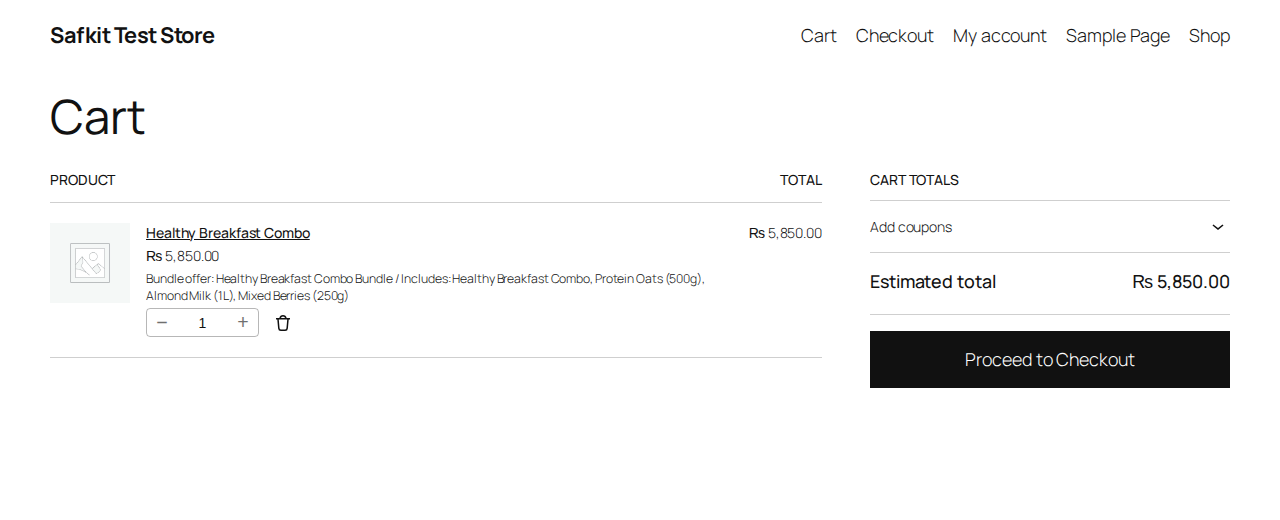
On the product page the bundle appears as a tick-box inside the add-to-cart form. Ticked, the normal Add to cart button adds the whole bundle as ONE cart line at the bundle price, showing the bundle name and the included products. Unticked, only the single product is added. Removing the bundle line removes the whole bundle.
Set it up in the product editor’s Safkit tab (simple products): pick the bundle products, set the price or discount, and customize the title, cart name, and badge text.
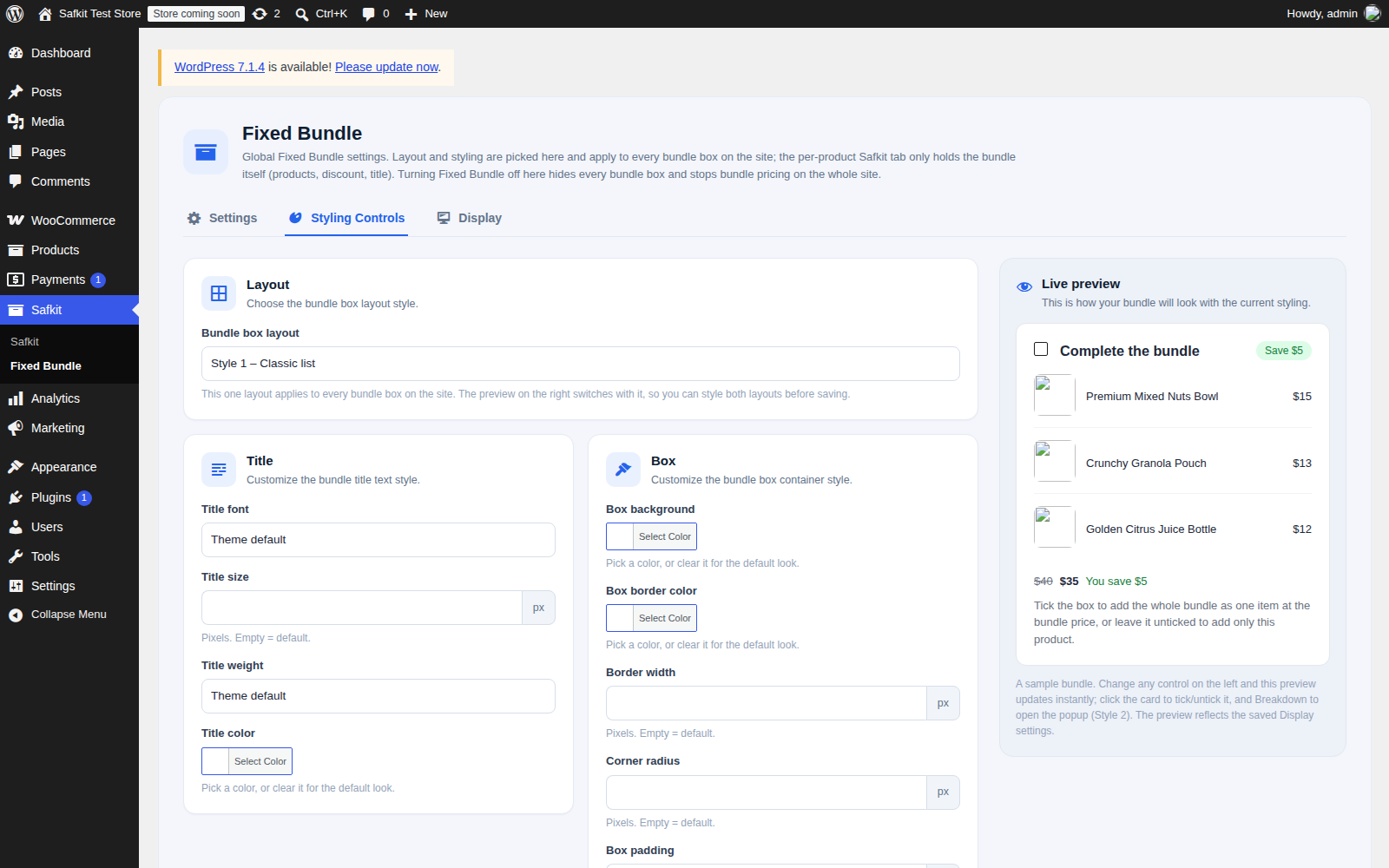
Pick one of two layouts — Style 1, a classic list, or Style 2, a card with “What’s included” and a Breakdown popup listing each item’s price, the total value, and what the customer pays. Style everything globally in Styling Controls with a live preview, show or hide any part of the box in the Display tab, and use the Settings on/off switch to hide all bundles site-wide without losing your setup.
Requires WooCommerce. The Safkit framework is built in — nothing else to install.
عکسهای صفحه

نصب
- Install and activate WooCommerce.
- Upload this plugin (Plugins > Add New > Upload) and activate it. That is the only plugin to install — there is no separate Safkit plugin.
- Edit a simple product, open the Safkit tab, tick “Show a Fixed Bundle offer”, pick products, and set the price.
If you previously installed v1.1.0, which auto-installed a separate BundleKit plugin, you can safely deactivate and delete that separate BundleKit plugin after installing v1.2.0 — this version tells you so in wp-admin, and keeps working on its built-in framework copy.
The bundle box does not show on the product page. What do I check?
- Click Update on the product after changing the Safkit tab — unsaved settings do nothing.
- Open the main product’s page (the one with the Safkit tab), not one of the bundle items’ pages.
- The main product must be a Simple product, published, purchasable, and with a price.
- Every bundle item must be a Simple product, published, in stock, and with a price. Items that are out of stock or have no price are left out, and if none are left the box is hidden.
- Clear any cache plugin / CDN cache and hard-refresh the page (Ctrl+F5).
- If your theme uses a block-based or custom (e.g. page-builder) single-product template, v1.2.1 renders the box through a fallback as well — update the plugin and check again.
سوالات متداول
-
Which products can be in a bundle?
-
Simple, purchasable, in-stock products in v1. Variable products are not supported yet.
-
What happens if a bundle product goes out of stock?
-
It is left out of the bundle config until it is back in stock.
نقد و بررسیها
نقد و بررسیای برای این افزونه یافت نشد.
توسعه دهندگان و همکاران
“Safkit Fixed Bundles for WooCommerce” نرم افزار متن باز است. افراد زیر در این افزونه مشارکت کردهاند.
مشارکت کنندگان
ترجمه “Safkit Fixed Bundles for WooCommerce” به زبان شما.
علاقه مند به توسعه هستید؟
کد را مرور کنید، مخزن SVN را بررسی کنید، یا از طریق RSS در گزارش توسعه مشترک شوید.
گزارش تغییرات
1.9.3
- Renamed from BundleKit – Fixed Bundle to Safkit Fixed Bundles for WooCommerce (new slug safkit-fixed-bundles) per the WordPress.org review — the ‘BundleKit’ name conflicted with another bundling product. Contributors fixed to safiq21. WordPress.org compliance: removed the Recommended Plugins one-click installer, which downloaded plugin zips from GitHub — the directory forbids installing plugins from servers other than WordPress.org. The tab now shows a “More info” link instead; there is deliberately no installer. Also removed all third-party brand references (WPClever, Smart Bundles, Elementor) from code, comments, and readme, and rewrote the readme Description (199 words). No functional changes otherwise — installs over 1.9.2, all settings kept.
1.9.2
- Readme fix: the short description is now the 134-character paragraph between the header and the Description section (the .org parser ignores a “Short Description” heading and truncates that leading paragraph at 150 characters). No code changes — installs over 1.9.1, all settings kept.
1.9.1
- WordPress.org review cleanup: the bundled framework now uses the ‘bundlekit-fixed-bundle’ text domain everywhere (it previously used ‘bundlekit’, so those strings could never translate); the four admin-helper strings use a literal text domain so translation tools can extract them; added missing translator comments for all placeholder strings; documented the product-save nonce exception (WooCommerce verifies its own product-data nonce before this plugin’s save hook runs); readme: Tested up to 7.1, proper Short Description section. No functional changes — installs over 1.9.0, all settings kept.
1.9.0
- Admin redesign: Settings, Styling Controls and Display now share the new BundleKit admin design (framework 1.0.4) — section cards with icons, toggle switches, layout-locked cards with lock notes, sticky live preview; all inline CSS removed into a shared stylesheet. The Styling Controls page also carries the Style 1 / Style 2 show/hide toggles. No functional changes.
1.8.2
- Admin redesign: the Styling Controls page is now a bento grid — section cards on the left, sticky live preview on the right; Display and Settings use the same card style. No functional changes.
1.8.1
- Fix: two BundleKit add-ons active at the same time no longer cause a fatal error. The framework’s functions are now declared conditionally, so the second add-on’s copy loads cleanly (framework 1.0.3). No feature changes — install alongside BundleKit – Buy in Packs 1.0.0.
1.8.0
- Styling and layout are now global only, per the new design: the BundleKit Styling tab and the layout selector are removed from the product editor. The product’s BundleKit tab now holds only the bundle itself (products, discount, title, name, badge text). Pick the layout once on the Styling Controls page — it applies to every bundle box on the site. Note: a layout or styling saved on a single product by an earlier version no longer applies; those products now follow the global layout and styling.
- Modern Styling Controls page: controls on the left with real color pickers, and a live preview of a sample bundle on the right that updates as you change values. Click the preview card to tick/untick it, and Breakdown to open the popup (Style 2). The layout picker sits at the top of the controls and switches the preview between Style 1 and Style 2.
- New Display tab (BundleKit > Fixed Bundle > Display): show/hide toggles for every frontend part — badge, product images, item prices, bundle total, struck regular price, “You save” text, hint text, checkbox, “Your bundle” heading, “What’s included” heading, quantity badges, and the Breakdown button/popup. Unticked parts are hidden on the frontend on both layouts.
1.7.0
- New global Fixed Bundle pages under the BundleKit menu — BundleKit > Fixed Bundle > Settings and Styling Controls. Settings holds the global on/off switch (off hides every bundle box and stops bundle pricing site-wide, product settings are kept so turning it back on restores everything) and the default box layout for products with no layout saved. Styling Controls holds the same 36 styling controls as the per-product Styling tab, as site-wide defaults: a product’s own styling overrides them, and empty fields fall back to the built-in look. Per-product BundleKit / BundleKit Styling tabs are unchanged and still win over the globals.
1.6.1
- BundleKit now has its own top-level menu in wp-admin (with a bundle icon, right after WooCommerce) instead of sitting under the WooCommerce menu. The page itself is unchanged — About Developer and Recommended Plugins tabs, same address (admin.php?page=bundlekit), same access. Bundle settings and styling are still per product: edit a simple product and open the BundleKit tab (bundle settings) or the BundleKit Styling tab (styling controls).
1.6.0
- New: BundleKit Styling tab in the product editor (next to the BundleKit tab, simple products). 36 styling controls, all per product: box background, border color, border width, corner radius, padding; title, item, price and total font family, size, weight and color; badge background/text, “You save” text, and selected-state border/background; Style 1 checkbox color and hint text size/color; Style 2 check circle, “Your bundle” and “What’s included” text/size, quantity badge colors, and Breakdown popup background/border/radius. Shared controls apply to both layouts; layout-only controls appear only when that layout is selected in the BundleKit tab. Styling is output as CSS variables on the box itself, so it works with both layouts and any theme. Leave a field empty to keep the default look — existing bundles look exactly as before until styled.
1.5.0
- New: second bundle box layout. Style 2 is a card — “Your bundle” header with the main product image and bundle price, “What’s included” with every bundle product, its price and a x1 badge, and a footer with the bundle total, the struck regular total, and a Breakdown button. Clicking Breakdown opens a popup with the full price breakdown: the bundle at its bundle price, every item at its price, the total value, and what the customer pays. Clicking Breakdown never ticks/unticks the bundle. Pick the layout per product in the BundleKit tab (“Bundle box layout”); existing bundles keep Style 1 unless you change them.
- Same tick-box logic in both styles: clicking anywhere on the box (except the Breakdown button / popup) ticks/unticks it, ticked adds the whole bundle as one cart line at the bundle price, unticked adds only the single product. Style 2’s checkbox is visually hidden and the selected state shows as a green border with a check circle, like the reference design.
1.4.1
- Fixed layout: on themes where form.cart is display:flex, the quantity spinner and Add to cart / Buy now buttons were still pushed off the right edge of the container and cut off (v1.4.0 only set flex-wrap, and the theme’s row rules won). When a bundle box is present, the whole form now stacks vertically — bundle box, then quantity, then buttons, each full width — with every row capped at the container width, so nothing overflows. Products without a bundle are untouched.
1.4.0
- One cart line per bundle (user request): ticking the box now adds the whole bundle as ONE line — the main product at the whole bundle total, with the bundle name and included products shown on the line — instead of one line per bundle product. Unticked still adds only the single product at its normal price. Removing the one line removes the whole bundle.
- Fixed: on themes whose Add to cart / Buy now buttons submit via AJAX and only send product id + quantity, the ticked state never reached the server, so a ticked bundle was silently added as a single product. The checkbox state is now also saved to the WooCommerce session (wc-ajax) when it is ticked/unticked, and the cart handler reads that as a fallback. The checkbox inside the form still covers normal form POSTs. (Found in testing: a guest has no session cookie until the cart is used, and WooCommerce refuses to save session data without one, so the flag endpoint now also sets the session cookie when the box is ticked.)
- Fixed layout: on themes where form.cart is display:flex, the bundle box was squeezed into a narrow column next to the Add to cart / Buy now buttons. The box now takes the full width of the form, on its own row.
1.3.0
- Redesign (user request): removed the separate “Add bundle to cart” button and its separate form — it did not work reliably, because on block themes the bundle form ended up inside / around the main add-to-cart form’s rendering. The bundle box is now a clickable tick-box inside the product’s own add-to-cart form. Tick it and the normal Add to cart button adds the whole bundle at the bundle price; leave it unticked and only the single product is added at its normal price. The box is unchecked by default. Added a small frontend.js (whole-box click toggles the tick, checked-state styling, and moves the box inside form.cart if a theme rendered it outside the form).
- Fixed: removing the main bundle line from the cart now removes the whole bundle. Found in testing: WooCommerce saves the cart session at the end of calculate_totals, which runs before this plugin’s add-to-cart hook, so the list of bundle items never reached the session. The plugin now saves the session again after the bundle is built, and removal also finds bundle items by their parent link as a safety net.
1.2.1
- Fix: the bundle box did not show on block-based themes or custom product-page builders because v1.2.0 only hooked into
woocommerce_single_product_summary, which the blockified single-product template never calls. The box now also renders viawoocommerce_after_add_to_cart_form(which fires in both the classic template and WooCommerce’s block Add to Cart Form) andwoocommerce_after_single_product_summary, with a once-only guard so it is never printed twice. Athe_contentfallback was tried first and removed: on block themes it injected the box into the product summary/excerpt block, where the HTML was stripped to plain text. Added a troubleshooting FAQ for a missing bundle box.
1.2.0
- Bundled-framework model: the BundleKit framework is now built into this plugin (includes/framework/) instead of a separate plugin. The Plugins list shows only “BundleKit – Fixed Bundle” — no second BundleKit entry, nothing else to install. Removed the v1.1.0 auto-installer and the bundled framework zip. Only the first loaded copy of the framework runs when several BundleKit add-ons are installed. Added an admin notice telling you the old separate BundleKit plugin (v1.1.0) can now be safely deleted.
1.1.0
- One-install behaviour: installing and activating just this add-on now installs and activates the shared BundleKit framework automatically if it is missing (bundled copy first, GitHub release as fallback). The framework stays shared across all add-ons. Removed BundleKit from the “Requires Plugins” header — WordPress can only auto-install dependencies from WordPress.org and would have blocked activation instead of installing the framework. Added a one-click “Install BundleKit framework now” admin notice if the framework is deleted later.
1.0.0
- First release. Fixed Bundle product tab, product-page bundle box, cart pricing spread across lines, remove-together behaviour.