
توضیحات
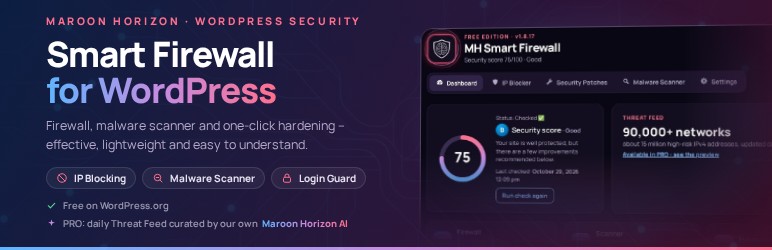
Maroon Horizon Smart Firewall is built for practical WordPress protection: block bad traffic, scan for malware, quarantine suspicious files, and reduce attack surface — without sending your site files off-server.
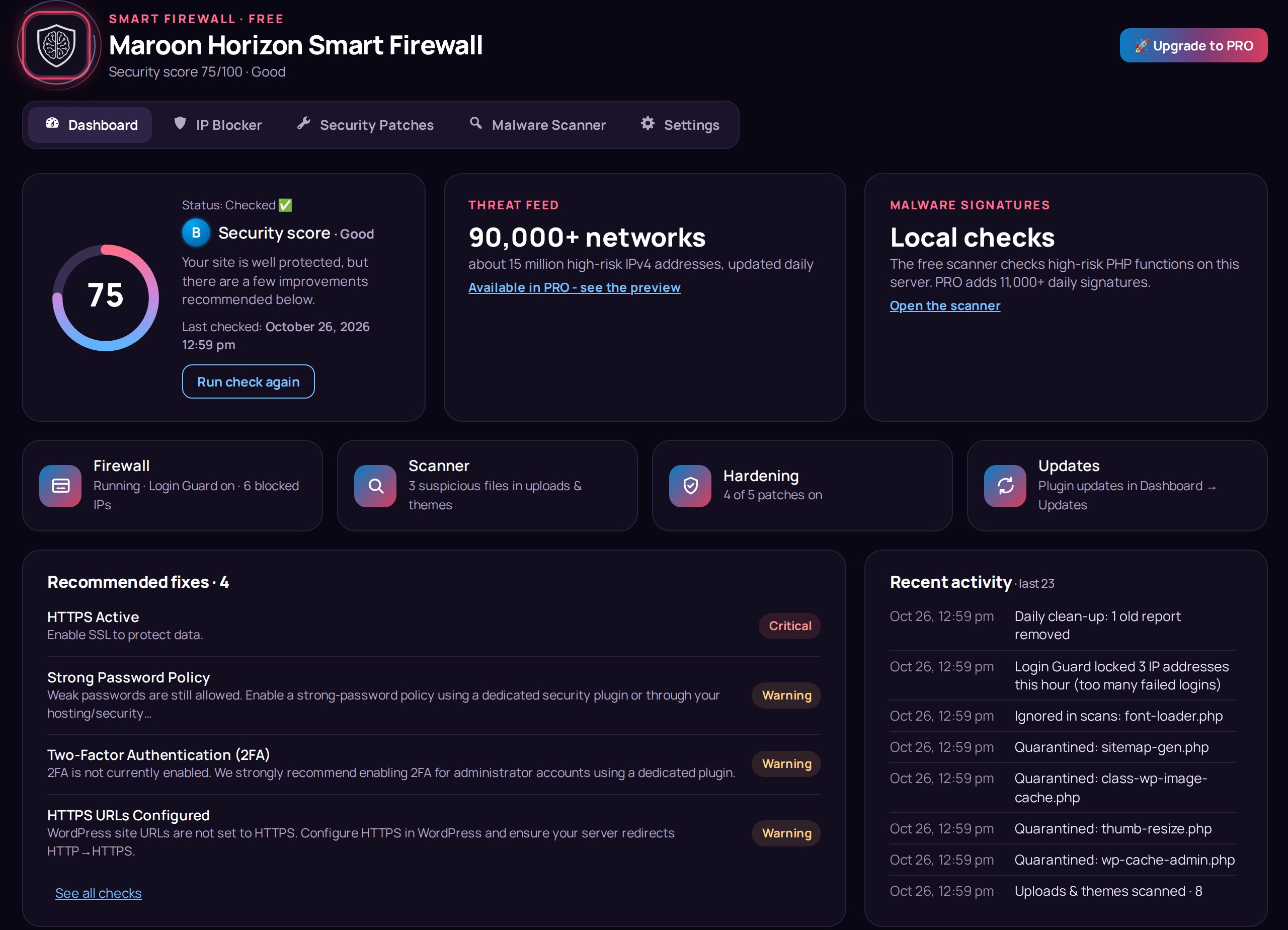
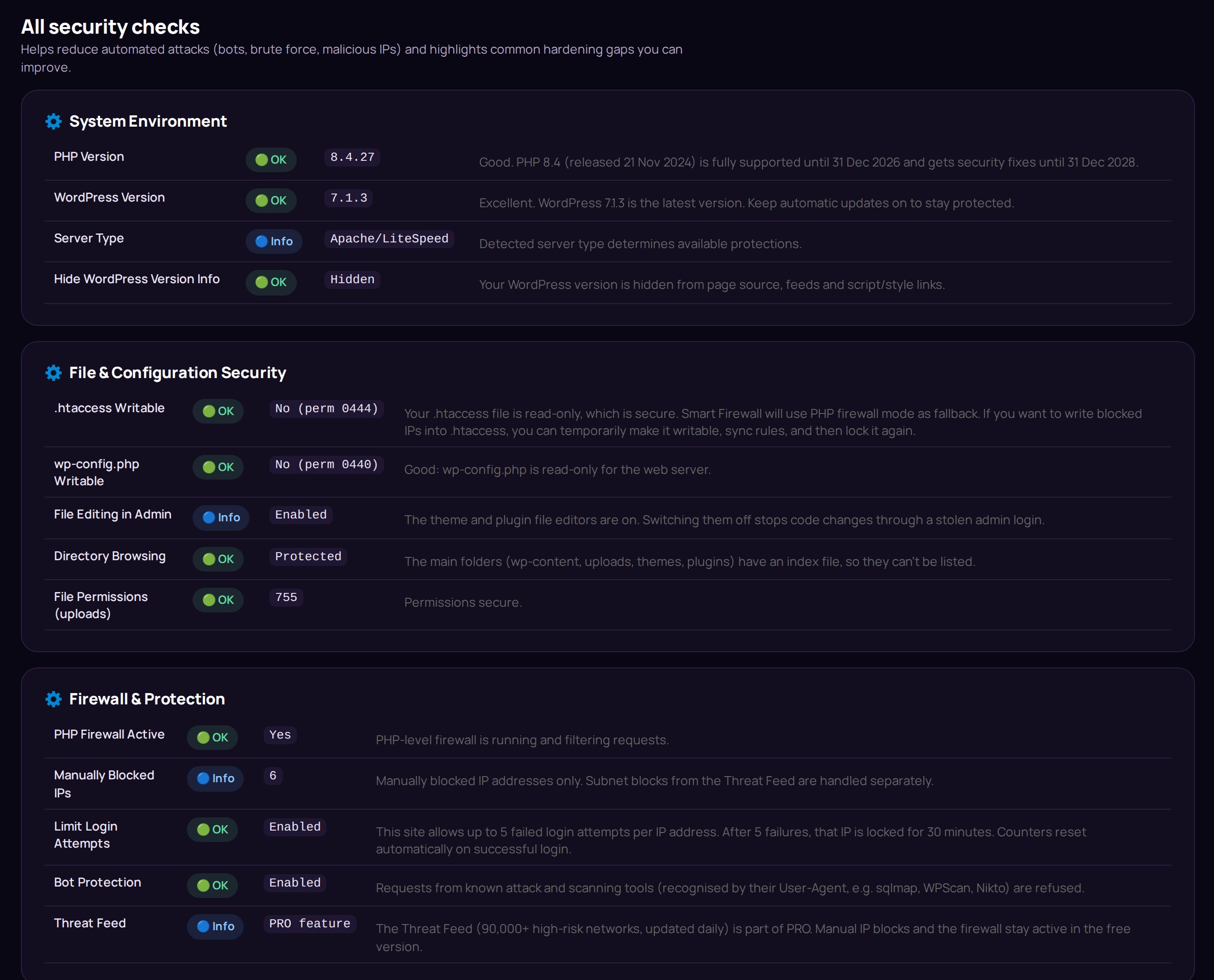
Advanced Security Check (Quick Scan) gives you an easy-to-understand Overall Security Rating, plus clear details and explanations for each check so you can quickly see what to improve and raise your security level. The free version can reach 100/100 on its own.
This WordPress.org (FREE) build is fully functional for the FREE feature set and is designed to run locally for those features. Advanced capabilities are provided by a separate commercial PRO plugin (not included in this WordPress.org build).
Outbound network requests (if any) are disclosed under “External Services” and “Privacy”.
What you get in the FREE plugin (local-only)
- Advanced Security Check (Quick Scan) with an Overall Security Rating and easy-to-follow explanations so you can improve your security level step by step – the score updates the moment you change something.
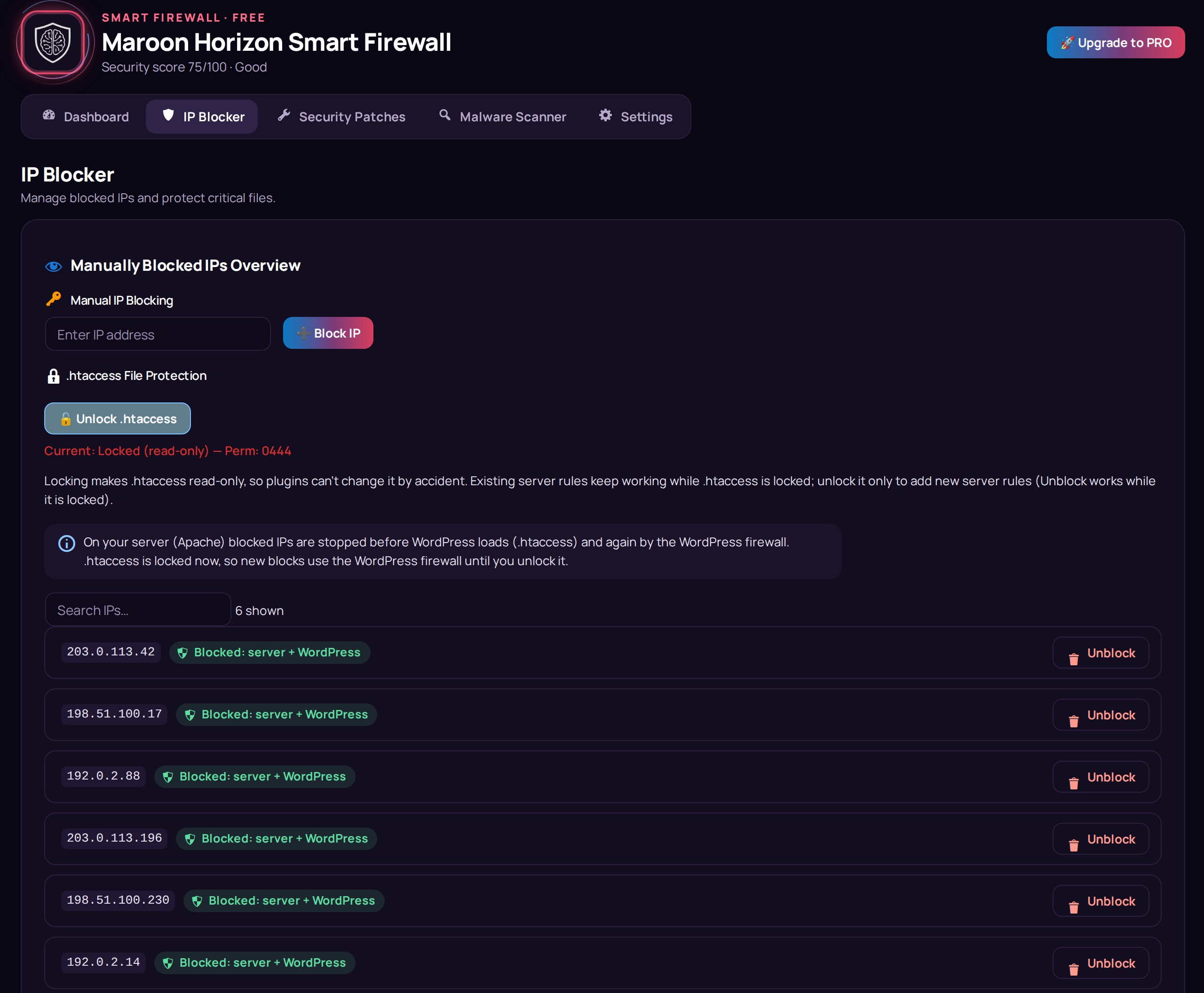
- Manual IP blocking and IP management (server rule in .htaccess plus the WordPress firewall; automatic Cloudflare support).
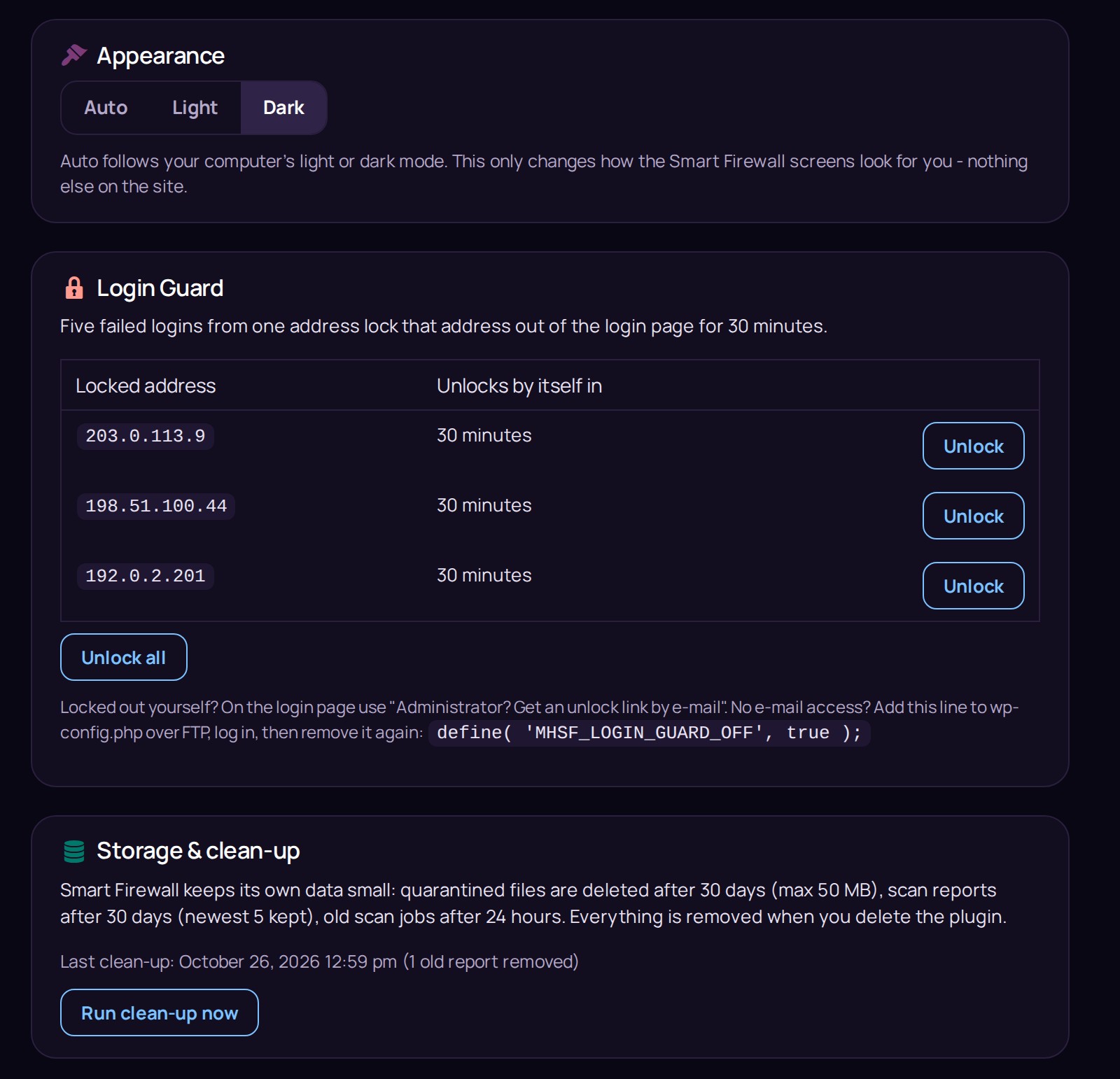
- Login Guard: 5 failed logins lock that address out for 30 minutes, with a safe e-mail unlock link for administrators.
- Security patch toggles for common hardening actions (hide the WordPress version, prevent directory browsing, disable XML-RPC, protect uploads, fix file permissions).
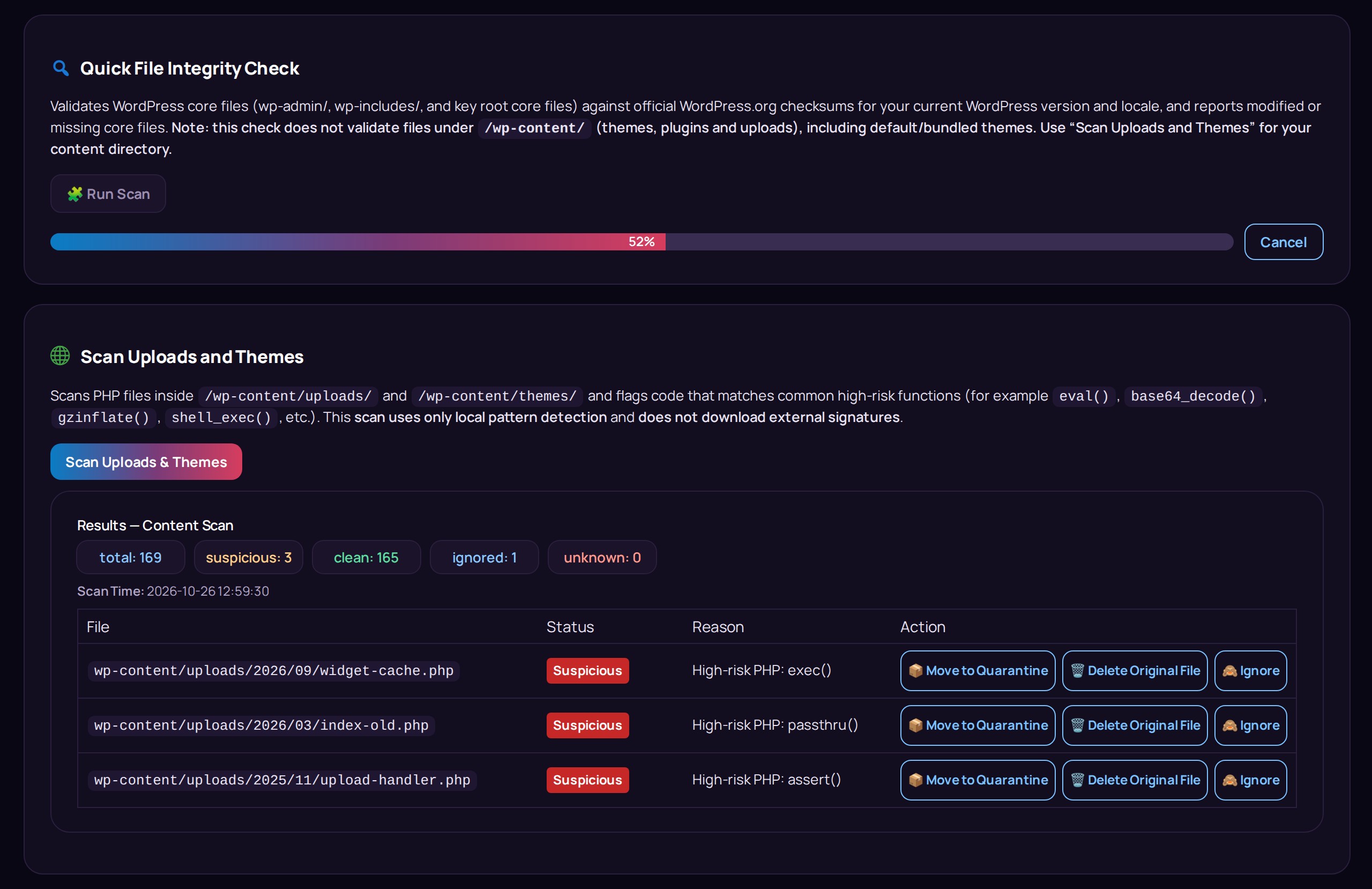
- Malware scanning of uploads and theme directories using local pattern detection (no external signatures).
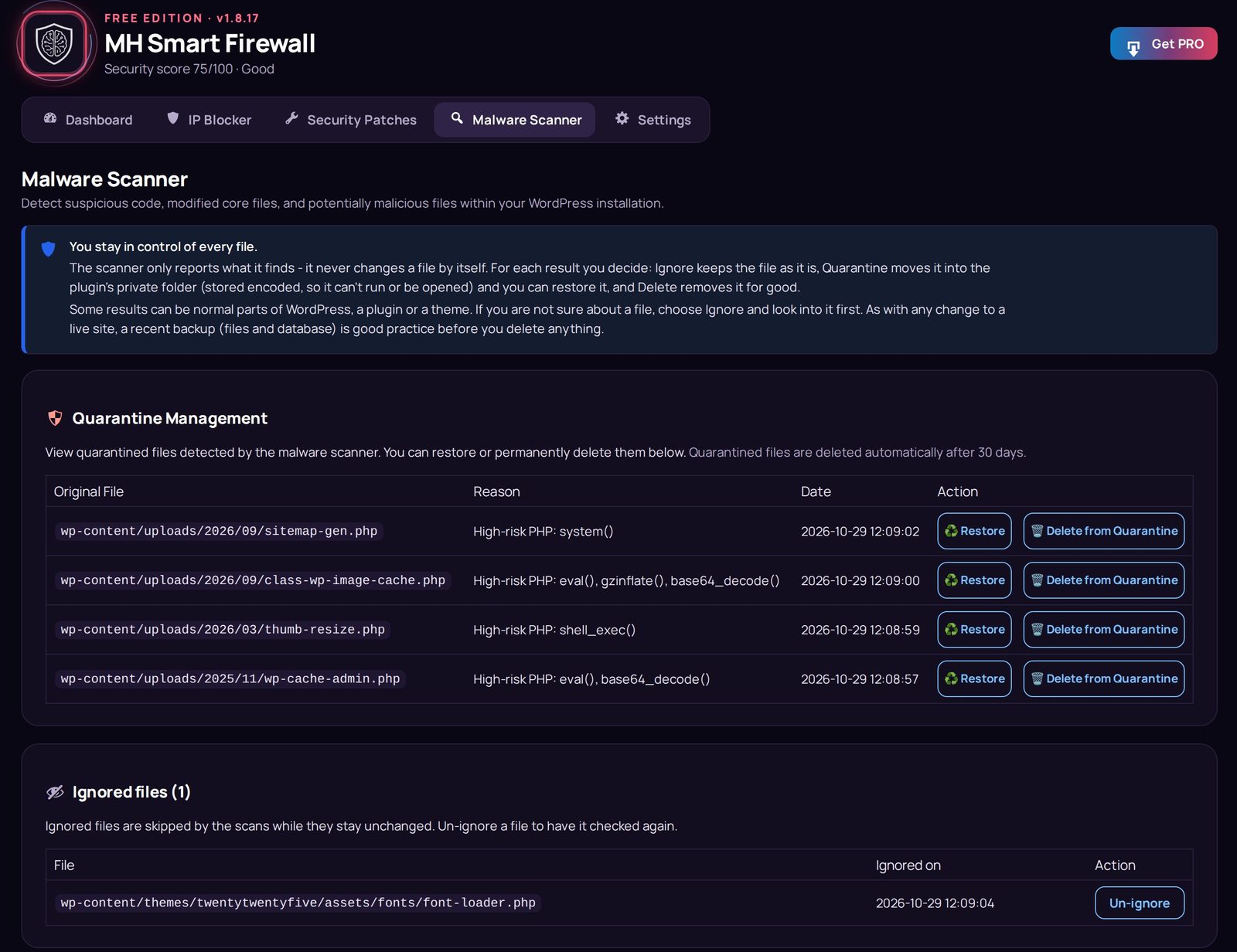
- Quarantine management (restore / delete quarantined files) – quarantined files are stored encoded, so they can’t run.
- Quick file integrity check of WordPress core files against the official WordPress.org checksums.
- Recent activity log (the last 200 security events) and automatic clean-up, so the plugin never fills your hosting.
Local-first design (privacy & control)
- Malware scans run on your server.
- Scanned file contents are not uploaded by the plugin.
- External requests (if any) are limited and disclosed below.
Who it’s for
- Site owners who want simple, practical protection without complex configuration.
- Agencies and developers who need a clean hardening + scanning toolkit.
- Anyone who wants a transparent FREE build, with an optional PRO upgrade path.
PRO features (separate commercial plugin, optional)
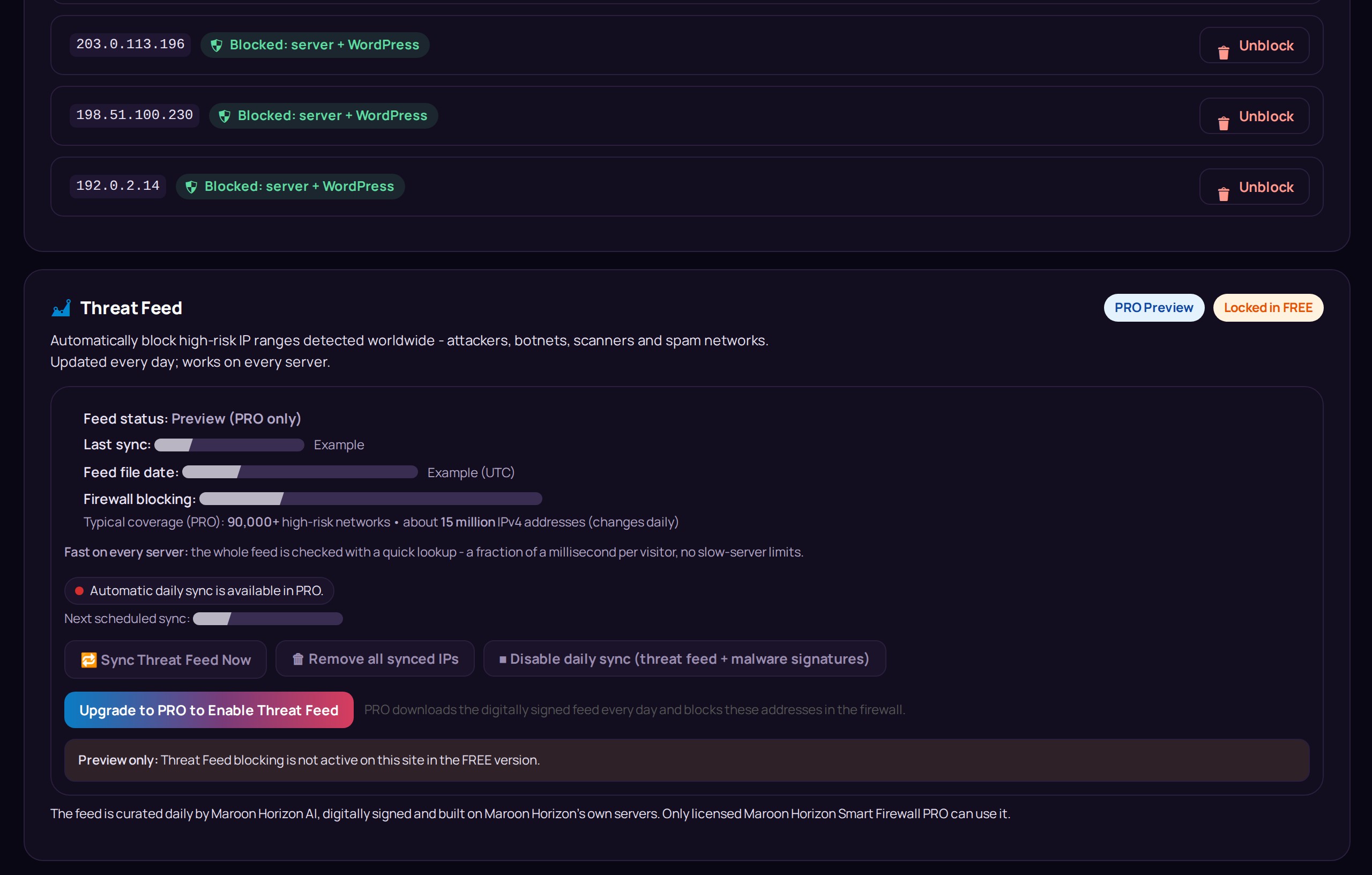
- Maroon Horizon Threat Feed: a digitally signed feed of high-risk IP networks, curated daily by Maroon Horizon AI, with automatic daily sync.
- Deep Scan with the daily Maroon Horizon malware signatures (reviewed by Maroon Horizon AI) and scheduled e-mail reports.
- PRO security patches: disable file editing, block PHP in wp-content, Force HTTPS, protect wp-config.php, hide author enumeration.
Commercial PRO plugin
The PRO edition is a separate commercial plugin (not included in this WordPress.org build).
Learn more: https://mh.ie/maroon-horizon-smart-firewall/
External Services
This plugin may perform outbound network requests in the following cases:
1) WordPress.org Core Checksums API (FREE: Core Integrity Scan)
* Service provider: WordPress.org
* Endpoint: https://api.wordpress.org/core/checksums/1.0/
* When: Only when you manually run the Core Integrity Scan from Maroon Horizon -> Scanner.
* Data sent: WordPress version and locale via URL query parameters. Your server IP address is inherently shared as part of the HTTPS request.
* Data received: Official JSON containing WordPress core file checksums, used to verify your local core files. No site files or content are uploaded.
* Privacy: https://wordpress.org/about/privacy/
2) Freemius (checkout and licensing – only when you upgrade)
* Service provider: Freemius (freemius.com)
* When: Only when you open “Upgrade to PRO” (the secure Freemius checkout) or buy PRO. This free version has no opt-in and sends no usage or diagnostic data.
* Data sent: What you enter in the checkout; after a purchase, the technical information needed for your license and PRO updates, as described by Freemius.
* Data received: The checkout page, and after a purchase your license status and the PRO download.
* Terms: https://freemius.com/terms/
* Privacy: https://freemius.com/privacy/
3) Maroon Horizon service (mh.ie) (PRO only: digitally signed Threat Feed and malware signatures)
* Service provider: Maroon Horizon Ltd – https://mh.ie
* When: Only in the separate PRO plugin, once a day and when you click “Sync now”.
* Data sent: Site URL, install ID, license ID and key, plugin version, plus standard HTTPS request metadata (including your server IP).
* Data received: A short-lived access token, then the digitally signed Threat Feed and malware signature files used by the PRO plugin. No site files or content are uploaded.
* Terms: https://mh.ie/terms
* Privacy: https://mh.ie/privacy-policy
Privacy
Maroon Horizon Smart Firewall is designed to minimize data sharing.
- Most FREE features run locally and do not transmit your site content.
- Malware scanning runs locally on your server; scanned file contents are not uploaded by the plugin.
- Any outbound requests (and the data exchanged) are disclosed in the “External Services” section above.
- PRO-only services are not included in this WordPress.org build.
Credits
- Manrope font (admin screens): Copyright 2018 The Manrope Project Authors, licensed under the SIL Open Font License 1.1 – see admin/fonts/OFL.txt.
عکسهای صفحه

نصب
- Install the plugin from the WordPress Plugins screen, or upload the plugin folder to your WordPress plugins directory.
- Activate the plugin through the “Plugins” screen in WordPress.
- Open the plugin from the WordPress admin menu and configure firewall controls, patches, and scanning.
- Run a scan and review findings. Use quarantine actions if needed.
سوالات متداول
-
Does the FREE version contact external servers?
-
Most FREE features run locally and do not require third-party services.
The only outbound requests made by this WordPress.org (FREE) build are disclosed in the “External Services” section above (the Core Integrity Scan checksums request you start, and the Freemius checkout if you open “Upgrade to PRO”). The free version has no opt-in and shares no usage or diagnostic data.
-
Does the plugin upload my files to be scanned?
-
No. Malware scans run locally on your server. The plugin reports findings inside the WordPress admin.
-
Will it slow down my site?
-
The firewall settings and hardening toggles are lightweight. Malware scans do work on the server, so it’s best to run scans during low-traffic periods on shared hosting.
-
What does the malware scanner scan in the FREE plugin?
-
The FREE scanner targets uploads and theme directories using local pattern detection, and the Quick File Integrity Check compares WordPress core files with the official WordPress.org checksums. Findings are reported in the admin UI and can be quarantined.
-
What about false positives?
-
Security scanning is conservative by design. Review findings before taking action, and use restore from quarantine if needed. An ignored file stays ignored only while it is unchanged.
-
Can the free version reach a 100/100 security score?
-
Yes. The free version scores only what it can fix or what you can confirm yourself; PRO-only features never cost free users points.
-
How do I upgrade to PRO?
-
PRO functionality is provided by a separate commercial plugin (not included in this WordPress.org build). Licensing and delivery are handled by Freemius.
After buying PRO from the plugin’s upgrade page, a short guide appears: download PRO, then upload and activate it. When PRO is activated it switches this free version off, takes over your license automatically and keeps all your settings.
The PRO plugin also downloads a daily, digitally signed threat feed and malware signatures from Maroon Horizon (mh.ie); this WordPress.org build does not.
Learn more: https://mh.ie/maroon-horizon-smart-firewall/ -
Does it work behind Cloudflare?
-
Yes, automatically. When a visit really comes through Cloudflare, the plugin uses the visitor’s real address that Cloudflare reports – for blocked IPs, the Login Guard and the PRO Threat Feed. It recognises Cloudflare by Cloudflare’s published address list, which is included in the plugin (nothing is downloaded), and ignores the same header from anyone else. Other CDNs are not recognised yet.
-
I locked myself out of the login. What now?
-
After five failed logins, the Login Guard locks that address out of the login page for 30 minutes. You do not have to wait:
- On the login page, click “Administrator? Get an unlock link by e-mail” and enter your administrator user name or e-mail address. The link works once, for 15 minutes.
- Another administrator can unlock you in Smart Firewall > Settings > Login Guard (Unlock / Unlock all).
- No e-mail access? Add
define( 'MHSF_LOGIN_GUARD_OFF', true );to wp-config.php over FTP, log in, then remove the line again.
-
Does the plugin store much data?
-
No. A daily clean-up deletes quarantined files after 30 days (max 50 MB), scan reports after 30 days (the newest 5 are kept) and old scan jobs after 24 hours.
Expired login-failure records are removed every hour; Settings > Storage & clean-up shows the last clean-up.
When you delete the plugin, its data folder, settings and .htaccess rules are removed.
نقد و بررسیها

توسعه دهندگان و همکاران
“Maroon Horizon Smart Firewall – Malware Scanner & IP Blocking” نرم افزار متن باز است. افراد زیر در این افزونه مشارکت کردهاند.
مشارکت کنندگان
ترجمه “Maroon Horizon Smart Firewall – Malware Scanner & IP Blocking” به زبان شما.
علاقه مند به توسعه هستید؟
کد را مرور کنید، مخزن SVN را بررسی کنید، یا از طریق RSS در گزارش توسعه مشترک شوید.
گزارش تغییرات
1.8.16
- New: Recent activity on the Dashboard keeps the last 200 events (patches, IP blocks, quarantine, ignored files, scans, score changes, Login Guard lockouts, Threat Feed updates, clean-ups) in a scrollable list.
- New: quarantine is safer – a quarantined file is stored encoded under a random name, readable only by the owner, so it can’t run, can’t be opened from the web (also on Nginx) and host virus scanners don’t see the original code. Restore checks it is unchanged and puts the file back exactly, with its permissions. Older quarantined files are converted automatically.
- New: automatic clean-up, so the plugin never fills your hosting – quarantined files are deleted after 30 days (max 50 MB), scan reports after 30 days (newest 5 kept), unfinished scan jobs after 24 hours, leftover temporary files after 1 hour, expired login records every hour. Settings > Storage & clean-up shows the last clean-up and has a “Run clean-up now” button.
- New: deleting the plugin removes everything it added – its data folder, settings, schedules and its own rules in .htaccess (patches are reverted, permissions restored).
- Improved: Malware Scanner cards sit side by side and use the full width only when they show results; result buttons are on one line; compact rows on phones.
- Improved: the quarantine list shows what the scan found (for example “High-risk PHP: eval(), base64_decode()”).
- Limits: the IP Blocker holds up to 1,000 addresses; stored scan results keep up to 500 rows; old data from version 1.8.2 is removed once.
1.8.14
- Fix: the security score, the Dashboard checks and “x of N patches on” now update right after you switch a Security Patch or confirm an item – no page reload needed.
- Important fix: Force HTTPS checks first that https:// really works on your site (valid certificate). Before, switching it on without working HTTPS sent every page, including the login, to a broken address. It now also keeps special characters in addresses, keeps www / non-www, and works on every permalink.
- Important fix: with Protect Uploads on, a blocked IP could still download files from the uploads folder. The uploads and wp-content rules no longer switch off the server block, and both are checked after writing (the previous file comes back if the site stops answering).
- Fix: Disable XML-RPC now really closes xmlrpc.php (pingbacks too) and removes the X-Pingback header and the RSD link.
- Fix: Hide WordPress Version Info also hides the version in script and style links. Hide Author Enumeration also hides the REST users list, the users sitemap and author data in embeds.
- Fix: Protect wp-config.php no longer blocks searches that contain “wp-config.php”. Fix File Permissions never makes a stricter setting looser and keeps the first original permissions for the revert.
- Fix: a PRO patch can always be removed, also when the PRO licence has ended.
- Fix: IP Blocker – ranges or several addresses are refused with a clear message (before, only the first address was blocked). IPv6 addresses are stored in one standard form, so every way of writing them blocks. Each IP shows its true status (also “server only”). Requests that only pretended to be account actions no longer get past the firewall.
- Fix: Threat Feed and malware signatures show the real state: “Healthy” only after a recent successful update; a failed or old update, or a missing data file, is said plainly. All dates use your site’s time zone. IPv6 feed checks are as fast as IPv4.
- Fix: Malware Scanner – ignored files stay ignored only while they are unchanged, and ignored core files no longer come back; new “Ignored files” list with Un-ignore. Results stay correct after Delete, Ignore or Quarantine. Quarantine lists every file, stores .htaccess / .user.ini / php.ini so they can’t take effect, never overwrites a different file on restore, and says the truth when deleting.
- Fix: honest texts everywhere – no “real-time” claims (scans are manual or scheduled), “Scan Uploads & Themes” for the free scan, risk shown as NN/100, PHP status from the official support dates, WordPress status from WordPress’s own update check, 2FA / strong passwords / backups say what was really found, HTTPS behind Cloudflare is recognised, Recent activity shows the right time.
- Improved: report options are no longer loaded on every page, the plugin’s own data folder is never scanned, and an automatic Deep Scan is scheduled again after the plugin is reactivated.
1.8.12
- New: automatic Cloudflare support. When a visit really comes through Cloudflare (checked against Cloudflare’s published address list, which is included in the plugin – nothing is downloaded), the firewall, the Login Guard and the PRO Threat Feed use the visitor’s real address that Cloudflare reports. The same header from anyone else is ignored.
- New: the server rule in .htaccess also matches the address Cloudflare reports, so blocking before WordPress loads works behind Cloudflare too. Existing rules get this line the next time you open the IP Blocker.
- New: Cloudflare’s own addresses cannot be blocked by mistake (that would block every visitor coming through Cloudflare).
- Fix: behind Cloudflare, the Login Guard could lock out a Cloudflare address – and with it many real visitors at once.
1.8.11
- Improved: “Unblock” now always really unblocks. When .htaccess is locked, the plugin unlocks it for a moment, removes the server rule and locks it again with the same permissions.
1.8.10
- Important fix: blocking or unblocking an IP could damage the .htaccess blocks of the Force HTTPS or Protect wp-config.php patches and take the site offline (HTTP 500). The IP Blocker now only touches its own block, and removes a leftover line from that bug.
- New safety net: after every change to .htaccess the plugin checks that the site still answers. If the server rejects the change, the previous file is put back at once.
- New: your own IP address, the proxy or CDN address your visit arrives through and the server’s own addresses cannot be blocked by mistake.
- Improved: IP Blocker results appear right under the button or row you used, in plain words (where the IP is blocked, why a server rule could not be added). A server error is reported as such instead of “Network error”.
- Improved: every blocked IP shows one clear status – “Blocked: server + WordPress” or “Blocked: WordPress only” with the reason – and one plain sentence explains how blocking works on your server (Apache, LiteSpeed, Nginx).
- Improved: a clear “Unblock” button on every blocked IP.
1.8.8
- Fix: the security score in the header now always matches the Dashboard (it showed the previous score until the next page load).
- Improved: the score label (for example “Excellent”) is easier to read in the dark look.
1.8.7
- New design: a clear overview on the Dashboard (security score, Threat Feed, malware signatures, the four protection areas, recommended fixes and recent activity).
- New: Appearance setting – Auto (follows your computer’s light or dark mode), Light or Dark – per user, only for the Smart Firewall screens.
- Improved: Security Patches are simple on/off switches with the result right below.
- Improved: the menu icon is redrawn from the official logo and uses exactly the colour of the WordPress admin icons in every colour scheme.
- Fix: the WordPress version check no longer shows an outdated “6.9” text on newer versions.
- Fix (PRO): the Threat Feed check in the Dashboard shows the real sync status instead of “Never synced”.
- The Manrope font is included in the plugin (SIL Open Font License) – no external font requests.
1.8.6
- Improved: Security Patches show the result right under the button you clicked.
- Improved: clearer, friendlier guidance in the Malware Scanner (you decide about every file; quarantine can be undone).
- Fix: the Threat Feed preview shows today’s real coverage (100,000+ networks, daily updates) instead of outdated numbers.
- PRO: “Disable Auto-Sync” now really stops the daily sync, the next sync time is shown again, and the outdated slow/fast mode choice is gone (the whole feed is always used).
1.8.5
- Privacy: the free version has no opt-in any more and shares no data (the opt-in buttons led to a “not allowed” page).
- Fix: the Quick File Integrity Check no longer reports WordPress’s documentation and sample files (readme.html, license.txt, wp-config-sample.php) as missing – deleting them is common hardening.
- Fix: “Account details” and “Already purchased?” in Settings no longer open a “not allowed” page on sites that are not connected; “Already purchased? Download PRO” opens your customer account.
1.8.4
- New: locked out of the login? Get a one-time unlock link by e-mail (administrators only), or unlock addresses in Settings > Login Guard.
- Improved: login tries during a lockout no longer extend it, and the message shows when the lock ends.
- Fix: the Quick File Integrity Check no longer reports optional bundled plugins (Akismet, Hello Dolly) in wp-content as missing core files.
- Improved: one clear first-run notice and one menu.
- Improved: after buying PRO, a short two-step guide (download, upload & activate) replaces the generic notices; settings are kept when either edition is deleted while the other is still installed.
1.8.3
- Security: the login limit can no longer be bypassed or misused with fake IP headers; the visitor address behind a proxy is read the safe way.
- Security: the plugin’s data folder in uploads is now closed to the web.
- Tested with WordPress 7.1.
- Updated plugin information (author Maroon Horizon Ltd, plugin page on mh.ie).
1.8.2
- WordPress.org packaging/compliance refinements (FREE build contains only FREE functionality).
- Refined build separation between FREE and PRO for cleaner packaging and better maintainability.
1.8.1
- Fixed scan bug in Automatic AI Scan & Email Reports
1.8.0
- Added defensive pruning for abandoned scan-job artifacts (stale/overflow cleanup) to ensure scan-jobs cannot grow without bound due to interrupted scans.
- Added automatic scan-job cleanup, removes scan-job on scan completion or cancel
1.7.9
- Improved: Saving AI scan settings now reschedules the cron job without running a full scan inside the AJAX request.
1.7.8
- Security: Added nonce verification for admin actions and improved request validation.
- Compatibility: Minor internal refactoring and stability improvements.
1.7.7
- Improved PRO upgrade UX in FREE build (Checking and updating minor cosmetic details in: code quality, privacy/external calls, licensing, “freemium” behavior, readme metadata, and submission requirements).
1.7.6
- Improved PRO upgrade UX in PRO build (If Signatures is 0, the AI-Powered Deep Scan runs in local-only mode (patterns + heuristics) until user sync the AI model from our mh.ie servers.).
1.7.5
- Improved PRO upgrade UX in FREE build (Removed the broken “Switch to PRO now” button).
1.7.4
- Improved PRO upgrade UX in FREE build (visually more impact).
1.7.3
- Improved PRO upgrade UX in FREE build (switch button + clear manual steps).
1.7.2
- WordPress.org compliance updates (privacy disclosure + i18n folder/textdomain loading).
1.7.1
- Initial release.