

توضیحات
جستجوی سایت وردپرس خود را با جستجوی بهتر تقویت کنید – جایگزینی قدرتمند برای موتور جستجوی پیشفرض وردپرس که نتایج مرتبطتر و تجربه جستجوی غنیتری ارائه میدهد.
جستجوی بهتر کنترل کامل بر نتایج جستجوی سایت شما به شما میدهد. تنظیم دقیق ارتباط، جستجو در زمینهها و انواع مطالب مختلف، ردیابی پرسشهای پرطرفدار و سفارشیسازی خروجی — همه بدون نوشتن حتی یک خط کد.
جستجوی خود را با نقشه حرارتی جستجو از پرکاربردترین پرسشها، نمایش نتایج هنگام تایپ کاربران با جستجوی زنده AJAX و تنظیم ظاهر با قالبها و استایلهای سفارشی برای پوسته خود، شهودیتر و جذابتر کنید.
با توجه به عملکرد ساخته شده، جستجوی بهتر شامل سیستم کش خود است و به خوبی با افزونههای کش محبوب مانند WP Super Cache و W3 Total Cache کار میکند. همچنین دارای فیلتر الفاظ نامناسب است و برای استفاده جهانی آماده ترجمه است.
Awesome features in Better Search:
- خودکار: فقط افزونه را فعال کنید و بلافاصله از نتایج جستجوی بهتر لذت ببرید
- یکپارچهسازی بیدرز: بدون نیاز به ویرایش کد یا ایجاد قالبهای جستجوی سفارشی
- ارتباط: مرتبسازی نتایج بر اساس ارتباط یا تاریخ، و اختصاص وزنهای مختلف به عنوان و محتوا
- کنترل نتایج: جستجو در عنوان، محتوا، چکیده، فیلدهای متا، نویسندگان، برچسبها و سایر طبقهبندیها و نظرات
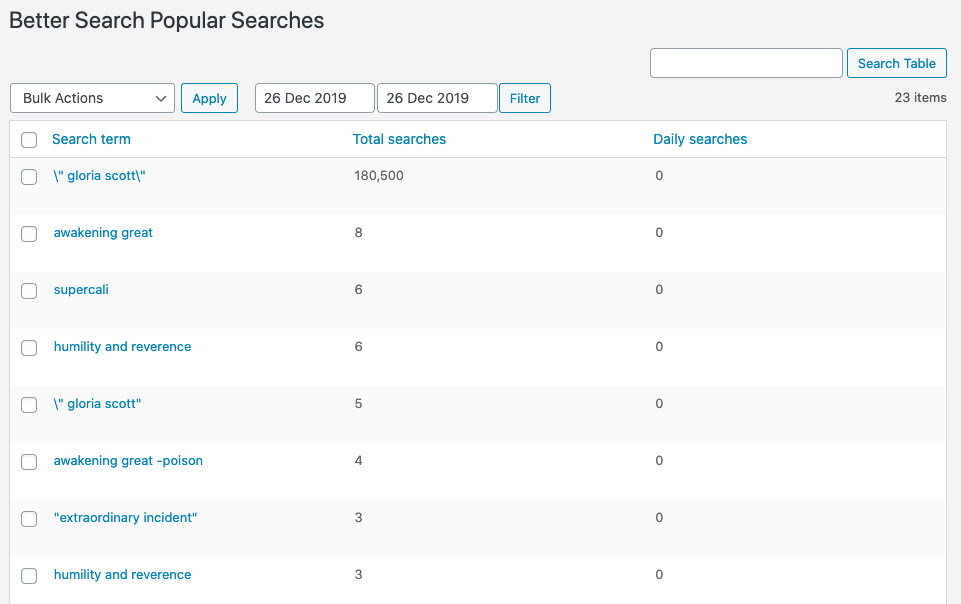
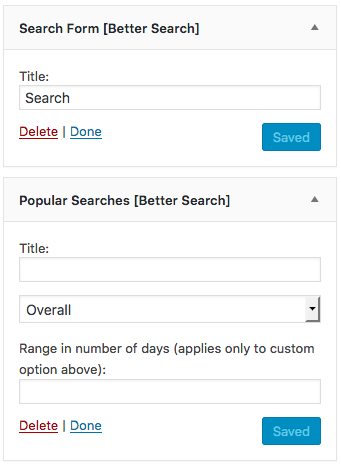
- جستجوهای پرطرفدار: نمایش نقشه حرارتی محبوبترین جستجوها در سایت شما، چه به صورت ویجت و چه شورتکد
- جستجوی زنده AJAX: نمایش نتایج جستجو هنگام تایپ در هر فرم جستجو در سایت شما
- سفارشیسازی: استفاده از فایل قالب و استایلهای CSS خود برای ظاهر و احساس نهایی
- پشتیبانی از افزونههای کش: به طور بیدرز با افزونههای کش مانند WP-Super-Cache و W3 Total Cache کار میکند
- فیلتر الفاظ نامناسب: فیلتر کردن هر کلمهای که نمیخواهید در پرسشهای جستجو ظاهر شود
- آماده ترجمه: استفاده از افزونه به هر زبان
اگر میخواهید جستجوی سایت خود را بهبود بخشید، همین امروز جستجوی بهتر را دانلود کرده و تفاوت را خودتان تجربه کنید.
ویژگیها در جستجوی بهتر Pro
جستجوی بهتر Pro کنترل و عملکرد حتی بیشتری به شما میدهد:
- 🗄️ Efficient Content Storage and Indexing
- 🔍 جستجوی چندسایتی
- ✨ مطابقتهای فازی
- 🎯 آستانه ارتباط
- 🔗 جستجوی نامک مطالب
- ⚙️ یکپارچهسازی REST API
- 🔄 LIKE Fallback Search
- ⚖️ Advanced Relevance Weighting
فهرستهای FULLTEXT مایاسکیوال
جستجوی بهتر فهرستهای FULLTEXT مایاسکیوال زیر را به جدول wp_posts اضافه میکند:
post_contentpost_title(post_title, post_content)
در حالت چندسایتی، این موارد پس از فعالسازی به هر وبلاگ اضافه میشوند. این فهرستها، جستجوی مبتنی بر ارتباط را قدرت میبخشند و برای عملکرد کامل لازم هستند.
مشارکت
جستجوی بهتر در Github نیز موجود است. اگر ویژگی جالبی دارید که میخواهید در افزونه پیادهسازی کنید یا باگی که توانستهاید رفع کنید، فورک کردن پروژه و ارسال درخواست pull را در نظر بگیرید.
افزونههای WebberZone
جستجوی بهتر یکی از افزونههای متعددی است که توسط WebberZone توسعه یافته است. سایر افزونههای ما را بررسی کنید:
- Contextual Related Posts – نمایش مطالب مرتبط در وبلاگ و فید وردپرس شما
- WebberZone Link Warnings – Add accessible warnings for external links and target=”_blank” links
- Top 10 – ردیابی بازدیدهای روزانه و کل پستهای وبلاگ شما و نمایش پستهای محبوب و ترند
- Knowledge Base – ایجاد پایگاه دانش یا بخش سؤالات متداول در سایت وردپرس شما
- WebberZone Snippetz – مدیر نهایی اسنیپت برای وردپرس جهت ایجاد و مدیریت اسنیپتهای کد HTML، CSS یا JS سفارشی
- Auto-Close – به طور خودکار نظرات، پینگبکها و ترکبکها را بسته و بازبینیها را در سایت وردپرس شما مدیریت میکند
Multilingual sites
Better Search supports WPML and Polylang and detects TranslatePress’s current language when caching search results. Caches are separated by language so results from one language are not reused in another.
TranslatePress translates the displayed results with the rest of the page; it does not create a separate search index of translated text. Better Search Pro’s core WordPress REST search responses and live-search suggestions are translated using the active TranslatePress language.
Search-term highlighting can prevent TranslatePress from translating a complete title because it splits the text with markup. Disable search-term highlighting if translated titles remain in the default language.
عکسهای صفحه

نصب
نصب وردپرس
به افزونهها در ناحیه مدیریت وردپرس خود بروید.
روی “افزودن جدید” کلیک کرده و “جستجوی بهتر” را در کادر جستجو وارد کنید.
افزونه را در لیست پیدا کنید (معمولاً اولین نتیجه) و روی “نصب اکنون” کلیک کنید.
نصب دستی
دانلود افزونه
محتوای better-search.zip را به پوشه wp-content/plugins/ استخراج کنید. باید پوشهای به نام better-search دریافت کنید.
افزونه را در WP-Admin فعال کنید.
به تنظیمات > جستجوی بهتر بروید تا پیکربندی کنید
سوالات متداول
اگر سؤال شما در اینجا پوشش داده نشده است، لطفاً یک پست جدید در انجمن پشتیبانی WordPress.org ایجاد کنید. من به طور منظم انجمنها را نظارت میکنم. اگر پشتیبانی پولی پیشرفتهتری میخواهید، لطفاً جزئیات را اینجا ببینید.
-
آیا این با هر پوسته وردپرسی کار میکند؟
-
بله! جستجوی پیشفرض وردپرس را جایگزین میکند و با اکثر پوستهها به طور پیشفرض یکپارچه میشود.
-
آیا از ووکامرس یا انواع مطالب سفارشی پشتیبانی میکند؟
-
بله، میتوانید جستجو در هر نوع مطلب عمومی را از تنظیمات فعال کنید.
-
چگونه بر عملکرد تأثیر میگذارد؟
-
جستجوی بهتر از فهرستهای FULLTEXT مایاسکیوال استفاده میکند و شامل کش داخلی است. همچنین به خوبی با افزونههای کش خارجی کار میکند.
-
آیا میتوانم قالب نتایج جستجو را سفارشی کنم؟
-
بله، با کپی کردن فایل به دایرکتوری پوسته خود میتوانید قالب نتایج را بازنویسی کنید. اطلاعات بیشتر در مستندات.
-
فیلتر الفاظ نامناسب چیست؟
-
کلمات کلیدی انتخاب شده را از جستجو فیلتر میکند. برای سایتهای مناسب خانواده مفید است.
جستجوی بهتر شامل یک فیلتر الفاظ نامناسب بسیار جذاب با استفاده از اسکریپت از Banbuilder است. میتوانید لیست کلماتی را که میخواهید از صفحه تنظیمات جستجوی بهتر فیلتر کنید، سفارشی کنید. تنظیمی به نام “فیلتر این کلمات:” را پیدا کنید. افزونه به طور خودکار ارجاعات جزئی و کامل به این کلمات را حذف میکند. میتوانید فیلتر را با خالی کردن لیست خاموش کنید.
-
چگونه میتوانم باگهای امنیتی را گزارش دهم؟
-
میتوانید باگهای امنیتی را از طریق برنامه افشای آسیبپذیری Patchstack گزارش دهید. تیم Patchstack به اعتبارسنجی، اولویتبندی و رسیدگی به هرگونه آسیبپذیری امنیتی کمک میکند. گزارش یک آسیبپذیری امنیتی.
نقد و بررسیها


توسعه دهندگان و همکاران
“جستجوی بهتر – نتایج جستجوی مرتبط برای وردپرس” نرم افزار متن باز است. افراد زیر در این افزونه مشارکت کردهاند.
مشارکت کنندگان

“جستجوی بهتر – نتایج جستجوی مرتبط برای وردپرس” به 3 زبان ترجمه شده است. با تشکر از مترجمین برای همکاری و کمکهایشان.
ترجمه “جستجوی بهتر – نتایج جستجوی مرتبط برای وردپرس” به زبان شما.
علاقه مند به توسعه هستید؟
کد را مرور کنید، مخزن SVN را بررسی کنید، یا از طریق RSS در گزارش توسعه مشترک شوید.
گزارش تغییرات
4.5.0
Release date: 2 October 2026
Release post: https://webberzone.com/announcements/better-search-v4-5/
Added
- Added WordPress Abilities API support for site searches, with an option to disable it in the Features tab.
- Added a Status section to Tools showing database, index and cache health.
- Added a setting to restrict search results to selected terms.
- Added
*wildcard support to filtered words, sospam*also blocked “spammer”. - Added translated titles and language-specific links to TranslatePress live-search suggestions.
- Added the
data-bsearch-live-search="off"form attribute, so forms with their own live search did not show a second list of suggestions. - [Pro] Added abilities for popular search terms, spelling suggestions and cache clearing.
- [Pro] Added optional AI answers grounded in Better Search results, with source links, cached answers, usage limits and a Content gaps report.
- [Pro] Added WP-CLI commands for AI questions, answer-cache management and Content gaps.
- [Pro] Expanded Tools status with custom-table and AI-provider health.
- [Pro] Added optional recency weighting, disabled by default; existing custom-table indexes required a one-time backfill from Tools.
- [Pro] Added optional ranking weights for slug, metadata, author and comment matches.
- [Pro] Added wildcard search redirects, so
help*could match multiple search phrases.
Changed
- Raised the minimum WordPress version to 6.9 for the Abilities API.
- Improved keyboard and screen reader access to settings and repeater controls.
- [Pro] Expanded include and exclude settings to all public taxonomies.
- [Pro] Improved custom-table search performance on large sites.
- [Pro] Moved the REST API search setting to the Features tab.
Security
- Hardened thumbnail dimensions to prevent markup injection through custom image sizes.
Fixed
- Cached search results could appear in the wrong language on WPML, Polylang and TranslatePress sites.
- Searches covering taxonomies, metadata, authors or comments could time out on large sites.
- Common words were not excluded on sites without a Better Search translation.
- Network search caches remained stale after settings changes or manual cache clearing, and nested queries could prevent caching.
- Cache-clearing confirmation and error messages were missing.
- Live search suggestions could reopen after pressing Escape or submitting the search.
- [Pro] Custom-table searches ignored some search settings, taxonomy weights and term restrictions.
- [Pro] Custom-table searches could show empty pages, and multisite searches could repeat, skip or return posts from the wrong site.
- [Pro] Multisite custom-table searches returned no results when
posts_per_pagewas-1. - [Pro] Custom-table schema and taxonomy indexes were not reliably updated.
- [Pro] Fuzzy searches could ignore Boolean operators or match common words, returning too many results.
- [Pro] Multisite and fuzzy searches could omit posts matching slugs, taxonomies, metadata, authors or comments.
- [Pro] Search terms containing a dollar sign followed by a digit were omitted from relevance scoring.
Earlier versions
For the changelog of earlier versions, please refer to the releases page on GitHub.