

توضیحات
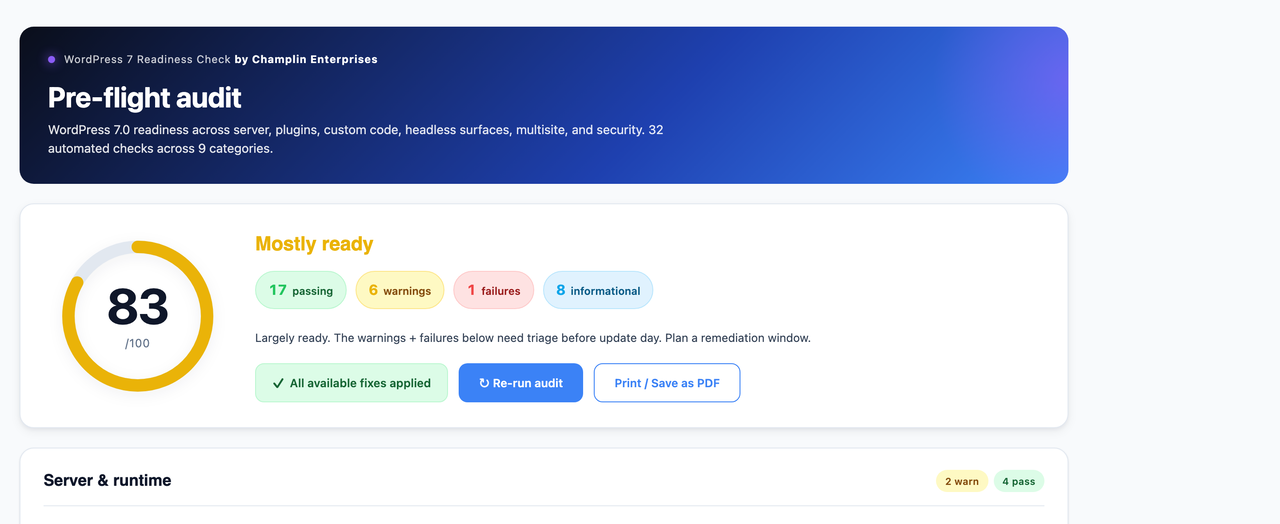
The WordPress 7.0 upgrade is the biggest core release in years — bringing the WP AI Client, DataViews, Block API v3, and a higher PHP floor. This plugin runs a 30+ point automated audit of your site against the WordPress 7.0 readiness criteria, with a visual score and remediation hints for every finding.
The same checks the engineering team at Champlin Enterprises runs across enterprise WordPress migrations, packaged free for the community.
About this distribution
This is the WordPress.org distribution of the plugin. A self-hosted variant is available at https://github.com/Kevinchamplin/champlin-pre-flight-audit for users who prefer to install directly from GitHub. The audit logic, autofixes, and snapshot system are identical; only the update mechanism differs.
What it checks
- Server & runtime — PHP version, OPcache, memory limit, max_execution_time, required extensions
- Database — MySQL/MariaDB version, InnoDB availability
- WordPress core — version, debug mode, auto-update status, HTTPS
- Plugins — pending updates, per-plugin compatibility headers, known-risky page-builder slugs
- Themes — active theme version, compatibility header, block vs classic, deprecated theme support
- Custom code — static scan of your theme + custom plugins for WordPress 7.0 breaking patterns (WP_List_Table, manage_posts_columns, Block API v2, Interactivity effect(), deprecated HTML5 script support, and more)
- Headless & API — WPGraphQL detection, custom REST routes
- Multisite — site count, super admins, 7.0 spam-flag behavior change
- Security — admin user count, 2FA plugin, backup plugin, file-edit lockdown, AI Connectors policy reminder
What it does NOT do
- It does not modify your site. Read-only.
- It does not phone home or transmit any data externally.
- It does not require a license key or account signup.
Why it’s free
This plugin is the automated companion to the 80-point printable enterprise readiness checklist published by Champlin Enterprises at champlinenterprises.com/wordpress-7-0-readiness-checklist.html. Together they cover the engineering work of a WordPress 7.0 migration. If you’d rather have an engineer run it as an engagement, the contact link is in the dashboard footer.
عکسهای صفحه

نصب
- Upload the plugin folder to
/wp-content/plugins/, OR install via the Plugins admin page. - Activate the plugin through the ‘Plugins’ menu in WordPress.
- Navigate to Tools WP 7 Readiness to run the audit.
سوالات متداول
-
Does this work before AND after WordPress 7.0 is installed?
-
Yes. On pre-7.0 sites it operates as a pre-flight audit. On post-7.0 sites it operates as a post-flight verification — checking that the upgrade landed cleanly.
-
Will it modify my site?
-
No. The plugin is strictly read-only. It scans your configuration and files; it does not write any changes.
-
How long does the audit take?
-
Typically under 5 seconds on most sites. The custom-code static scan is capped at 1500 files to ensure even very large sites complete quickly.
-
Does it cover everything in the 80-point manual checklist?
-
It covers the 30+ items that can be automated. The remaining 50 are human-judgment items — has the rollback been tested? has the AI Connectors policy been signed off? has the on-call rota been confirmed? — that no plugin can verify. The dashboard links to the printable checklist for the full audit.
نقد و بررسیها
نقد و بررسیای برای این افزونه یافت نشد.
توسعه دهندگان و همکاران
“Champlin Pre-Flight Audit” نرم افزار متن باز است. افراد زیر در این افزونه مشارکت کردهاند.
مشارکت کنندگان
ترجمه “Champlin Pre-Flight Audit” به زبان شما.
علاقه مند به توسعه هستید؟
کد را مرور کنید، مخزن SVN را بررسی کنید، یا از طریق RSS در گزارش توسعه مشترک شوید.
گزارش تغییرات
1.0.7
- Plugin review compliance. Managed-host detection no longer assumes a hardcoded server filesystem layout — Plesk is now detected from the
DOCUMENT_ROOT/SERVER_SOFTWAREenvironment signals and the control-panel install directory instead of matchingABSPATHagainst a fixed vhost path. No functional change: the same hosts are detected, and detection staysopen_basedir-safe. Contributors list corrected to the plugin’s WordPress.org account. The legacy-migration success notice now signals via a transient set by the nonce-verified migrate action instead of a URL parameter, resolving the Plugin Check nonce-verification warnings (and making the notice reliably display).
1.0.6
- WordPress.org submission readiness. All Plugin Check ERRORs and most WARNINGs resolved: short PHP tags converted, direct filesystem operations refactored to use WP_Filesystem, $_POST/$_SERVER inputs unslashed before sanitization, readme tags trimmed to 5, build script now excludes hidden files. No functional changes — same audit, same autofixes, same snapshot safety net. Ready for the WP.org plugin directory review.
1.0.5
- Distribution improvements. The self-hosted GitHub variant gained automated release delivery; the WordPress.org distribution uses WordPress.org’s native plugin-update channel.
1.0.4
- Fix: Plesk detection now works under
open_basedirrestrictions. v1.0.2’sis_dir(/usr/local/psa)check silently failed when the vhost’sopen_basedirexcluded/usr/local/psa/. New detection uses ABSPATH (/var/www/vhosts/...), DOCUMENT_ROOT, and SERVER_SOFTWARE signals — all open_basedir-safe. - Grading curve relief during major-release week. Within 14 days of a WordPress major release, plugins and themes still tested against the immediately-prior major (6.9 when current is 7.0) are downgraded from WARN to INFO and excluded from the score. Vendors typically catch up within this window; penalizing every site on day one was unfair. Auto-expires 14 days after the release date.
- Accept-as-known-risk override mechanism. Each warn/fail finding now has an “Accept as known risk” link. Click to acknowledge — the finding still appears in the report (with an “Accepted risk” tag) but is excluded from the readiness score calculation. Real enterprise audit pattern, fully reversible via “Un-accept” button.
1.0.3
- Fix: Re-run audit spinner appearing on page load and never stopping. The v1.0.1 spinner icon used the HTML
hiddenattribute to start hidden, but the plugin’s.wp7rc-btn__iconclass setdisplay: inline-blockwhich silently overrode[hidden]. The spin animation then ran constantly. Added an explicit[hidden]CSS override so the spinner stays hidden until the button is clicked.
1.0.2
- Fix: Custom-code scan no longer false-positives on common vendor plugins. The previous scope included Advanced Custom Fields, WPGraphQL, Two-Factor, page builders, and other widely-installed plugins that ship their own WordPress 7.0 compatibility updates. Flagging their internal code as if it were user-owned created noise. The vendor-skip list now covers 30+ common plugin slugs across page builders, SEO, ACF, GraphQL/headless, security, cache, forms, translation, and backup.
- Fix: Backup-plugin check now detects managed-host snapshot systems. Previously warned even on Plesk / WP Engine / Kinsta / Pantheon / Pressable / SiteGround / Flywheel / GoDaddy Managed WordPress / cPanel / DreamHost installs where host-level backups are the standard. The check now detects 10 managed-host platforms and reports PASS with “host-level snapshots assumed” instead.
1.0.1
- Fix: OPcache detection no longer false-positives on hardened hosts. The previous check used
function_exists('opcache_get_status'), which returns false on Plesk / CloudLinux / managed-WP servers that disableopcache_get_statusviadisable_functionsfor security. The new check usesextension_loaded('Zend OPcache')as the primary signal, falling back to detailed memory stats only if the introspection function is available. OPcache now correctly reports PASS on Plesk and CloudLinux hosts. - UX: Re-run audit button now uses a proper event listener (was inline
onclickwhich felt unresponsive when the audit state was unchanged), with a spinning ↻ icon during reload. - UX: “Apply N available fixes” button replaced with a positive “All available fixes applied” green pill when there are no fixes left, instead of just disappearing.
- UX: “Apply all” dialog now shows a clear bullet list of what will change.
- UX: Fix-results report panel appears below the action buttons after Apply-all, listing every fix’s outcome with its full error message inline. No more aggregate “N applied · M failed” without context.
- Discoverability: All outbound links to champlinenterprises.com now carry UTM parameters for attribution. “No telemetry” promise unchanged — UTMs are appended to URLs only, no data sent from your server.
- Discoverability: Tasteful “Star on GitHub” band added to the dashboard footer. Self-reported install signal; fully opt-in.
- Docs: Added README.md, SECURITY.md, CONTRIBUTING.md to the GitHub repo for community standards.
1.0.0
- Initial release.
- 30+ automated checks across 9 categories (server, database, WP core, plugins, themes, custom code, headless, multisite, security).
- Premium visual dashboard with animated readiness-score donut and color-coded findings.
- Print-friendly stylesheet — browser print dialog produces a clean PDF report.
- Autofix support for 4 common issues — each fix is one click, idempotent, and reversible:
- Disable major auto-updates during the WordPress 7.0 launch window
- Lock down in-admin file editing (drops a mu-plugin defining DISALLOW_FILE_EDIT)
- Update all plugins to their latest stable releases (uses WordPress core’s own Plugin_Upgrader)
- Install and activate the official Two-Factor plugin from WordPress.org