
توضیحات
Change WordPress usernames from the user edit screen, with validation for existing users, illegal logins, and Multisite admins.
Change Username
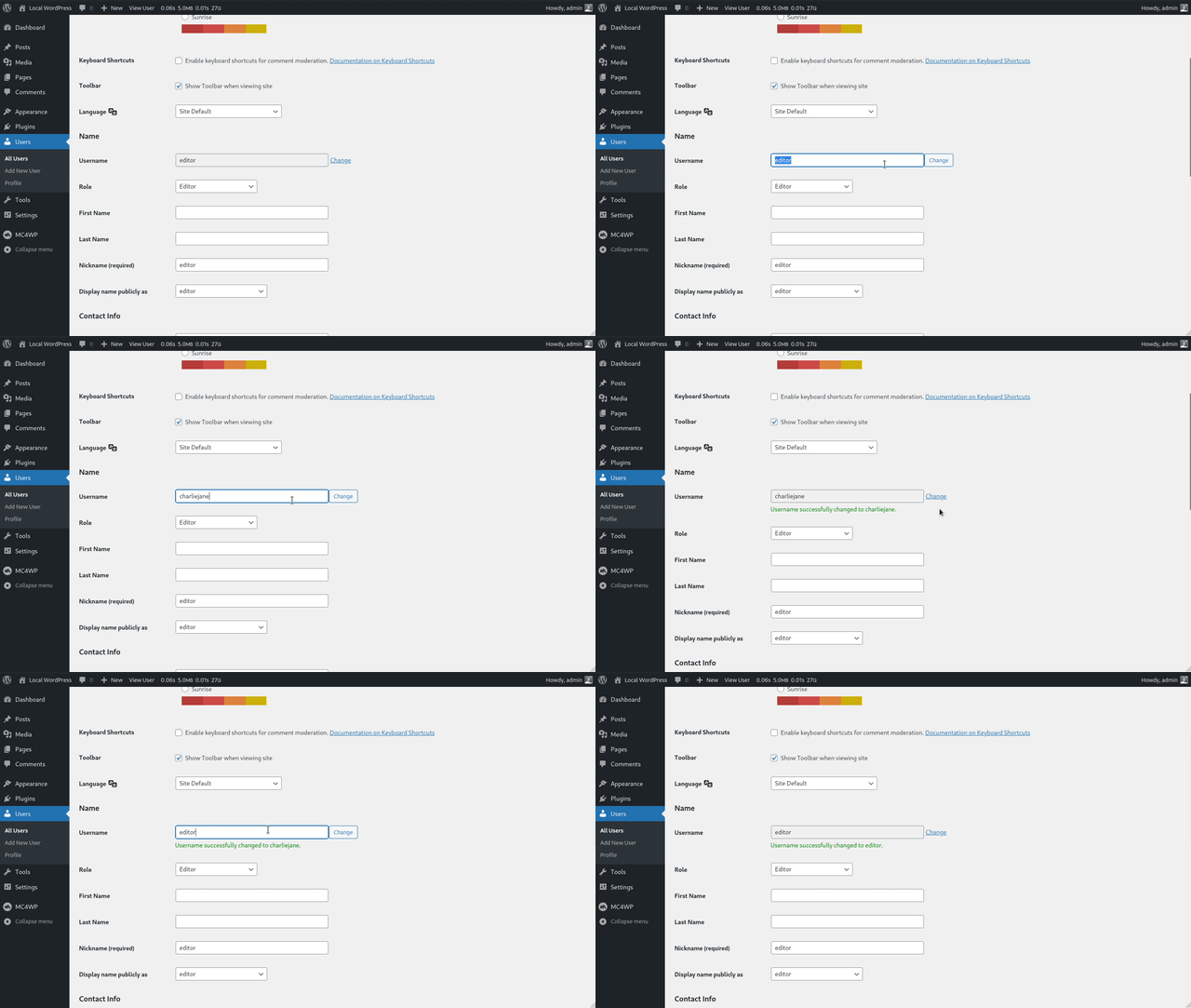
WordPress does not let administrators change usernames by default. Change Username adds that option directly to the existing user edit screen, without a separate settings page.
Use it to update a WordPress username while keeping the same user ID, posts, comments, and profile data attached to the account.
Features
- Change any WordPress username from the existing user edit screen.
- Prevent username conflicts by checking whether the new username already exists.
- Block usernames that are listed as illegal logins.
- Follow the same username validation rules as WordPress core.
- Retain superadmin rights when changing the username of a Multisite super admin.
Requirements
- PHP version 7.4 or higher
- WordPress version 6.0 or higher
About the plugin author
Danny van Kooten has been building WordPress plugins since 2010, starting with WordPress 3.0.
He is the founder of ibericode, the small software company behind popular WordPress plugins including Mailchimp for WordPress and Koko Analytics.
عکسهای صفحه
نصب
Installing the plugin
- In your WordPress admin panel, go to Plugins > New Plugin, search for Change Username and click “Install now“
- Alternatively, download the plugin and upload the contents of
change-username.zipto your plugins directory, which usually is/wp-content/plugins/. - Activate the plugin
- Go to Users, edit a user, and change the username from the existing user edit screen.
سوالات متداول
-
Where do I change a WordPress username after activation?
-
Go to Users, open the user you want to edit, and use the username control on the existing user edit screen.
-
Can I change an administrator username?
-
Yes. Any user with the
edit_userscapability can change usernames, including administrator usernames. -
Can users change their own username?
-
Not right now. Only administrators with the
edit_userscapability can change usernames. -
Does changing a username affect user IDs or posts?
-
No. The plugin changes the user’s login name, but it does not change the user ID. Existing posts, pages, comments, and user metadata stay assigned to the same user account.
-
Does this work on WordPress Multisite?
-
Yes. When changing the username of a Multisite super admin, the plugin keeps that user in the super admin list.
-
I’ve activated the plugin but nothing happens.
-
Please check if your server is running PHP version 7.4 or higher. The plugin will not do anything if you’re on an older version of PHP.
نقد و بررسیها


توسعه دهندگان و همکاران
“Change Username” نرم افزار متن باز است. افراد زیر در این افزونه مشارکت کردهاند.
مشارکت کنندگان

ترجمه “Change Username” به زبان شما.
علاقه مند به توسعه هستید؟
کد را مرور کنید، مخزن SVN را بررسی کنید، یا از طریق RSS در گزارش توسعه مشترک شوید.
گزارش تغییرات
1.0.3 – Jun 19, 2026
- Bump required PHP version to 7.4 or higher.
- Bump required WordPress version to 6.0 or higher.
- Bump tested WordPress version to 7.0.
- Fix retaining Multisite super admin rights when the user is first in the super admin list.
- Improve sanitization of submitted username values.
- Add PHPCS and PHPStan checks to the release process.
- Exclude Makefile from plugin release packages.
1.0.2 – Oct 04, 2024
- Show message when new username is less than 3 characters long.
- Show message when new username is more than 60 characters long.
- Improved request validation in general.
- Remove ES6 code from JS file to support a wider range of browsers.
- Bump required PHP version to 7.2 or higher.
1.0.1 – Dec 23, 2022
- Always load minified JS asset by default
1.0 – Dec 2016
Initial release.