
توضیحات
Hover Preview enhances your WordPress website by displaying a small website preview when users hover over a link.
It utilizes the PagePeeker service to generate the previews, making it easier for users to get a sneak peek of the linked website.
Features
- Automatically displays a preview of the linked website when hovering over a link.
- Easily configure the API key for the PagePeeker service.
- Lightweight and responsive design.
- Free to use with the PagePeeker unbranded plan.
How to Get Started
- Install and activate the plugin.
- Navigate to “Settings > Hover Preview” in the WordPress admin dashboard.
- Enter your PagePeeker API key. If you don’t have one, sign up for a free unbranded plan here:
https://pagepeeker.com/signup/unbranded/. - Save the settings and enjoy!
عکسهای صفحه
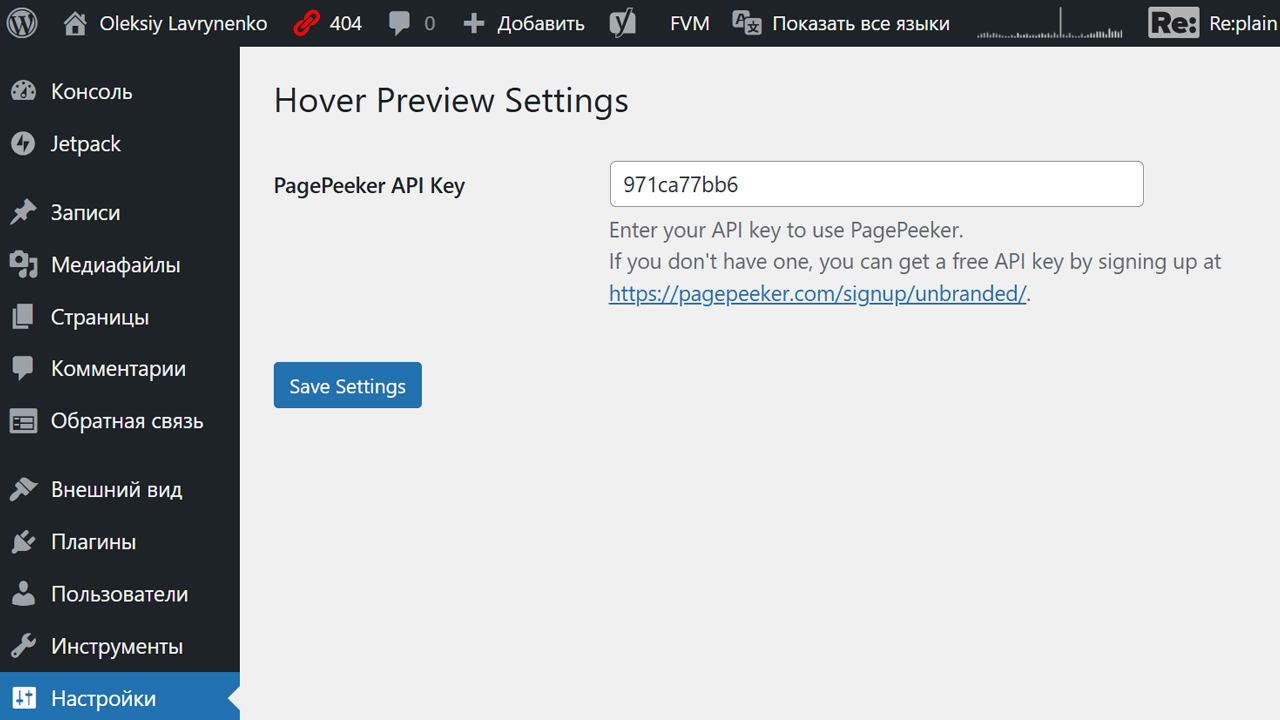
نصب
- Download the plugin zip file.
- Upload the zip file through the “Plugins > Add New > Upload Plugin” section in the WordPress admin dashboard.
- Activate the plugin.
- Configure the API key under “Settings > Hover Preview.”
سوالات متداول
-
Where can I get a PagePeeker API key?
-
You can sign up for a free unbranded API key at PagePeeker: https://pagepeeker.com/signup/unbranded/.
-
Can I customize the preview size?
-
The current version does not support custom preview sizes. This feature may be added in a future release.
نقد و بررسیها
نقد و بررسیای برای این افزونه یافت نشد.
توسعه دهندگان و همکاران
“Hover Preview” نرم افزار متن باز است. افراد زیر در این افزونه مشارکت کردهاند.
مشارکت کنندگان
ترجمه “Hover Preview” به زبان شما.
علاقه مند به توسعه هستید؟
کد را مرور کنید، مخزن SVN را بررسی کنید، یا از طریق RSS در گزارش توسعه مشترک شوید.
گزارش تغییرات
1.1
- Added an admin settings page for configuring the API key.
- Included a helper link to guide users on obtaining a free API key.
1.0
- Initial release with basic hover preview functionality.