

توضیحات
Create playful puzzles from images and embed them to your WordPress site using JigsawPlanet.com online tool.
About Jigsaw Planet
Jigsaw Planet is an ideal place for playing free online jigsaw puzzles. Create puzzles from your images, collect, exhibit and share them with your friends.
Jigsaw Planet WordPress Plugin
Using this plugin you can embed jigsaw planet puzzles into your WordPress site using nothing but the URL.
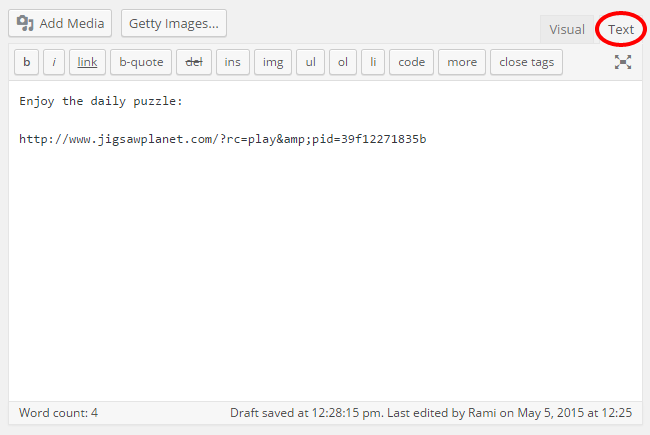
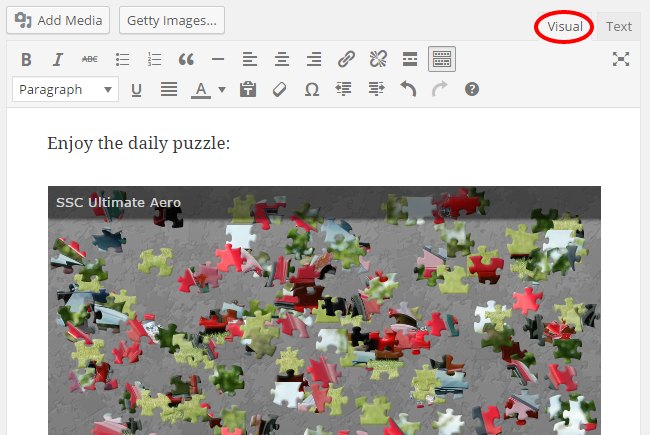
Choose any puzzle, or create your own! Copy the puzzle URL and paste it to the post text editor. Then simply click over to the visual editor to confirm that it loads properly.
اطلاعات بیشتر
For any questions or more information, please contact us.
عکسهای صفحه
نصب
Installation
- In your WordPress Dashboard go to “Plugins” -> “Add Plugin”.
- Search for “Jigsaw Planet”.
- Install the plugin by pressing the “Install” button.
- Activate the plugin by pressing the “Activate” button.
Minimum Requirements
- WordPress version 3.5 or greater.
- PHP version 5.2.4 or greater.
- MySQL version 5.0 or greater.
Recommended Requirements
- The latest WordPress version.
- PHP version 7.0 or greater.
- MySQL version 5.6 or greater.
سوالات متداول
- Installation Instructions
-
Installation
- In your WordPress Dashboard go to “Plugins” -> “Add Plugin”.
- Search for “Jigsaw Planet”.
- Install the plugin by pressing the “Install” button.
- Activate the plugin by pressing the “Activate” button.
Minimum Requirements
- WordPress version 3.5 or greater.
- PHP version 5.2.4 or greater.
- MySQL version 5.0 or greater.
Recommended Requirements
- The latest WordPress version.
- PHP version 7.0 or greater.
- MySQL version 5.6 or greater.
- How do I embed puzzles from Jigsaw Planet?
-
For simple puzzle embed, use puzzle URL. Just paste the URL in the editor:
http://www.jigsawplanet.com/?rc=play&pid=39f12271835b - How do I set custom dimensions to my puzzles?
-
Since WordPress 4.2, you can double click the embedded item to set max width and max height. It will add the WordPress
[embed]shortcode:
[embed width=”600″ height=”400″]http://www.jigsawplanet.com/?rc=play&pid=39f12271835b[/embed]Note: Doing it the WordPress way, using the
[embed]shortcode, is backwards and forward compatible, and it works with all the themes.
نقد و بررسیها


توسعه دهندگان و همکاران
“Jigsaw Planet” نرم افزار متن باز است. افراد زیر در این افزونه مشارکت کردهاند.
مشارکت کنندگان

“Jigsaw Planet” به 7 زبان ترجمه شده است. با تشکر از مترجمین برای همکاری و کمکهایشان.
ترجمه “Jigsaw Planet” به زبان شما.
علاقه مند به توسعه هستید؟
کد را مرور کنید، مخزن SVN را بررسی کنید، یا از طریق RSS در گزارش توسعه مشترک شوید.
گزارش تغییرات
1.3 (2015-04-04)
- Move plugin files to ‘includes’ directory.
1.2 (2015-12-01)
- Remove po/mo files from the plugin.
- Use translate.wordpress.org to translate the plugin.
1.1 (2015-05-05)
- Add screenshots.
- Add i18n support.
- Add Hebrew (he_IL) translation.
1.0 (2015-04-18)
- Initial release.
- Register oEmbed provider.