

توضیحات
Turn every Bible reference on your site into an instant verse preview.
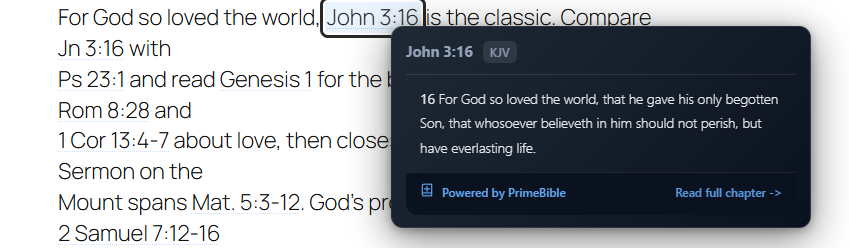
PrimeBible Verse Preview automatically finds references in your content — “John 3:16”, “Romans 8:1-4”, even shorthand like “2 Sam 7:12” — and turns each one into an elegant tooltip that reveals the verse the moment a reader hovers or taps. No copying Scripture into every post, no interrupting your writing, no sending readers off to another site.
It reads like plain writing and just works: type a reference naturally and it becomes interactive on the front end.
Built and maintained by PrimeBible, a 501(c)(3) nonprofit dedicated to making Scripture accessible to everyone, it is fast, privacy-respecting, and free — forever. No accounts, no upsells, no tracking.
Key Features
- Automatic Detection – Finds Bible references like “John 3:16” or “Romans 8:1-4” in your content
- Manual References – Add explicit references with the
[primebible]shortcode - Multiple Translations – Choose from KJV, ESV, ASV, WEB, and more
- Translation Selector – Pick from supported translations instead of typing codes manually
- API Test Tool – Verify the selected translation and endpoint from the settings screen
- Mobile Optimized – Touch-friendly with long-press support for mobile devices
- Lightning Fast – Aggressive caching, lazy loading, and prefetch optimization
- Fully Customizable – Control appearance, behavior, timing, and styling
- Privacy First – No tracking, no external dependencies beyond the Bible API
- Accessibility – Keyboard navigation and screen reader friendly
- Theme Support – Light, dark, or auto-detect system preference
- Performance – Deferred loading, intersection observer, minimal DOM manipulation
How It Works
- Install and activate the plugin
- Configure your preferred Bible translation and appearance
- Write content naturally: “For God so loved the world (John 3:16)”
- The reference automatically becomes interactive
- Visitors hover or tap to see the verse instantly
Advanced Features
- Lazy Scanning – Only processes content when it enters viewport
- Smart Caching – LRU cache with configurable size and expiry
- Per-Post Control – Disable scanning on specific posts/pages via meta box
- Exclude Selectors – Prevent scanning in code blocks, comments, etc.
- CSP Aware – Injected styles carry a configurable nonce attribute (works with static-nonce CSP setups; per-request rotating nonces are not supported)
- Chapter Verse Counts – Optional JSON config for accurate verse range detection
- Bundled Verse Counts – Accurate cross-chapter expansion works out of the box
- Prefetch – Intelligently preloads nearby references
- Analytics Ready – Optional Google Analytics integration
- Custom CSS – Add your own styles to match your theme
Perfect For
- Theology and Bible study blogs
- Church websites and ministries
- Christian authors and writers
- Seminary and Bible college sites
- Devotional and sermon websites
- Christian education platforms
Technical Highlights
- No jQuery or external library dependencies
- Modern vanilla JavaScript (ES2020+)
- Deferred script loading for zero blocking
- Intersection Observer API for performance
- Fetch API with retry logic and timeout
- Mobile-first responsive design
- Lightweight – a single deferred script, no jQuery, no render blocking
Additional Info
About PrimeBible
PrimeBible is a 501(c)(3) nonprofit organization dedicated to making deep Bible study accessible to everyone. Our platform provides free tools including:
* Hebrew and Greek original language analysis
* Strong’s Concordance integration
* Cross-reference explorer
* Biblical timeline
* Scholarly articles on messianic prophecy, textual criticism, and theology
Learn more at primebible.com
Support the Mission
This plugin is free and always will be. If it blesses your ministry, consider:
* Leaving a 5-star review
* Sharing with other Christian content creators
* Donating to support nonprofit Bible study tools at primebible.com/donate
Credits
Developed by the PrimeBible team with love for the global church.
Special thanks to the WordPress community and all beta testers who provided feedback.
Privacy Policy
Data Collection: This plugin does not collect, store, or transmit any personal data about your visitors.
API Requests: When a verse tooltip is displayed, the plugin fetches verse text from primebible.com’s API. These requests include:
– The Bible reference (e.g., “John 3:16”)
– The requested translation (e.g., “KJV”)
No Tracking: PrimeBible does not log IP addresses, track user behavior, or use cookies from these API requests.
Optional Analytics: If you enable the analytics setting, the plugin will fire a Google Analytics event when a tooltip is opened (if GA is already installed on your site). This is disabled by default.
Third-Party Services: The plugin connects to primebible.com’s API to fetch verse text. No other third-party services are used.
For more information, see the PrimeBible Privacy Policy.
Copyright and Licensing
PrimeBible Verse Preview is free software: you can redistribute it and/or modify it under the terms of the GNU General Public License as published by the Free Software Foundation, either version 2 of the License, or (at your option) any later version.
This program is distributed in the hope that it will be useful, but WITHOUT ANY WARRANTY; without even the implied warranty of MERCHANTABILITY or FITNESS FOR A PARTICULAR PURPOSE. See the GNU General Public License for more details.
Bible translations are subject to their respective copyright holders. PrimeBible provides access to public domain translations and those licensed for free distribution.
Developer Notes
Hooks and Filters
Filter: primebible_config
Modify the JavaScript configuration before it’s output.
add_filter('primebible_config', function($config) {
    $config['translation'] = 'ESV';
    $config['theme'] = 'dark';
    return $config;
});
Filter: primebible_available_translations
Customize the translation dropdown.
add_filter('primebible_available_translations', function($translations) {
    $translations['YLT'] = 'Young\'s Literal Translation';
    return $translations;
});
Action: primebible_before_enqueue
Runs before scripts are enqueued (if loading conditions are met).
add_action('primebible_before_enqueue', function() {
    // Your code here
});
Programmatic Control
Disable on specific page by template:
add_filter('primebible_should_load', function($should_load) {
    if (is_page_template('template-landing.php')) {
        return false;
    }
    return $should_load;
});
GitHub Repository
Development happens on GitHub: github.com/primebible/wordpress-plugin
Contributions welcome:
– Bug reports
– Feature requests
– Pull requests
– Documentation improvements
Support
Documentation: primebible.com/docs/wordpress-plugin
Support Forum: wordpress.org/support/plugin/primebible
Email: support@primebible.com
Average Response Time: 24-48 hours
We’re committed to excellent support. If you have an issue, we’ll help you resolve it.
عکسهای صفحه
نصب
Automatic Installation
- Log into your WordPress admin panel
- Navigate to ‘Plugins Add New’
- Search for “PrimeBible Verse Preview”
- Click ‘Install Now’ and then ‘Activate’
- Go to ‘Settings PrimeBible’ to configure
Manual Installation
- Download the plugin zip file
- Extract to
/wp-content/plugins/primebible/(the zip extracts to aprimebiblefolder) - Activate through the ‘Plugins’ menu in WordPress
- Configure at ‘Settings PrimeBible’
After Installation
- Navigate to ‘Settings PrimeBible’
- Choose your preferred Bible translation (default: KJV)
- Select theme (light/dark/system)
- Adjust timing and behavior settings if desired
- Save changes and test on a post with Bible references
Manual References
Use the shortcode when you want exact control over the clickable text:
[primebible ref="John 3:16"]
You can also override the translation for a single reference:
[primebible ref="Romans 8:1" translation="ESV"]this promise[/primebible]
سوالات متداول
-
Is this plugin really free?
-
Yes, 100% free with no hidden costs, premium tiers, or upsells. PrimeBible is a 501(c)(3) nonprofit organization making Bible study tools accessible to everyone.
-
What Bible translations are available?
-
The settings screen includes KJV, ESV, NIV, ASV, WEB, NET, NASB, NKJV, NLT, and CSB. Developers can customize this list with the
primebible_available_translationsfilter. -
Does it work on mobile devices?
-
Absolutely. The plugin is mobile-first with touch-optimized interactions including long-press to view verses. Tooltips automatically adjust size and position for small screens.
-
Will it slow down my website?
-
No. The plugin uses:
– Deferred script loading (non-blocking)
– Lazy scanning with Intersection Observer
– Aggressive caching with LRU eviction
– Minimal DOM manipulation
– No external library dependencies
Total impact: <50kb and processes only visible content. -
Can I customize the appearance?
-
Yes. You can:
– Choose light, dark, or system theme
– Adjust tooltip width for desktop and mobile
– Add custom CSS in the settings panel
– Control whether to show reference header and footer branding
– Enable/disable animations -
How do I disable scanning on a specific post?
-
Edit the post and look for the ‘PrimeBible Verse Preview’ meta box in the sidebar (usually on the right). Check “Disable PrimeBible scanning on this content” and save.
-
Can I exclude certain elements from scanning?
-
Yes. By default, these elements are excluded:
script,style,noscript,iframe,textarea,code,pre,.pbv-no-scan
You can customize this list in ‘Settings PrimeBible Exclude selectors’.
You can also add the classpbv-no-scanto any HTML element to prevent scanning inside it. -
Does it collect user data or track visitors?
-
No. The plugin is privacy-focused and doesn’t collect, store, or transmit any user data except Bible verse API requests to primebible.com (which are not logged or tracked).
Optional: You can enable Google Analytics event tracking in settings if you use GA on your site. -
What happens if the API is down?
-
The plugin includes:
– Configurable timeout (default: 8 seconds)
– Automatic retry logic (default: 2 retries)
– Graceful fallback (tooltip shows “Unable to load verse”)
– Error handling that doesn’t break your page -
Can I use this with page builders?
-
Yes. Works with:
– Gutenberg (WordPress block editor)
– Classic Editor
– Elementor
– Beaver Builder
– Divi Builder
– WPBakery
– And most other page builders -
Does it support custom post types?
-
Yes. In ‘Settings PrimeBible Post types’, you can select which post types should have the meta box and be scanned when using “singular only” mode.
-
What if I need help?
-
- Check this FAQ
- Visit the Support Forum
- Read documentation at primebible.com/docs
- Contact support at support@primebible.com
-
Can I contribute or request features?
-
Absolutely! The plugin is GPL-licensed. You can:
– Submit bug reports and feature requests on the support forum
– Contribute code via GitHub (link in plugin header)
– Suggest improvements
– Translate into other languages
نقد و بررسیها
نقد و بررسیای برای این افزونه یافت نشد.
توسعه دهندگان و همکاران
“PrimeBible Verse Preview” نرم افزار متن باز است. افراد زیر در این افزونه مشارکت کردهاند.
مشارکت کنندگان
ترجمه “PrimeBible Verse Preview” به زبان شما.
علاقه مند به توسعه هستید؟
کد را مرور کنید، مخزن SVN را بررسی کنید، یا از طریق RSS در گزارش توسعه مشترک شوید.
گزارش تغییرات
Full history: see CHANGELOG.md on GitHub (github.com/primebible/wordpress-plugin).
2.5.3 – 2026-07-11
- Fixed: Reference detection no longer matches everyday words — prose like “there is 5”, “I am 24”, or “so 3 people” was being wrapped as a verse link (and “is 5” fetched 1 Samuel 5). Ambiguous short aliases still work in the shortcode but never trigger auto-detection
- Fixed: Times (“3pm”), ordinals (“3rd”), years, and percentages next to book-like words no longer create false verse links
- Fixed: The “Load in Admin Dashboard” setting now actually loads the script in wp-admin
- Fixed: The documented
primebible_should_loadfilter is now implemented - Security: Inline config JSON hardened so stored settings values cannot break out of the script tag
- Added: 14 detection regression tests in
PrimeBible.runTests()
2.5.2 – 2026-06-11
- Fixed: Short book abbreviations are normalized before API requests
- Fixed:
Ac,Rm,Ga,Lu, and compact numbered forms such as2Sanow resolve to their full book names internally - Fixed: Delayed hover previews are canceled when the pointer leaves a reference
- Fixed: Invalid exclude selectors no longer stop content scanning
- Added: Translation dropdown and API test tool in settings
- Added:
[primebible ref="John 3:16"]shortcode for manual references - Added: Bundled chapter verse counts for accurate cross-chapter expansion
- Updated:
mobileOptimizednow controls mobile tooltip layout instead of being a dead setting - Updated: Release metadata now matches plugin version 2.5.2
2.5.1 – 2025-11-15
- Added: Chapter verse counts awareness for accurate range detection
- Added:
maxMatchesPerNodeandmaxNodeTextLengthperformance limits - Added: Debug mode for troubleshooting
- Improved: Mobile touch interaction reliability
- Improved: Cache efficiency with LRU algorithm
- Fixed: Edge case with overlapping verse ranges
- Fixed: Tooltip positioning on narrow viewports
2.5.0 – 2025-11-01
- Added: Multi-translation support (KJV, ESV, ASV, WEB) with admin selector
- Added: Aggressive caching with configurable TTL, lazy tooltips, prefetch
- Changed: Redesigned admin settings page and tooltip design
- Fixed: WordPress 6.4 compatibility, PHP 8.2 deprecations, theme CSS conflicts
2.0.0 – 2025-10-01
- Major: Complete rewrite for performance and reliability
- Added: Lazy scanning with Intersection Observer
- Added: Smart prefetch for nearby references
- Added: Configurable caching with expiry
- Added: Per-post disable meta box
- Added: Custom CSS support
- Added: CSP nonce compatibility
- Added: Load scope (everywhere vs singular only)
- Added: Post type selection
- Added: Exclude selectors configuration
- Improved: Mobile interactions with long-press
- Improved: Tooltip positioning algorithm
- Improved: Error handling and retry logic
- Changed: Migrated from inline styles to dynamic style injection
- Changed: Settings UI overhaul for better UX
- Performance: 40% faster initial scan
- Performance: 60% reduction in memory usage
1.5.0 – 2025-08-15
- Added: Multiple translation support
- Added: Theme selection (light/dark/system)
- Added: Animation controls
- Improved: Tooltip positioning on mobile
- Fixed: Conflict with certain themes
1.0.0 – 2025-06-01
- Initial release
- Auto-detection of Bible references
- KJV translation support
- Basic tooltip functionality
- Admin settings panel