
توضیحات
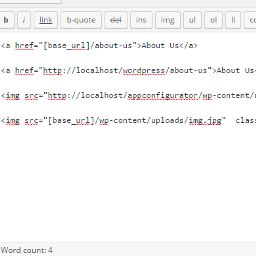
Now its easy to change domains and move your wordpress blog from subdomain to parent domain like from localhost to live domain you just need to use this shortcode [base_url] as your base url and images So now all links and images are fine after transfer site from localhost to live you don’t need to adjust links after change domain.
ShortCode
[base_url]
عکسهای صفحه

نصب
** From your WordPress dashboard **
Visit ‘Plugins > Add New’ Search for ‘Relative URL ShortCode’ Activate ‘Relative URL ShortCode’ from your Plugins page.
** From WordPress.org **
Download ‘Relative URL ShortCode’. Upload the ‘Relative URL ShortCode’ directory to your ‘/wp-content/plugins/’ directory, using your favorite method (ftp, sftp, scp, etc…) Activate ‘Relative URL ShortCode’ from your Plugins page.
سوالات متداول
-
I need to change something after change domain?
-
No. we always use your site base url so you do not need any configuration for change domain.
-
I need to change any configuration after activate?
-
No. we always use your site base url so you do not need any configuration after activate.
نقد و بررسیها


توسعه دهندگان و همکاران
“Relative URL ShortCode” نرم افزار متن باز است. افراد زیر در این افزونه مشارکت کردهاند.
مشارکت کنندگان
ترجمه “Relative URL ShortCode” به زبان شما.
علاقه مند به توسعه هستید؟
کد را مرور کنید، مخزن SVN را بررسی کنید، یا از طریق RSS در گزارش توسعه مشترک شوید.
گزارش تغییرات
1.0
- it is a first version.