

توضیحات
Adds easy to configure Elementor widgets specific for the restaurant industry.
Available elements
- Restaurant Menu widget: easy to configure restaurant menu widget for displaying restaurant menus
- OpenTable Reservation widget: easily add the official OpenTable Reservation widget without hassle
- More elements coming soon
Coming soon
- EventBrite Widget
- Schema markup for menus – Schema.org/Menu
عکسهای صفحه


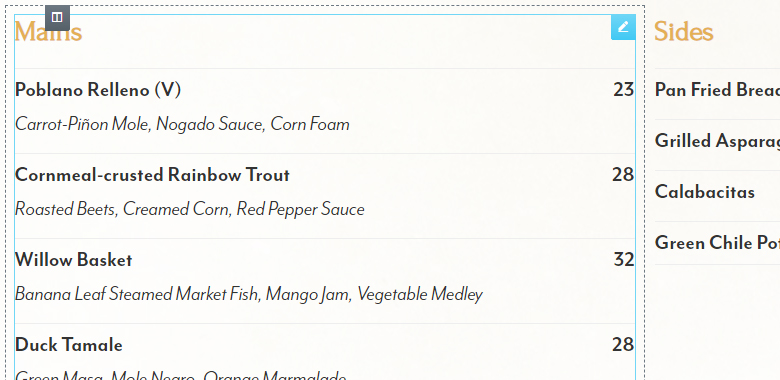

نصب
Note : This plugin is an addon for Elementor. Make sure you have Elementor installed.
- Upload the plugin folder to the “/wp-content/plugins/” directory, or install the plugin through the WordPress plugins screen directly.
- Activate the plugin through the “Plugins” screen in WordPress.
- You can find the elements/widgets under the category “Restaurant Addon” on your Elementor elements list.
سوالات متداول
- Can I use the plugin without Elementor Page Builder?
-
No. You cannot use it without Elementor since it’s an addon for Elementor.
- Does it work with any theme?
-
Yes, it will work with any theme where Elementor works.
- Can I style the elements myself?
-
Yes, the basic styling of the elements is very minimal and only for basic layout purposes. Things such as font size, color etc will be inherited.
نقد و بررسیها
نقد و بررسیای برای این افزونه یافت نشد.
توسعه دهندگان و همکاران
“Restaurant Addon for Elementor” نرم افزار متن باز است. افراد زیر در این افزونه مشارکت کردهاند.
مشارکت کنندگان

ترجمه “Restaurant Addon for Elementor” به زبان شما.
علاقه مند به توسعه هستید؟
Browse the code, check out the SVN repository, or subscribe to the development log by RSS.
گزارش تغییرات
1.0
- Initial release.
1.1
- Added OpenTable Reservation widget