
توضیحات
WP FreeStyle Wiki is yet another markup plugin for WordPress. It lets you
FreeStyle Wiki syntax in your markup. It includes original FreeStyle Wiki
3.6.4.
- FreeStyle Wiki: http://fswiki.sourceforge.jp/cgi-bin/wiki.cgi
عکسهای صفحه
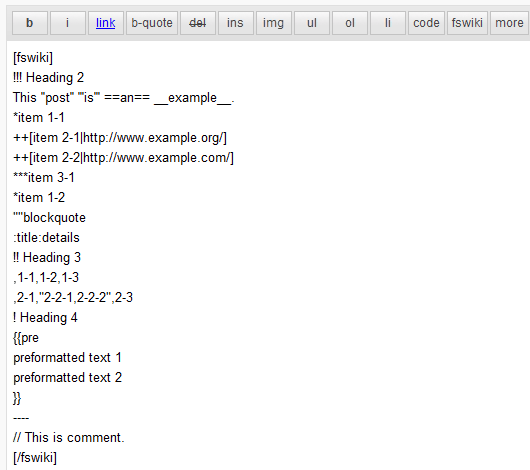
The markup example 
The working example
نصب
- Upload
wp-freestyle-wikito the/wp-content/plugins/directory - Activate the plugin through the ‘Plugins’ menu in WordPress
- Create new port or page
- Add fswiki text into [fswiki][/fswiki] tag
سوالات متداول
- What is the FreeStyle Wiki?
-
The FreeStyle Wiki(fswiki) is famous wiki system in Japan.
- FreeStyle Wiki: http://fswiki.sourceforge.jp/cgi-bin/wiki.cgi
- How do I add a FreeStyle Wiki plugin?
-
This plugin includes the FreeStyle Wiki 3.6.4.
You can add a FreeStyle Wiki plugin to/wp-content/plugins/wp-freestyle-wiki/fswiki/plugin.
And you should add the plugin name to/wp-content/plugins/wp-freestyle-wiki/fswiki/config/plugin.dat. - I would like to modify stylesheet
-
This plugin convert html into
<div class="fswiki_content" />element.
Please add style (ex. .fswiki_content h1 {…}) to your css file in theme.
And you should override style on `/wp-content/plugins/wp-freestyle-wiki/fswiki.css’.
نقد و بررسیها
نقد و بررسیای برای این افزونه یافت نشد.
توسعه دهندگان و همکاران
“WP FreeStyle Wiki” نرم افزار متن باز است. افراد زیر در این افزونه مشارکت کردهاند.
مشارکت کنندگان
ترجمه “WP FreeStyle Wiki” به زبان شما.
علاقه مند به توسعه هستید؟
Browse the code, check out the SVN repository, or subscribe to the development log by RSS.
گزارش تغییرات
0.2.2
- Added execute permission if it is not
0.2.1
- Improved Frequently Asked Questions documentation
0.2
- Updated to FreeStyle Wiki 3.6.4
- Disable auto_keyword_page configuration
0.1.1
- Improved convert_html by using STDIN
0.1
- Initial release