WordPress.org

فارسی

  • پوسته‌ها
  • افزونه‌ها
  • اخبار
  • پشتیبانی
  • درباره
  • تیم وردپرس فارسی
  • دریافت وردپرس
دریافت وردپرس
WordPress.org

Plugin Directory

WP ShareX

  • ثبت یک افزونه
  • علاقه‌مندی‌های من
  • ورود
  • ثبت یک افزونه
  • علاقه‌مندی‌های من
  • ورود

This plugin hasn’t been tested with the latest 3 major releases of WordPress. It may no longer be maintained or supported and may have compatibility issues when used with more recent versions of WordPress.

WP ShareX

توسط joomdev
دانلود
  • جزئیات
  • نقد و بررسی‌ها
  • نصب
  • توسعه
پشتیبانی

توضیحات

WP ShareX is an advanced WordPress Social Share plugin enables you to add social share buttons on Posts and pages. You can assign buttons on Top of the Content, Bottom of the Content, Sidebar and on media.

Features of WP Social Share by JoomDev
1. 24 Social Network
2. You have the option to select either Icons or Icons with Text
3. 3 Button Shapes
4. 4 Button Animations
5. URL Shortening Option with Bitly and Goo.gl
6. Embed Twitter Handle and desired tags with Tweet
7. 4 Button display Location e.i. Top of the Content, Bottom of the content, Media, and Sidebar
8. Hide On Mobile Ability
9. Default Share Count Option. (You can play with your user’s mind)
10. Encourage your Audience to share your content with Share Incentive Feature

عکس‌های صفحه

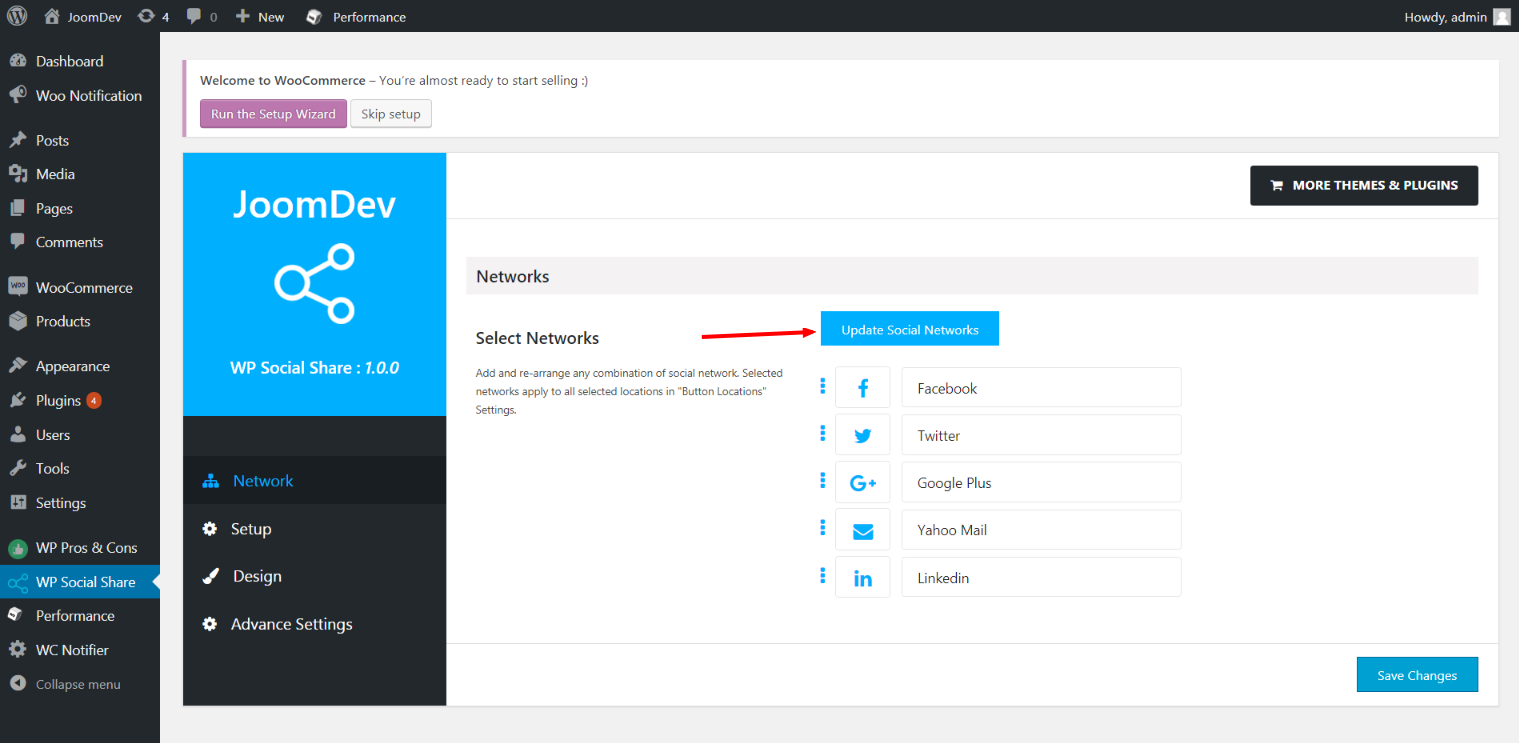
  • Click here to select networks
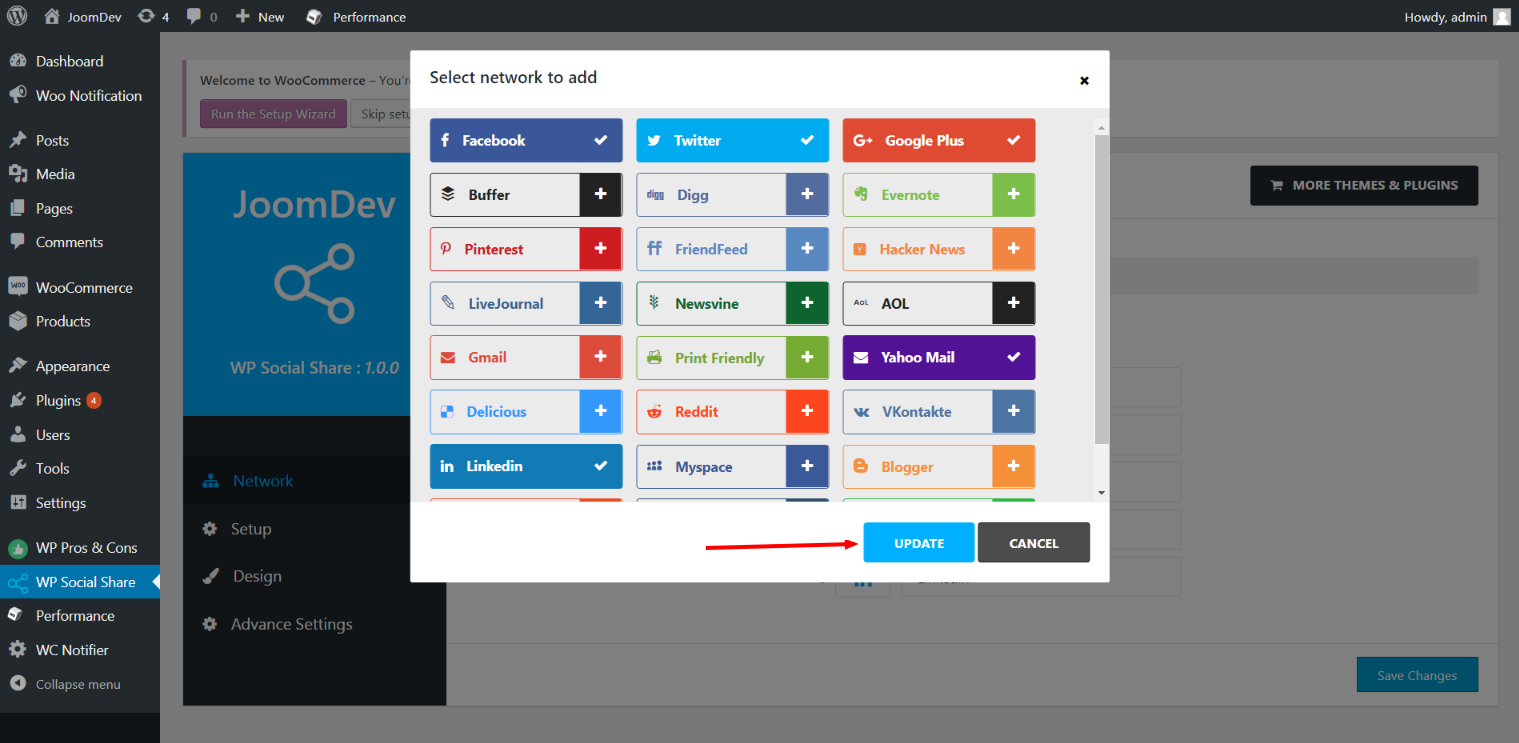
  • Update networks after selecting them.
  • Setup plugin and api settings.
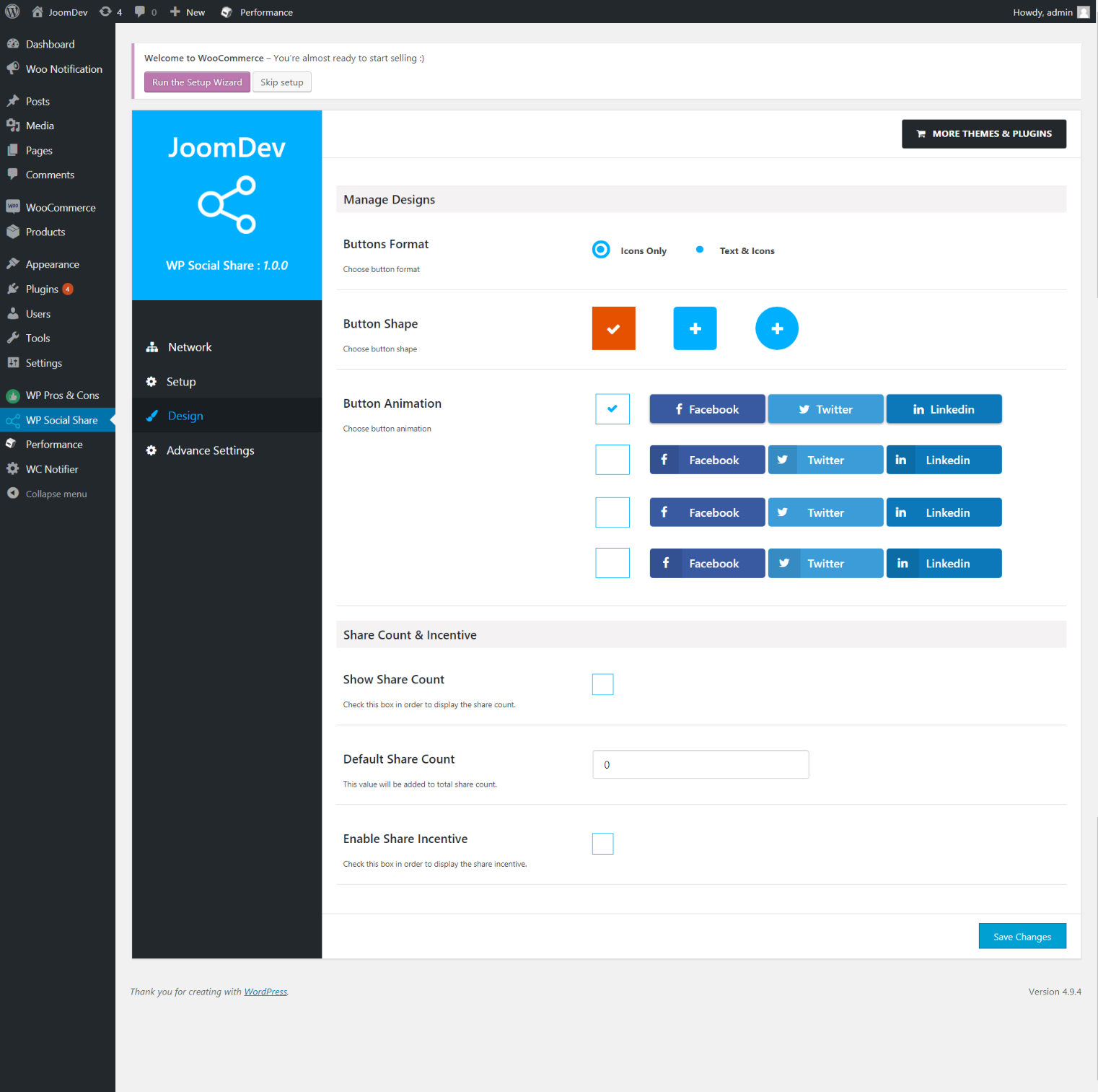
  • Select any design to display the buttons.
  • For mobile

نصب

Way 1:
1. Upload joomdev-wp-social-share.zip to the /wp-content/plugins/ directory
2. Extract the zip file.
3. Activate the plugin from wordpress plugins page. And you have done.

Way 2:
1. Go to plugins page in admin.
2. Click on Add New button.
3. Search for “WP ShareX”.
4. Click install on WP Social Share.
5. Activate the plugin.

سوالات متداول

Installation Instructions

Way 1:
1. Upload joomdev-wp-social-share.zip to the /wp-content/plugins/ directory
2. Extract the zip file.
3. Activate the plugin from wordpress plugins page. And you have done.

Way 2:
1. Go to plugins page in admin.
2. Click on Add New button.
3. Search for “WP ShareX”.
4. Click install on WP Social Share.
5. Activate the plugin.

How do I use this plugin?

See description.

نقد و بررسی‌ها

Excellent!

Arnab Mohapatra 16 مارس 2018 1 پاسخ
Incredible plugin. It allows to add any sharing button on the page simply and fast!
خواندن تمامی 1 نقد و بررسی‌

توسعه دهندگان و همکاران

“WP ShareX” نرم افزار متن باز است. افراد زیر در این افزونه مشارکت کرده‌اند.

مشارکت کنندگان
  • joomdev

ترجمه “WP ShareX” به زبان شما.

علاقه‌ مند به توسعه هستید؟

Browse the code, check out the SVN repository, or subscribe to the development log by RSS.

گزارش تغییرات

1.0.0

  • New Plugin initialized.

اطلاعات

  • نگارش 1.0.0
  • Last updated 8 سال پیش
  • نصب‌های فعال 10+
  • نگارش وردپرس 3.0 یا بالاتر
  • Tested up to 4.9.28
  • زبان
    English (US)
  • Tags
    sharesocialsocial share
  • نمایش پیشرفته

امتیازها

5 از 5 ستاره.
  • امتیاز 1 5-ستاره 5 ستاره 1
  • امتیاز 0 4-ستاره 4 ستاره 0
  • امتیاز 0 3-ستاره 3 ستاره 0
  • امتیاز 0 2-ستاره 2 ستاره 0
  • امتیاز 0 1-ستاره 1 ستاره 0

افزودن ارزیابی من

مشاهده همه بررسی‌ها

مشارکت کنندگان

  • joomdev

پشتیبانی

چیزی برای گفتن دارید؟ نیاز به کمک دارید؟

مشاهده انجمن پشتیبانی

کمک مالی

آیا تمایل دارید از پیشرفت این افزونه حمایت کنید؟

کمک مالی به این افزونه

  • درباره ما
  • اخبار
  • میزبانی
  • حریم خصوصی
  • ویترین
  • پوسته‌ها
  • افزونه‌ها
  • الگوها
  • یادگیری
  • پشتیبانی
  • توسعه‌دهندگان
  • WordPress.tv ↖
  • مشارکت کنید
  • رویدادها
  • حمایت ↖
  • پنج برای آینده
  • WordPress.com ↖
  • مت ↖
  • بی‌بی‌پرس ↖
  • بادی‌پرس ↖
WordPress.org
WordPress.org

فارسی

  • از حساب کاربری X (تویتر سابق) ما بازدید کنید
  • بازدید از حساب کاربری ما در بلواسکای
  • بازدید از حساب کاربری ما در ماستودون
  • بازدید از حساب کاربری ما در تردز
  • صفحه ی فیسبوک ما را ببینید
  • بازدید از حساب کاربری ما در اینستاگرام
  • بازدید از حساب کاربری ما در LinkedIn
  • بازدید از حساب کاربری ما در تیک‌تاک
  • کانال یوتیوب ما را ببینید
  • بازدید از حساب کاربری ما در تامبلر
کد شعر است.