
توضیحات
This plugin lets you increase or decrease paragraph indentation by pressing Tab or Shift+Tab in the Gutenberg editor.
From version 1.1.0, indentation inside the editor is represented by a simple <tab> × N badge — ensuring clean, theme-independent preview — while the actual indentation remains visible on the front end.
FAQ Check on the site.
https://it-libero.com/en/en-us/download/indent-paragraph-with-tab/
Settings
You can change the indentation value.
1. Admin Settings > Indent Tab
2. Indent Step input
عکسهای صفحه
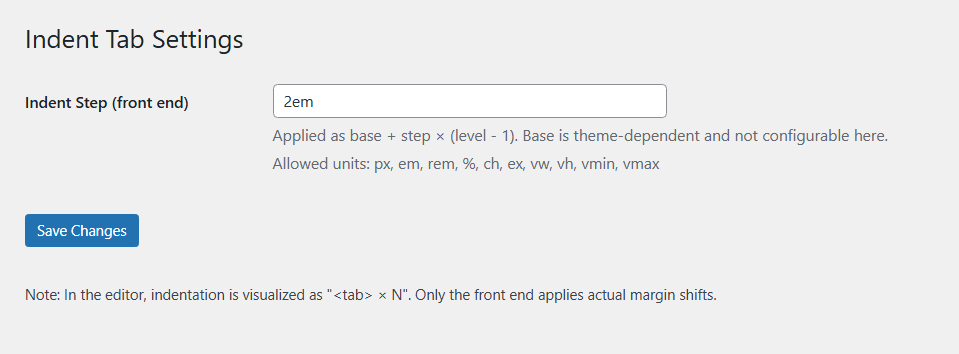
Admin UI
نقد و بررسیها
نقد و بررسیای برای این افزونه یافت نشد.
توسعه دهندگان و همکاران
“Indent Paragraph with Tab” نرم افزار متن باز است. افراد زیر در این افزونه مشارکت کردهاند.
مشارکت کنندگان
ترجمه “Indent Paragraph with Tab” به زبان شما.
علاقه مند به توسعه هستید؟
Browse the code, check out the SVN repository, or subscribe to the development log by RSS.
گزارش تغییرات
1.1.1
- Security: added sanitize_callback for options (
ipwt_base,ipwt_step) with a strict CSS unit whitelist. - Hardening: inline CSS now uses validated values only; invalid input is discarded.
- Admin UI: clarified settings descriptions and documented allowed units.
1.1.0
- Added visual
<tab> × Nbadge preview in editor. - Removed editor-side indentation shifting to avoid theme conflicts.
- Front-end rendering unchanged.
1.0.1
- Initial stable release.