

توضیحات
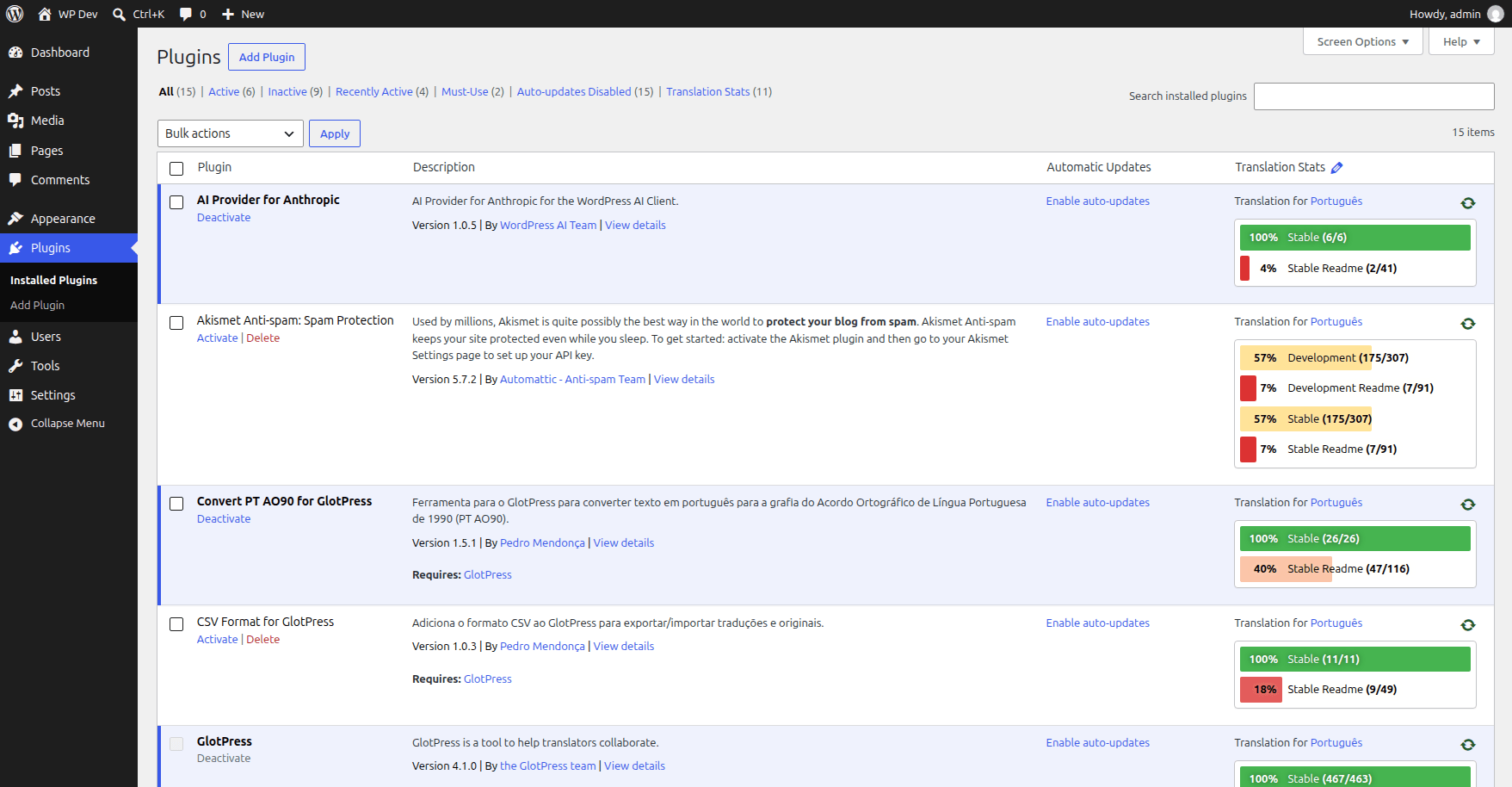
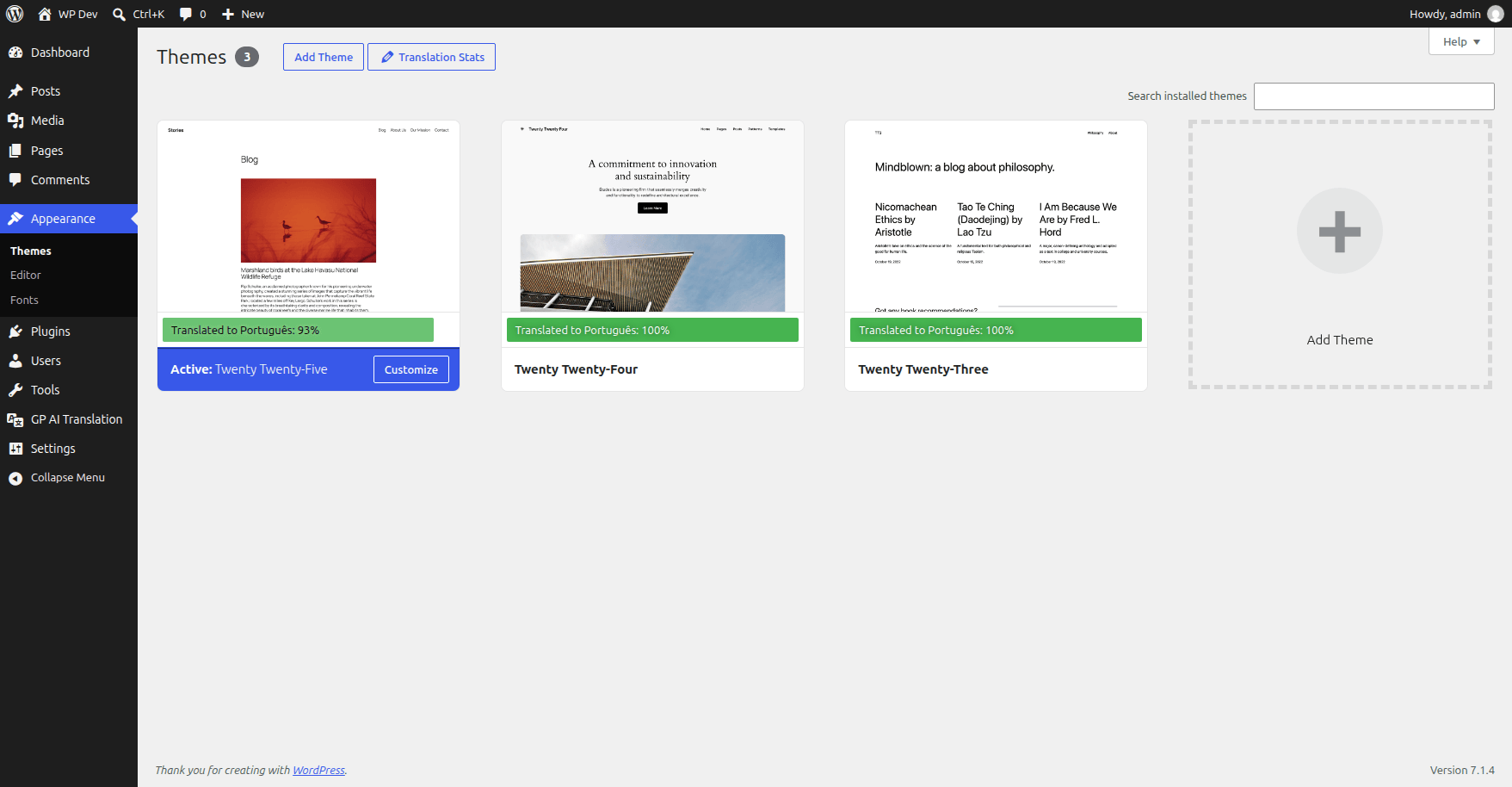
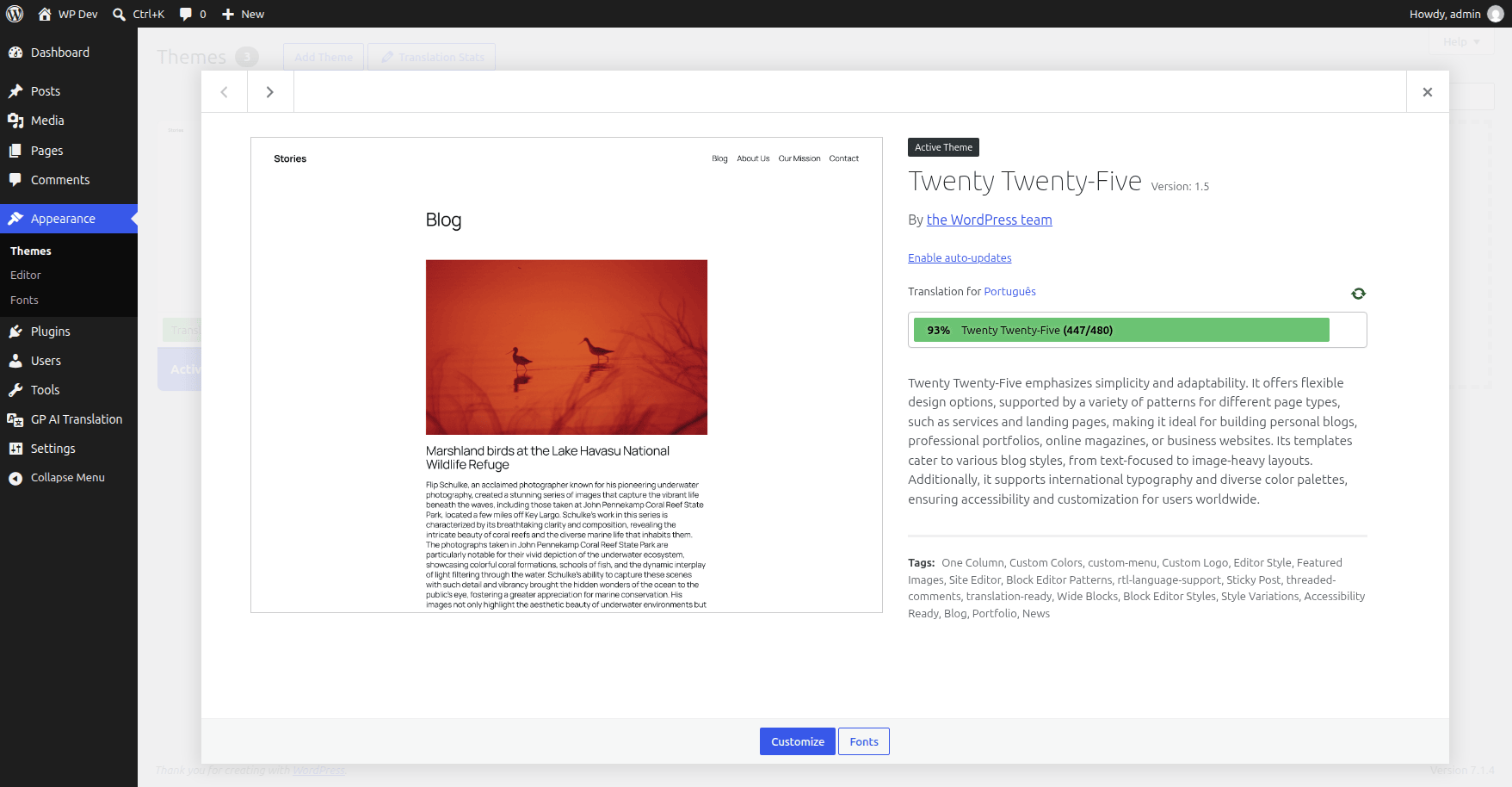
The plugin adds a “Translation Stats” column to the Plugins screen, and the translation stats to the Themes screen in WordPress admin: a translation stats bar on the theme cards, and a translation stats widget in the theme details.
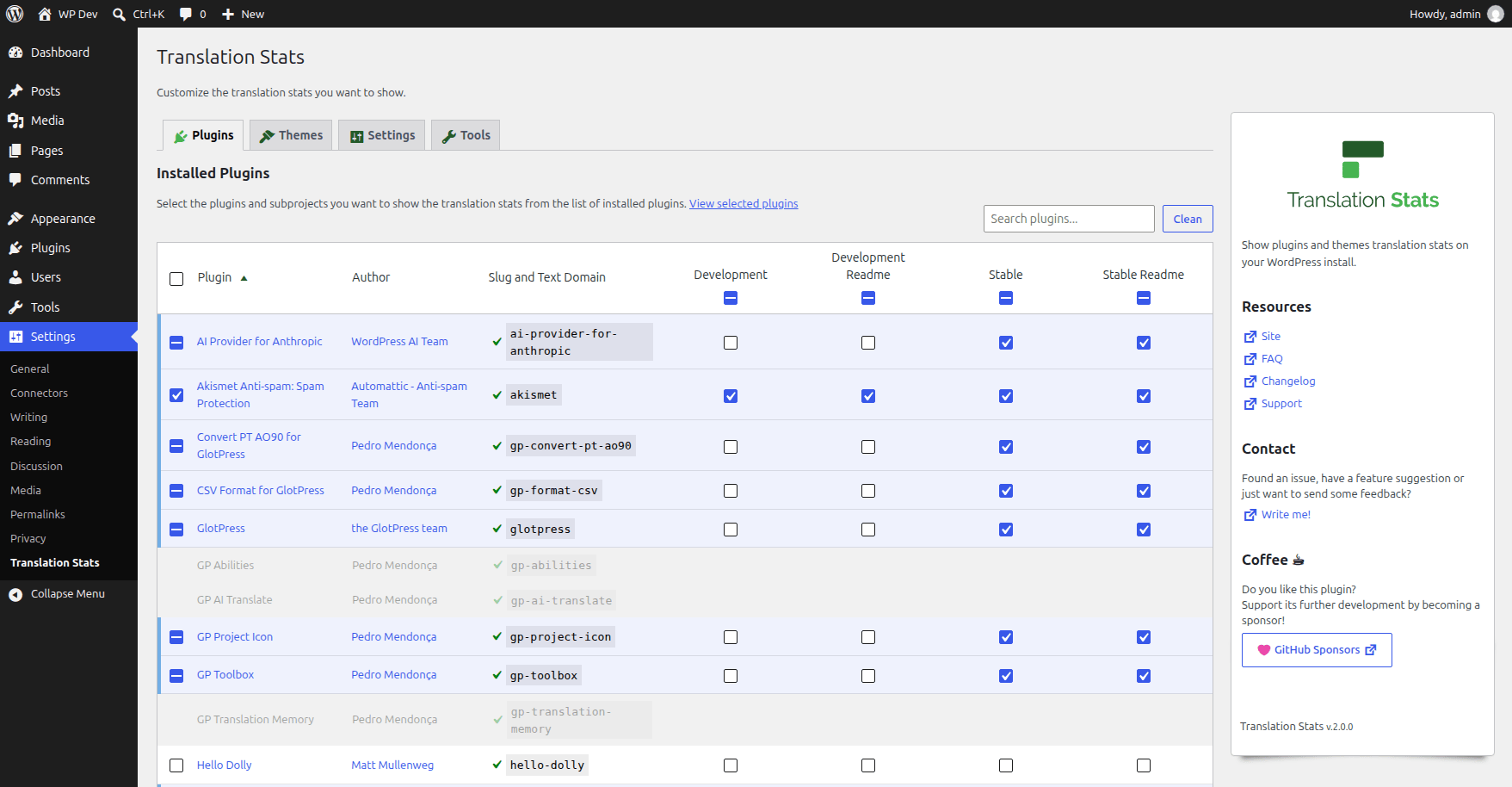
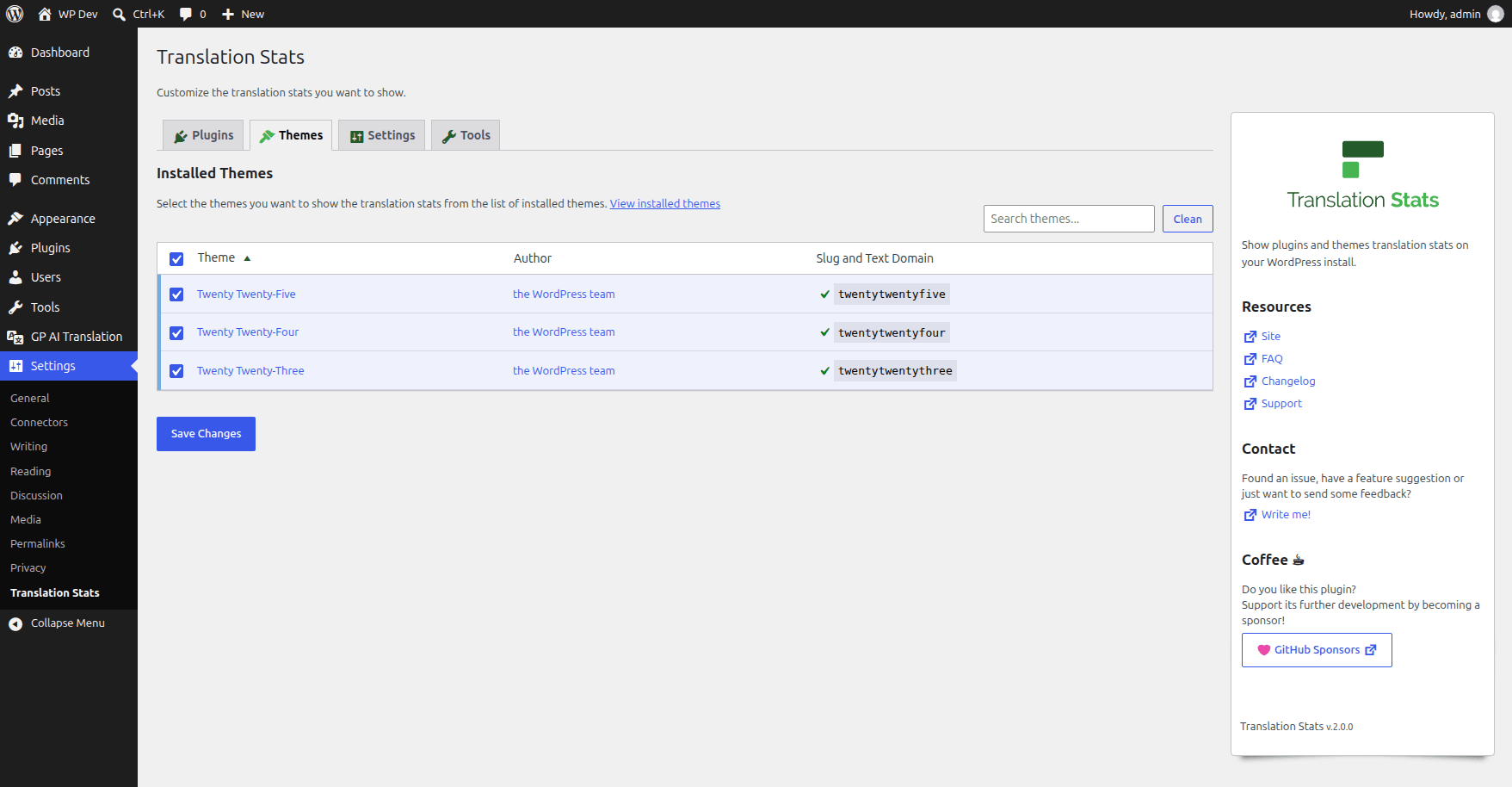
Select the plugins and themes to show the translation stats in the plugin settings.
Show the translation stats of any plugin or theme on your site with the Translation Stats block: search the project on WordPress.org, choose the language and the subprojects, and update the stats right from the block editor. The block requires WordPress 6.3 or later.
The translation stats are shown only for plugins and themes that exist in translate.wordpress.org and are prepared for localization.
اگر یک افزونه آمار ترجمه کامل نداشته باشد، یک اعلان با یکی از دلایل زیر را مشاهده میکنید:
- افزونه در WordPress.org یافت نشد.
- پروژهٔ ترجمه در WordPress.org یافت نشد.
- افزونه به درستی برای بومیسازی آماده نشده است
طرح رنگی نوارهای آمار ترجمه دقیقاً مانند آنچه در GlotPress استفاده میشود، برای ایجاد یک تجربه سازگار با تجربه ترجمه در translate.wp.org استفاده میشود.
این افزونه به درستی برای بومیسازی آماده شده است.
عکسهای صفحه


بلوکها
این افزونه 1 بلوک ارائه میدهد.
- آمار ترجمه Show the translate.wordpress.org translation stats of a plugin or theme.
سوالات متداول
زیرپروژههای افزونه چیست؟
- Development: the plugin’s Development version (trunk)
- Development Readme: the plugin page on WordPress.org/plugins, from the Development version
- Stable: the plugin’s Stable version (latest release)
- Stable Readme: the plugin page on WordPress.org/plugins, from the Stable version
Do themes have subprojects?
No. The themes translation projects on translate.wordpress.org have no subprojects, so the theme translation stats have a single translation stats bar.
Why don’t I see the translation stats for a plugin or theme?
Only plugins and themes hosted on WordPress.org have translation projects on translate.wordpress.org. Check that it’s selected in Settings > Translation Stats, and that its slug matches its text domain: the settings table shows a check mark when it does.
Which language are the stats shown for?
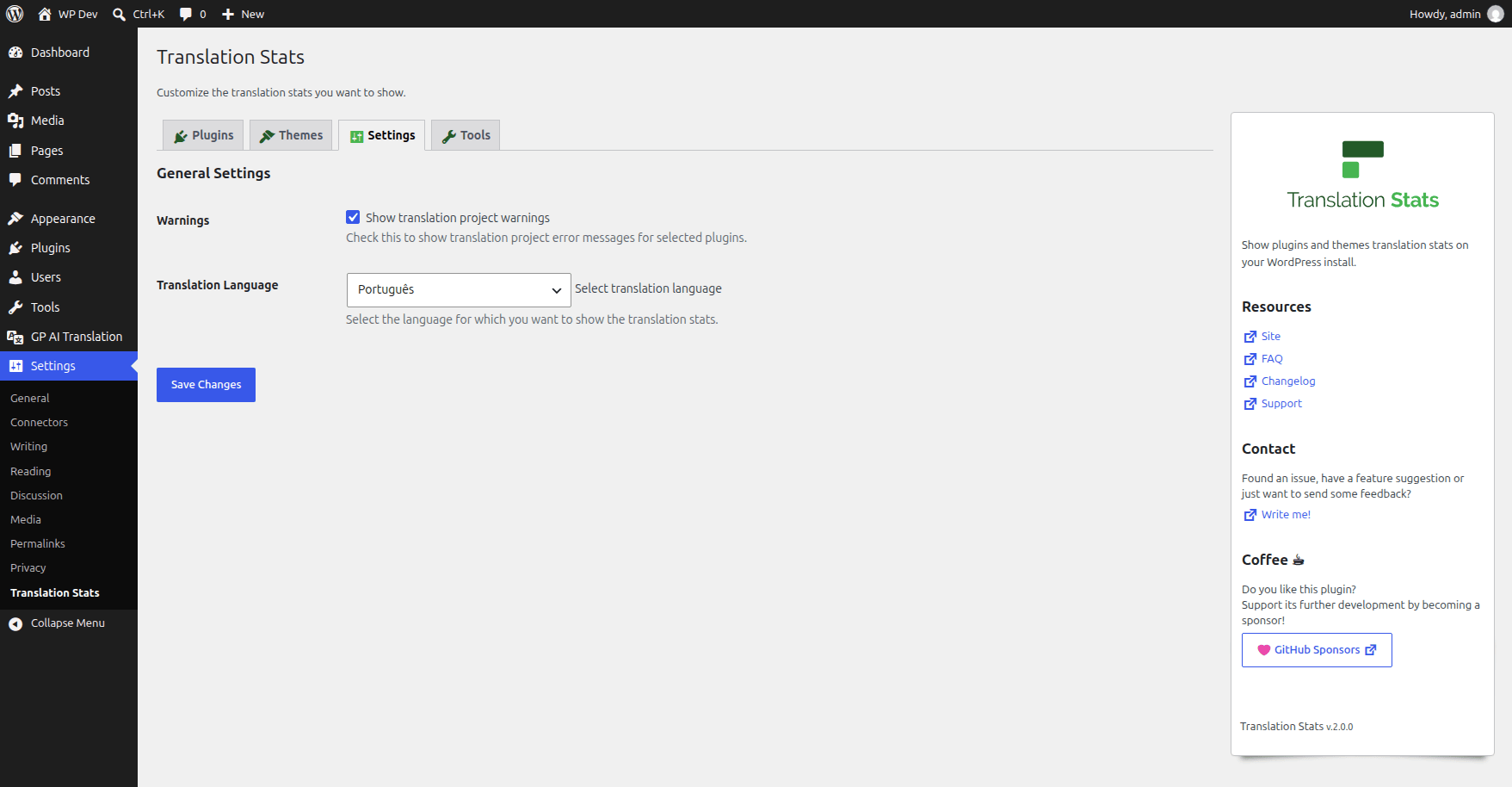
The language set in Settings > Translation Stats > Settings. By default, the site language.
How often are the stats updated?
The stats are cached for the time set in the Tools tab, 24 hours by default. Use the refresh button on each plugin or theme to update them right away, or clean the whole cache in the Tools tab. In the block editor, use the update button in the Translation Stats block toolbar.
How can I show the translation stats on my site?
Add the Translation Stats block to any post, page or template, and search the plugin or theme, installed or on WordPress.org. Choose the language and the plugin subprojects in the block settings. Visitors see the cached stats, loaded in the background when needed, without slowing down the page. The block requires WordPress 6.3 or later.
How can I translate a plugin or theme?
- Log in to WordPress.org, or create an account
- Click the translation stats bar of the plugin subproject or theme you want to translate
- Read the Polyglots Translator’s Handbook
- Translate according to the rules of your Locale Translation Team
آیا باید هم نسخهٔ پایدار و هم نسخهٔ توسعه را ترجمه کنم؟
Usually not. New strings and edits to approved translations are synced between Development and Stable, and when a plugin releases a new version, its Development translations are copied to Stable. Read more…
چقدر زمان می برد تا ترجمهای در دسترس قرار گیرد؟
Readme translations are published almost immediately. The first language pack of a plugin or theme is generated when 90% of its strings are translated and approved. For plugins, that’s the Stable (latest release) subproject. After that, language packs are updated with each new approved translation.
Can I help translate this plugin to my own language?
Yes you can! If you want to translate this plugin to your language, please translate it on translate.wordpress.org.
آیا میتوانم به این افزونه کمک کنم؟
قطعا! به شما خوشآمد میگویم تا هرگونه مشکل یا پیشنهادی را در مخزن GitHub گزارش دهید.
Where can I get support?
Ask your questions in the support forum on WordPress.org.
نقد و بررسیها


توسعه دهندگان و همکاران
“آمار ترجمه” نرم افزار متن باز است. افراد زیر در این افزونه مشارکت کردهاند.
مشارکت کنندگان
“آمار ترجمه” به 20 زبان ترجمه شده است. با تشکر از مترجمین برای همکاری و کمکهایشان.
ترجمه “آمار ترجمه” به زبان شما.
علاقه مند به توسعه هستید؟
کد را مرور کنید، مخزن SVN را بررسی کنید، یا از طریق RSS در گزارش توسعه مشترک شوید.
گزارش تغییرات
2.1.1
- Fix the block editor slow to load pages with many Translation Stats blocks, with a spinner on each block. The stats load in the background, as on the frontend, and each block shows the stats placeholder until they are loaded.
- Update the development dependencies.
- Developers: The
translation_stats_block_load_statsfilter defaults to false also in the block editor.
2.1.0
- New: The Translation Stats block, to show the translation stats of any plugin or theme on your site, in any language, with the project name and links to translate it. Search the plugins and themes on WordPress.org, and update the stats from the block editor. Requires WordPress 6.3.
- Fix the stats of the language variants, like Português (AO90), Deutsch (Sie), Nederlands (Formeel) or Català (Valencià), shown as not found since 1.3.3, and their links to translate.wordpress.org. The cached stats update when they expire: to see them right away, use Clean Cache in Settings > Translation Stats > Tools.
- Fix the Translation Stats link of the Themes screen, not translated.
- Include the SCSS sources in the GitHub archives.
- Update the development dependencies.
- Developers: The REST API routes
translation-stats/v1/block-statsandtranslation-stats/v1/block-projectsfor the block, and thetranslation_stats_block_load_statsfilter.
2.0.0
- New: Show the translation stats of themes on the Themes screen, with a translation stats bar on the theme cards and a translation stats widget in the theme details.
- New: Select the themes to show the translation stats in the new Themes settings tab.
- Show the translate.wordpress.org error message in the translation stats notice, like when it’s unavailable.
- Show a placeholder of the translation stats bars while loading them.
- Return to the same settings tab after saving the settings.
- Fix the settings update notice shown before the page, and in any request, after updating the plugin. It’s now shown once in the admin notices.
- Fix the activation notice not shown with a different plugin folder name, and mention the themes.
- Fix the settings Save button focus cut on the left.
- Save the settings checkboxes as booleans, updating the saved settings automatically.
- Remove the console logs.
- Remove the bundled Portuguese (pt_PT) translation files, not loaded by WordPress. The translations are loaded from translate.wordpress.org.
- Developers: Add the
Project,Plugin_ProjectandTheme_Projectclasses for the translate.wordpress.org projects and their translation stats. RemoveTranslations_API::translations_api_get_plugin(),plugin_project_on_translate_wporg()andplugin_subproject_on_translate_wporg(), andPlugins::plugin_subproject_stats(),plugin_stats_cached()andplugin_subproject_stats_transient(). - Developers: The REST API route
translation-stats/v1/(plugins|themes)/<slug>/statsloads the plugins and themes translation stats. - Developers: Rename the
TRANSLATION_STATS_TRANSIENTS_PREFIXconstant toTRANSLATION_STATS_TRANSIENTS_PLUGINS_PREFIX. The themes transients useTRANSLATION_STATS_TRANSIENTS_THEMES_PREFIX. - Build the JavaScript and CSS with
@wordpress/scripts. - Increase PHPStan level to 9, and unit tests coverage.
1.4.0
- Bump minimum WP version to 5.9.
- Security: Check the user permission to load the plugin translation stats, now loaded with the REST API.
- Show the cached plugin translation stats instantly, loading only the missing ones.
- Show the plugin translation stats update status next to the update button, without moving the stats.
- Fix translate.wordpress.org errors and rate limits shown as translation project not found for a day.
- Fix the Translation Stats plugins filter, status link and settings update on Multisite.
- Fix cleaning the cache on Multisite.
- Fix plugin data not deleted on uninstall with the default settings and on Multisite.
- Fix default settings saved nested when sanitizing settings without data.
- Show an error page with status 403 when the settings form nonce fails.
- Increase unit tests coverage.
1.3.3
- Tested up to WP 7.1.
- Fix deprecation notice on PHP 8.5.
- Fix settings icons.
- Bump minimum WP version to 5.1.
- Increase PHPStan Level to 8.
1.3.2
- Tested up to WP 6.9
- Fix the translated descriptions of plugins in the plugin table filter for plugins with translation stats.
- Add sanitization of settings.
- افزودن تستهای PHP Unit.
- Update library Tablesorter.
- ثابت TRANSLATION_STATS_DEBUG را از استفاده خارج کنید.
1.3.1
- تست شده تا نسخه WP 6.6
- همیشه اعلانها را برای افزونههایی که برای بومیسازی آماده نیستند نشان دهید.
1.3.0
- چکباکسهای جدید در ستون زیرپروژهها برای انتخاب کلی یک زیرپروژه در تمام افزونهها.
- بهبود رفتار نامعین [-] چکباکسهای جدول.
- بخش اشکالزدایی (Debug) را پاکسازی کنید و خطای PHP را زمانی که هنوز تنظیماتی ذخیره نشدهاند، رفع کنید.
1.2.8
- رفع اعلان از استفاده خارج شده در PHP 8.2+
- نمایش شمارشهای فعلی/همه در آمار زیرپروژه. با تشکر از @Irinashl
1.2.7
- اصلاح اشتباهات تایپی در نظرات. با تشکر از @szepeviktor
- نمایش اعلانهای آماری مدیر فقط در
WP_DEBUG. با تشکر از @Irinashl
1.2.6
- تست شده با وردپرس ۶.۵
- رفع موقعیت نادرست جایگذاریها در نظرات برای مترجمان. با تشکر از @presskopp
1.2.5
- آیکون سفارشی برای اطلاعیه بروزرسانی در صفحه صف جایگزین شود
1.2.4
- به ترتیب بروزرسانیهای آمار ترجمه را در صف قرار دهید تا از ایجاد درخواستهای Ajax موازی جلوگیری شود.
1.2.3
- ترکیبی از تنها افزونههای که در تنظیمات آمار ترجمه فعال شدهاند و در واقع نصب شدهاند را با شمارش ترمیم کنید.
1.2.2
- تست شده با وردپرس 6.1
- تنها بر روی نسخههای PHP (7.4+) تست و پشتیبانی شده
- گزارش کنسولی دقیقتر برای بهروزرسانی آمار ترجمه افزونه
- اگر درصد ترجمه زیر آستانه حداقل باشد، اطلاعات بسته زبان فقط نمایش داده می شود.
1.2.1
- تست شده با وردپرس 5.9
- اصلاح خطاهای PHP در نصبهای جدید قبل از ذخیره تنظیمات
- اصلاح حذف دادههای افزونه در هنگام حذف
- استفاده از CSS فشرده
1.2.0
- بهبود رنگ و حاشیه نوار ابزار آمار
- بهبود هشدارهای ابزار آمار با اطلاعات WP.org درباره مشکلات پروژههای ترجمه
- بازنگری کد بخشها و فیلدهای تنظیمات برای مدیریت و گسترش آسان
- بازنگری کد نوارهای ابزار آمار و هشدارها
- پشتیبانی از قابلیت سفارشیسازی هشدارهای مدیریتی
- اصلاح پیشوندهای کد
- اصلاح خطای بازگشت در نوار آمار زیرپروژه غیرفعال
- رفع مشکلات CSS
- بهبودهای حالت اشکالزدایی
- بهبود لینتینگ و کامپایل کد
1.1.5
- بهبود فرآیند انتشار در GitHub
- بهینهسازی پوشههای فایلهای منابع
- بهبودهای کوچک در کد
1.1.4
- حذف فایلهای توسعهای غیرضروری
1.1.3
- تست شده با وردپرس 5.8
- حذف سازگاری حالت تاریک منسوخشده
1.1.2
- تست شده با وردپرس 5.7
- بهبودهای کوچک در کد
- بهروزرسانی پیشوندهای ثابتهای افزونه
1.1.1
- تست شده با وردپرس 5.6
- بهبودهای کوچک در کد
1.1.0
- لیست محلهها را از API زبانهای translate.wp.org به دلیل غیرفعال شدن در متا تغییرات شماره ۱۰۰۵۶ شامل کنید.
- حذف ویژگی اخیر بروزرسانی ترجمه وردپرس؛ این ویژگی به افزونه جدید Translation Tools منتقل شده است که به طور خاص برای مدیریت بروزرسانیهای ترجمه طراحی شده و دارای ویژگیهای مرتبط بیشتری خارج از حوزه این افزونه است.
- تست شده با وردپرس ۵.۵
- بهینهسازی کد
1.0.5
- WPLANG و زبانهای موجود را به منوی انتخاب زبانها در تنظیمات اضافه کنید.
1.0.4
- رفع اطلاعرسانیهای ادمین
- بهبودهای کوچک در کد
1.0.3
- پیام سفارشی پاورقی را اضافه کنید
- پارامترهای utm را اصلاح کنید
1.0.2
- مرتبسازی و فیلتر جدید در جدول افزونههای تنظیمات
- برطرف کردن خطای انقضای زمان دریافت لیست زبانها از API translate.wp.org
1.0.1
- اصلاح آیکون عنوان ستون سفارشی و متن صفحهخوان صفحه
1.0.0
- نسخه 1.0! 🎉
- ساختار و نسخه جدید پایگاه داده تنظیمات
- بهروزرسانی پایگاه داده تنظیمات جدید
- کلاس فعالسازی جدید
- جدول تنظیمات افزونهها بهینهسازی شد
- اصلاح عدم نمایش اعلانها هنگامی که تنظیمات “هشدارها” غیرفعال شده است
- بهبودهای کوچک در کد
0.9.9
- نمای کلی جدید افزونهها برای نمایش فقط افزونههای دارای آمار ترجمه فعال
- پیوند جدید به فهرست فیلتر شده افزونهها در صفحه تنظیمات
- پیوند جدید به صفحه تنظیمات در صفحه افزونهها
- رفع باگ عدم نمایش آمار ترجمه در صورت غیرفعال بودن تنظیمات «هشدارها»
- بهبودهای کوچک در کد
- تست شده تا وردپرس ۵.۴
0.9.8
- رفع باگ سه حالته جعبههای تأیید تنظیمات
- حذف فیلتر tstats_enable_debug
- رفع اطلاع رسانی ترجمه بروزرسانی هسته وردپرس در نصب بتا
- بازنگاری کد با PHPStan (Level 6)
0.9.7
- Add tristate to parent checkboxes with enabled and disabled children
- بهبودهای کوچک در کد
0.9.6.3
- رفع باگ جاوااسکریپت
0.9.6.2
- بهینهسازی کد
0.9.6.1
- رفع اطلاعرسانیهای ادمین
- رفع مشکلات CSS
0.9.6
- افزودن بررسی نامک و دامنه متن به جدول تنظیمات افزونهها
- بارگذاری خودکار کلاس
- افزودن بررسی PHPStan
0.9.5.5
- رفع مشکل ترجمه i18n
- بهبودهای کوچک در کد
- کافی ☕
0.9.5.4
- بهبودهای کوچک در کد
- تست شده تا وردپرس ۵.۳.۲
0.9.5.3
- بهبودهای کوچک در کد
0.9.5.2
- بهبودهای کوچک در کد
- افزودن اعلان مدیر به داشبورد
0.9.5.1
- بهبودهای کوچک در کد
0.9.5
- اکنون میتوانید هر زمان که میخواهید ترجمه وردپرس خود را بهروز کنید.
- دیگر منتظر بستههای زبان یا تکمیل صددرصد زبان محلی شما نباشید.
- یک کلیک برای بهروزرسانی همه فایلهای ترجمه هسته وردپرس (.po، .mo و همه .json)
- تست شده تا وردپرس ۵.۳
0.9.4.3
- تست شده تا وردپرس 5.2.4
- Add PHP compatibility check
0.9.4.2
- تست شده تا وردپرس 5.2.3
- بهینهسازی کد
- بهبود رابط کاربری (UI)
0.9.4.1
- افزایش حداقل نسخه PHP مورد نیاز
- بهینهسازی کد
0.9.4
- افزودن ویژگیهای جدید بارگذاری و بهروزرسانی AJAX
- افزایش سرعت بارگذاری صفحه افزونهها
- افزودن دکمه جدید برای بهروزرسانی سریع آمار یک افزونه به تنهایی
- تست شده تا وردپرس 5.2.2
- بهینهسازی کد
0.9.3
- تست شده تا وردپرس 5.2.1
- بهینهسازی کد
0.9.2
- پشتیبانی از زیردامنههای سفارشی مربوط به WordPress.org
0.9.1
- پشتیبانی از نسخههای فعلی GlotPress 2.x
- بهبود مشکل تایپی
0.9.0
- تست شده تا وردپرس 5.1.1
- بهبود مشکل تایپی
- پشتیبانی از مناطق جدید
- پشتیبانی از تمامی مناطق جغرافیایی در translate.wp.org از طریق API وردپرس
0.8.5
- تست شده تا وردپرس 5.1
- رفع مشکلات CSS
- رفع خطاهای استانداردهای کدنویسی وردپرس
0.8.4
- رفع مشکلات CSS
0.8.3
- تصحیح عملکرد حذف
0.8.2
- تصحیح پیوندهای نویسنده
0.8.1
- افزودن ستون نویسنده به لیست افزونهها – پیشنهاد ویژگی از Webdados
- افزودن پیوندها به افزونهها و نویسندگان
- رفع خطاهای استانداردهای کدنویسی وردپرس
0.8
- افزودن صفحه تنظیمات آمار ترجمه
- افزودن جدول افزونههای نصب شده برای انتخاب تنها افزونههای مورد نظر برای مدیریت آمار ترجمه به منظور کاهش درخواستهای HTTP
- افزودن گزینه برای فعال یا غیرفعال کردن هشدارهای پروژههای ترجمه
- افزودن گزینهها برای تنظیم مجدد تنظیمات و پاکسازی حافظه پنهان برای بهروزرسانی اجباری آمار ترجمه
- افزودن گزینه برای مشخص کردن زبان ترجمه مورد نظر
- افزودن گزینه برای انتخاب حفظ یا حذف دادههای افزونه در هنگام حذف
- افزودن پرونده حذف
0.7
- اصلاح منطق نمایش/عدم نمایش ستون آمار ترجمه
- استفاده از استانداردهای کدنویسی وردپرس
0.6
- افزودن سبکهای اعلان هسته وردپرس به پیامهای خطا
- افزودن فایلهای منابع
- بهبودهای کوچک در کد
- بهروزرسانی فایل README
0.5
- انتشار اولیه